For the most granular control, Payment Methods by Product & Country for WooCommerce Pro lets you show or hide each gateway for specific products and variations. This is a Pro feature. This guide covers the Products settings tab.
Before you start #
- WooCommerce, active.
- Payment Methods by Product & Country for WooCommerce Pro (the Products section is Pro only).
Enable the Products section #
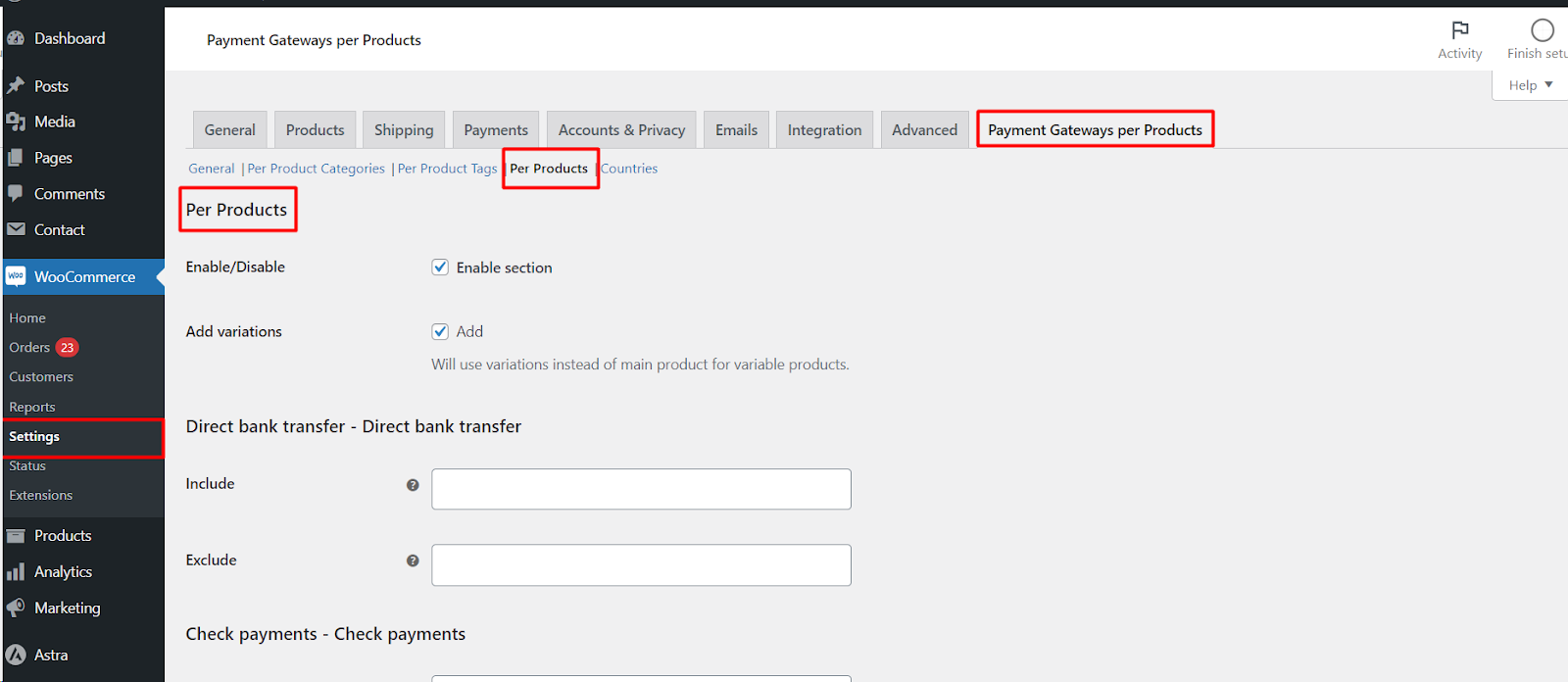
- Go to WPFactory > Payment Gateways per Products (also reachable at WooCommerce > Settings > Payment Gateways per Products).
- Open the Products tab.
- Tick Enable/Disable > Enable section (
alg_wc_pgpp_products_section_enabled), then Save changes.
Set Include and Exclude per gateway #
The Products tab works exactly like the Categories and Tags tabs: every gateway has an Include and an Exclude field. Here the fields are product-search boxes, so you type a product name and pick it from the results:
- Include: the gateway shows only when one of the selected products is in the cart.
- Exclude: the gateway is hidden when one of the selected products is in the cart.
Include and Exclude are the mechanism of this section, not decorative. Do not select the same product in both fields for a gateway.
Add variations (optional) #
Tick Add variations (alg_wc_pgpp_products_add_variations, default No) to target specific variations of variable products instead of the parent product. With this on, the product search returns variations and the rule is matched against the exact variation in the cart.
Tip: You can also assign gateways from the product edit screen. Once the Products section is enabled, a Choose payment gateway box appears on each product, letting you tick the gateways that product should be included for.
Example #
- Restrict a single high-value product to Direct Bank Transfer: add it to Direct Bank Transfer’s Include field, and to the Exclude field of the other gateways.
- Keep Cash on Delivery off one fragile product: add it to Cash on Delivery’s Exclude field.
Click Save changes to apply.
Ready to set this up? #
This is a Pro feature of Payment Gateways per Products. If you are still on the free version, upgrading unlocks per-product rules along with per-country rules and the fallback gateway. Get Payment Gateways per Products Pro.