To remove special characters from all existing WordPress permalinks at once, go to Tools > Remove Characters in Remove Special Characters From Permalinks (URLs) for WordPress Pro and click Remove special characters. The plugin finds every published item whose slug contains special characters, cleans the slugs in the background and emails you when it finishes.
Before you start #
- Remove Special Characters From Permalinks (URLs) for WordPress Pro, active (this is a Pro feature).
- WooCommerce active (the plugin does not load without it in the current version).
- A full database backup. The tool rewrites slugs directly and has no undo.
- If your slugs are written in a non-Latin script (Arabic, Cyrillic, Chinese and so on), read How to Fix Non-English Characters in WordPress Permalinks first. The tool removes those letters too.
- Optional: set the address that receives the completion email in Settings > Special Characters > Notification Email. It defaults to the site admin email.
How to run the bulk cleanup #
- Go to Tools > Remove Characters (or click Remove tool under the plugin on the Plugins screen).
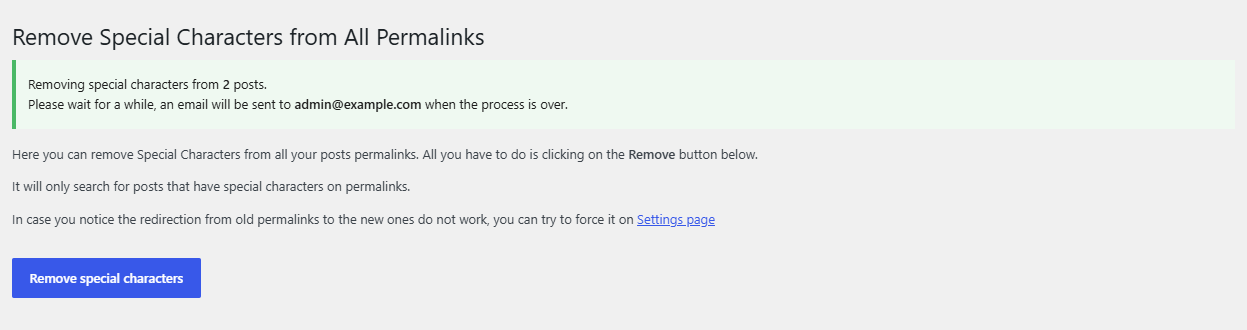
- Read the page: it explains that only posts with special characters in their permalinks are searched.
- Click Remove special characters.
- A notice confirms how many posts will be processed, for example Removing special characters from 42 posts, and tells you which address will get the email. If nothing needs cleaning you see You don’t have any posts with special characters on permalinks to remove.
- You can leave the page. The slugs are updated in the background, one post at a time.
- When the run finishes, the notification address receives an email with the subject Special Characters Removal complete.
- Spot-check a few old URLs in a private browser window. If any return a 404 error, turn on Force Redirection (see How to Redirect Old Permalinks After Removing Special Characters).
What the tool includes #
| Included | Not included |
|---|---|
| Published posts, pages, WooCommerce products and other post types that WordPress includes in its “any” post type query (post types not excluded from search) | Drafts, pending, scheduled and private items (they are cleaned by the save-time filter when you publish or update them) |
| Items whose slug contains any character other than a to z, 0 to 9, hyphen, underscore or dot, including URL-encoded characters | Category, tag and other taxonomy term slugs |
Each slug is cleaned with the same rules as the free save-time cleanup: accented Latin letters are converted, all other characters outside the safe set are removed and the slug is lowercased. Before each change, the post’s previous permalink path is stored in the post meta field _trscfp_original_post_name, which Force Redirection uses later.
How the background process runs #
The tool queues one job per post and processes the queue with the WP Background Processing library. It starts the queue with a request from your server to its own admin-ajax.php. If that request is blocked, a WP-Cron health check picks the queue up again every 5 minutes. Clicking the button again cancels any queue that is still running and starts a new one.
FAQ #
Can I undo the bulk cleanup? #
No. Restore your database backup if you need the old slugs back. The previous path of each changed post is kept in _trscfp_original_post_name, but there is no restore button.
How long does it take? #
It depends on how many posts need cleaning and on how often your site can run background requests. Each post is updated with a standard WordPress save, so large sites take longer. You do not need to keep the page open.
I did not get the completion email. Did it fail? #
Not necessarily. The email is sent with wp_mail(), so it depends on your site’s mail setup. Check a few slugs directly, and see Troubleshooting.
Who can use the tool? #
The Remove Characters page is available to users with the delete_posts capability. In a default WordPress setup that includes administrators, editors, authors and contributors, so keep that in mind when you give people accounts on the site.
Ready to set this up? #
This is a Pro feature of Remove Special Characters. If you are still on the free version, upgrading takes a couple of minutes and unlocks this along with forced redirects and completion emails. Get Remove Special Characters Pro.
Need a hand? Our team answers every ticket on the Remove Special Characters support forum.