This is the settings reference for Remove Special Characters From Permalinks (URLs) for WordPress. The free version has no settings: it cleans slugs automatically on save. Pro adds two screens: Settings > Special Characters for Force Redirection and the notification email, and Tools > Remove Characters for the one-click bulk cleanup.
Free version #
There is no menu item, settings page or option to configure. Once active (with WooCommerce also active), the plugin cleans the slug of any post, page, product or custom post type item when it is saved. See How to Remove Special Characters from WordPress URLs.
On the Plugins screen, the free plugin adds a Pro Version link. When you first activate it, a notice on the Plugins screen describes the Pro version.
Settings > Special Characters (Pro) #
The page is titled Remove Special Characters Settings and has one tab, General. Values are stored together in the option trscfp_general.
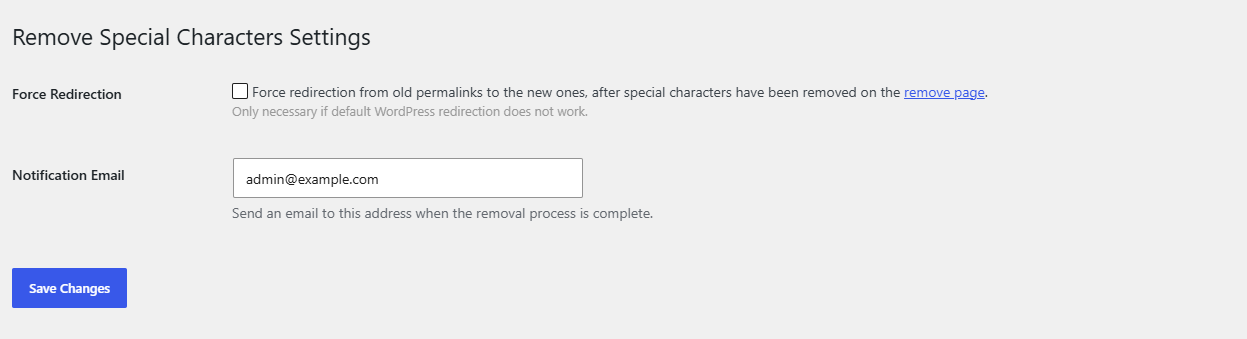
| Label | Option key | Type | Default | What it does |
|---|---|---|---|---|
| Force Redirection | redirect |
Checkbox | Off | When a front-end request ends in a 404 error, redirects it with a 301 to the post whose stored original path (_trscfp_original_post_name) matches the requested path. Only necessary if default WordPress redirection does not work. See How to Redirect Old Permalinks After Removing Special Characters. |
| Notification Email | email |
Text | The site admin email (Settings > General > Administration Email Address) | Receives an email when the bulk removal process is complete. The Remove Characters notice also names this address. Clear the field and save to send no email. |
Click Save Changes after editing. The page is saved through WordPress’s options.php, so saving requires an administrator (the manage_options capability), even though users with delete_posts can open the page.
Tools > Remove Characters (Pro) #
The page is titled Remove Special Characters from All Permalinks.
| Control | What it does |
|---|---|
| Remove special characters button | Finds every published item whose slug contains a character other than a to z, 0 to 9, hyphen, underscore or dot, and cleans those slugs in a background process. Shows a notice with the number of posts found. See How to Bulk Clean Special Characters from All WordPress Permalinks. |
Plugins screen links (Pro) #
| Link | Opens |
|---|---|
| Settings | Settings > Special Characters (options-general.php?page=trscfp) |
| Remove tool | Tools > Remove Characters (tools.php?page=trscfp_remove_characters) |
Who can see the Pro screens #
Both Pro menu items require the delete_posts capability. In a default WordPress setup that includes administrators, editors, authors and contributors.
Get more control #
Save-time cleanup is free. Remove Special Characters From Permalinks (URLs) for WordPress Pro adds the bulk tool, Force Redirection and completion emails. See what Pro unlocks.
Need a hand? Our team answers every ticket on the Remove Special Characters support forum.