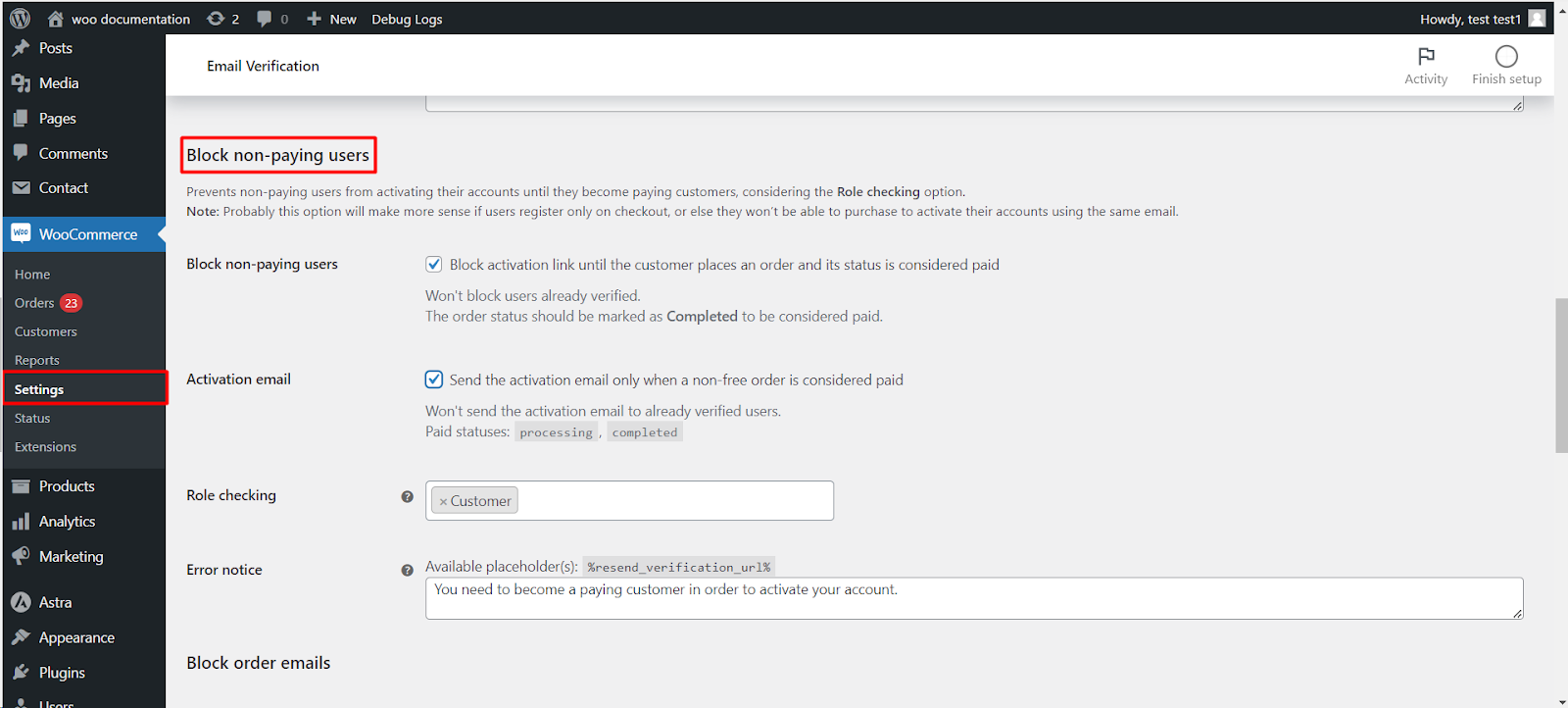
To activate accounts only for paying customers, go to WPFactory > Email Verification (also reachable at WooCommerce > Settings > Email Verification), open the Blocking sub-tab, and tick Block non-paying users. Customer Email Verification for WooCommerce then blocks the activation link until the customer has an order considered paid. The block is free; holding the activation email is Pro.
Before you start #
- WooCommerce, active.
- Customer Email Verification for WooCommerce, installed and active.
- This works best when customers register during checkout, so they can place a paying order with the same email they need to activate.
Where to find it #
Go to WPFactory > Email Verification (also reachable at WooCommerce > Settings > Email Verification) and open the Blocking sub-tab. Scroll to the Block non-paying users section.
Note: this section is on the Blocking sub-tab, not the General sub-tab. A related but separate option, Paying customers (alg_wc_ev_auto_verify_paying_user) on the General sub-tab, does the opposite: it auto-verifies a customer as soon as one of their non-free orders is paid.
Options reference #
| Label | Option ID | Default | Free/Pro |
|---|---|---|---|
| Block non-paying users | alg_wc_ev_block_nonpaying_users_activation |
No | Free |
| Activation email | alg_wc_ev_block_nonpaying_users_activation_email_on_payment |
No | Pro |
| Role checking | alg_wc_ev_block_nonpaying_users_activation_role |
Customer | Free |
| Error notice | alg_wc_ev_block_nonpaying_users_activation_error_notice |
Built-in text | Free |
How it decides who is a paying customer #
- Block non-paying users blocks the activation link until the customer places an order whose status is considered paid. The plugin treats the Completed status as paid for this check.
- Already verified users are never blocked.
- Role checking limits the block to the roles you select. Leave it on Customer in most cases, or clear it to apply the block to every role.
- Activation email, when enabled, holds the activation email back until a non-free order is paid, so no email goes out for an unpaid registration.
- Error notice is shown when a blocked user tries to log in or activate. It accepts the
%resend_verification_url%placeholder.
Step-by-step #
- Open the Blocking sub-tab and find Block non-paying users.
- Tick Block activation link until the customer places an order and its status is considered paid.
- Set Role checking (usually Customer).
- Optionally enable Activation email so the email is sent only after payment, and edit the Error notice.
- Click Save changes.
Get more control #
Blocking non-paying users is free. Customer Email Verification for WooCommerce Pro adds the payment-triggered activation email here, plus guest checkout verification, the REST API endpoint and scheduled cleanup of unverified users. See what Pro unlocks.