To delete unverified users in WooCommerce, use the cleanup tools in Customer Email Verification for WooCommerce. Email Verification can remove accounts that never confirmed their email, either on demand or automatically on a schedule, so fake and abandoned registrations do not pile up in your database.
Important: deleted users can only be restored from a backup. Take a database backup before you run either tool.
Before you start #
- WooCommerce, active.
- Customer Email Verification for WooCommerce, installed and active.
- A recent database backup.
Where the tools live #
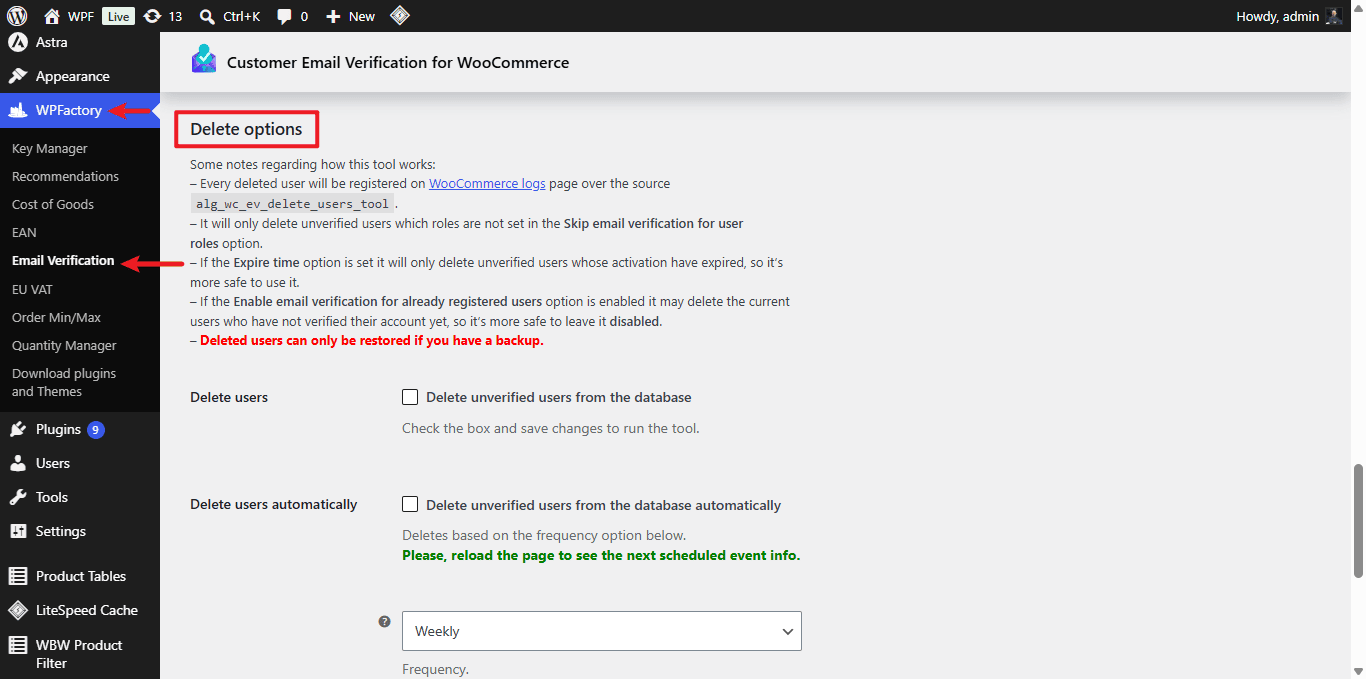
Go to WPFactory > Email Verification (also reachable at WooCommerce > Settings > Email Verification) and open the Advanced sub-tab. Scroll to the Delete options section.
How the deletion decides who to remove #
Both tools only ever delete users who are unverified and whose role is not listed in the Ignore user roles option (General sub-tab). Two more settings make the tools safer:
- If Expire time (General sub-tab) is set, only unverified users whose activation code has already expired are deleted.
- Registration delay keeps a brand-new account safe for a set number of hours before it becomes eligible.
Every deleted user is recorded in the WooCommerce logs (WooCommerce > Status > Logs) under the source alg_wc_ev_delete_users_tool.
Delete unverified users now (one time) #
- Open the Advanced sub-tab and find Delete users.
- Check the box Delete unverified users from the database.
- Click Save changes. The tool runs on save.
Delete unverified users automatically #
- Enable Delete users automatically.
- Set the Frequency (Hourly, Daily, Twice daily or Weekly).
- Set the Registration delay in hours.
- Click Save changes. Reload the page to see the next scheduled run time.
If you change the frequency after the automatic option is already on, turn the option off and on again so the new schedule takes effect.
Options reference #
| Label | Option ID | Default |
|---|---|---|
| Delete users | alg_wc_ev_delete_users |
No |
| Delete users automatically | alg_wc_ev_delete_users_cron |
No |
| Frequency | alg_wc_ev_delete_users_cron_frequency |
Weekly |
| Registration delay | alg_wc_ev_delete_users_registration_delay |
1 (hour) |
| Network deletion | alg_wc_ev_delete_users_from_network |
No |
Troubleshooting #
- A current customer got deleted. Keep Demand pre-plugin users to verify account (General sub-tab) disabled, otherwise existing unverified accounts become eligible for deletion.
- Nothing was deleted. Check that the accounts are actually unverified and that their role is not in Ignore user roles.
Get more control #
Automatic cleanup pairs well with the rest of the toolkit in Customer Email Verification for WooCommerce Pro. See what Pro unlocks.