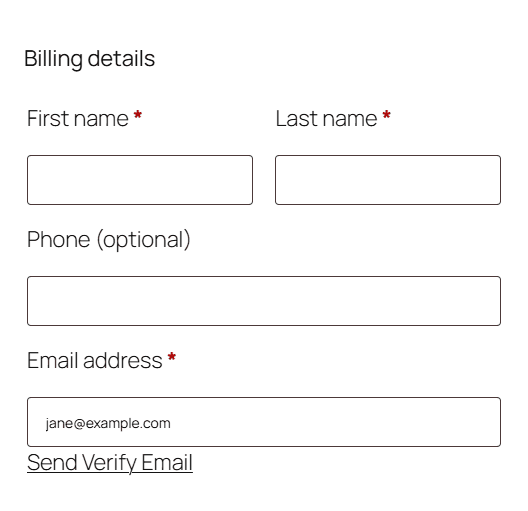
To confirm that a guest owns the email they enter at checkout, turn on guest verification in Customer Email Verification for WooCommerce. A verification link appears under the billing email field, and the customer confirms the address from their inbox before the order goes through. This is a free feature.
Before you start #
- WooCommerce, active, using the classic checkout. Guest verification does not yet run on the block-based checkout.
- Customer Email Verification for WooCommerce, installed and active.
- Guest checkout enabled in WooCommerce > Settings > Accounts & Privacy.
Turn on guest verification #
- Go to WPFactory > Email Verification (also reachable at WooCommerce > Settings > Email Verification) and open the General sub-tab.
- Find Guest users and tick Verify guest users (option
alg_wc_ev_verify_guest_email). - Leave Enable token verification on verify guest user (option
alg_wc_ev_nonce_verify_guest_email, on by default) enabled for the extra security token. If your checkout page is cached, you may need to turn this off. - Click Save changes.
Options reference #
| Label | Option ID | Default |
|---|---|---|
| Verify guest users | alg_wc_ev_verify_guest_email |
No |
| Token verification | alg_wc_ev_nonce_verify_guest_email |
Yes |
| Verification link text | alg_wc_ev_verify_guest_send_link_text |
Send Verify Email |
| Post-verification message | alg_wc_ev_verify_guest_verification_message |
Verification mail sent successfully… |
| Already verified message | alg_wc_ev_verify_guest_already_verification_message |
Email ID verified! |
| Resend link text | alg_wc_ev_verify_guest_resent_text |
Resend |
| Invalid token message | alg_wc_ev_guest_invalid_token_message |
The request could not be completed… |
| Unverified user message | alg_wc_ev_guest_unverified_user_message |
Your email is not verified… |
The Verification link text and all of the guest messages are set on the Messages sub-tab, under Guest checkout email verification.
What the customer sees #
- The customer enters their billing email at checkout and clicks the Send Verify Email link that appears below the field.
- They open the verification email and click the link to confirm the address.
- Once verified, the field shows the already-verified message and the order can be placed.

Customer Email Verification for WooCommerce
Get more from Email Verification
Guest checkout verification is free. Customer Email Verification for WooCommerce Pro adds checkout blocking, non-paying-user rules, the REST API endpoint and scheduled cleanup of unverified users.