To see who is verified and verify, unverify or resend activation emails by hand, open WPFactory > Email Verification (also reachable at WooCommerce > Settings > Email Verification) > Admin in Customer Email Verification for WooCommerce. It adds a Verified column, per-user action links, a status filter and bulk actions to the WordPress Users screen. All of these options are free.
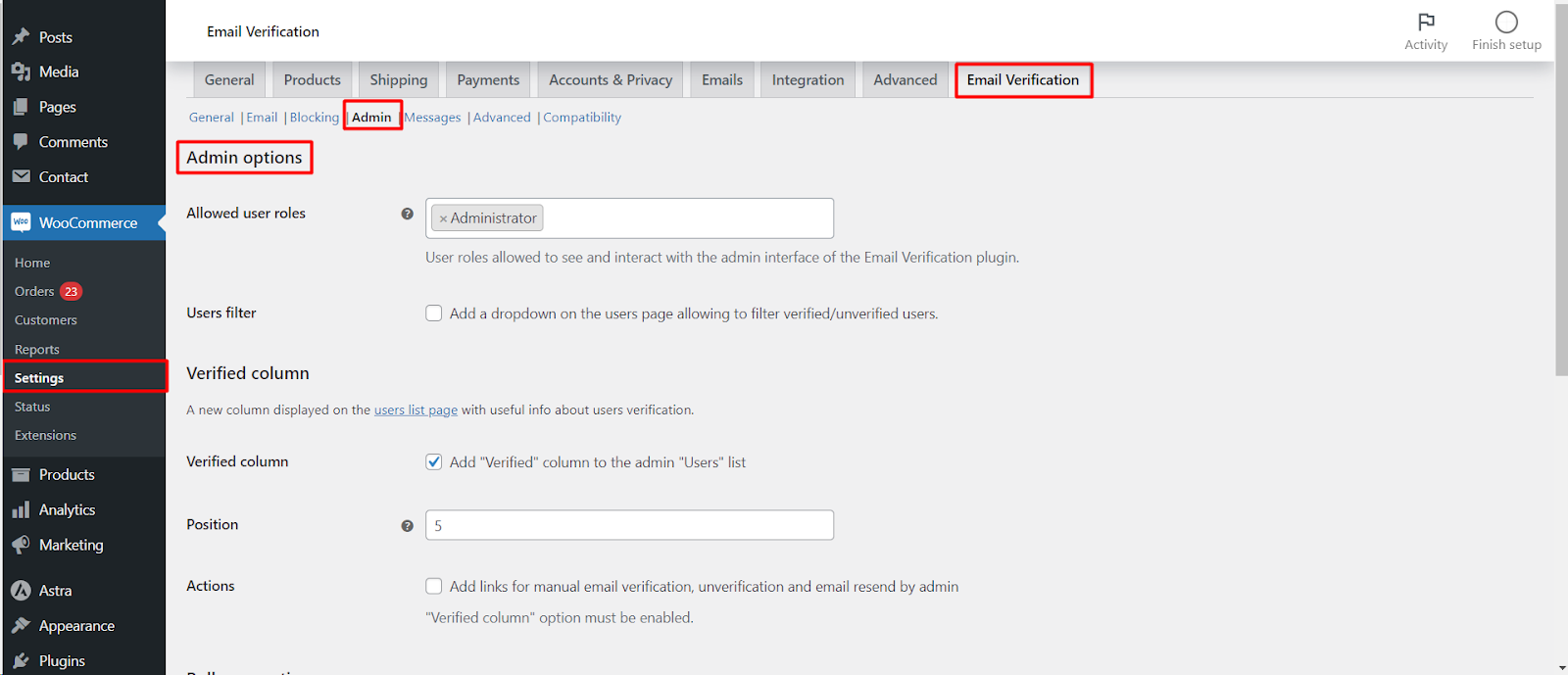
Options reference #
| Label | Option ID | Default | What it does |
|---|---|---|---|
| Allowed user roles | alg_wc_ev_admin_allowed_user_roles |
Empty (all roles) | Roles that can see and use the plugin’s admin interface. The administrator cannot be removed. |
| Users filter | alg_wc_ev_admin_users_filter |
No | Adds an All Users / Verified Users / Unverified Users dropdown and a Filter button above the Users list. |
| Verified column | alg_wc_ev_admin_column |
Yes | Adds the Verified column to Users. |
| Position | alg_wc_ev_admin_column_position |
5 | Column position in the table. |
| Actions | alg_wc_ev_admin_manual |
No | Adds Verify, Unverify and Resend links in the column. Needs Verified column. |
| Resend verification email (bulk) | alg_wc_ev_admin_bulk_user_actions_resend |
No | Adds the bulk action. |
| Verify users (bulk) | alg_wc_ev_admin_bulk_verify_users |
No | Adds the bulk action. |
| Unverify users (bulk) | alg_wc_ev_admin_bulk_unverify_users |
No | Adds the bulk action. |
Set it up #
- Go to WPFactory > Email Verification (also reachable at WooCommerce > Settings > Email Verification) and open the Admin sub-tab.
- Keep Verified column on and tick Actions.
- Tick Users filter and the three bulk actions you want.
- Click Save changes, then open Users.
What you see on the Users screen #
- A check mark means verified. A cross means not verified; hover it to see when the last activation code was created.
- Unverified users get Verify and Resend links, verified users get Unverify. Each link asks “Are you sure?” and then shows a notice such as “User ID: 12: verified.”
- Users whose role is in General > Ignore user roles (administrator by default) always show as verified and have no Unverify link.
How bulk actions behave #
- Resend verification email only emails the selected users who are still unverified.
- Verify users and Unverify users skip users already in the target state.
- When the selection reaches Advanced > Background processing > Minimum amount (default 20), the job runs in the background and, with Send email on (default), emails the site admin when it finishes.
If it does not work #
- No Verify or Resend links: Actions is off, or Verified column is off.
- A shop manager cannot see the column or links: their role is not in Allowed user roles. Leave the field empty to allow every role.
- Old customers show as verified: accounts created before the plugin was active count as verified unless General > Pre-plugin users is on.
FAQ #
Does verifying a user by hand send them an email? #
Not by default. Turn on Email > Confirmation email > Send confirmation email to the user manually verified by admin if you want them notified.
Can I delete unverified users from here? #
Use the standard WordPress Delete action, or the cleanup tool in Advanced > Delete options. See How to Delete Unverified Users in WooCommerce.
Where is the verification status stored? #
In the user meta alg_wc_ev_is_activated.
Related: Restricting Logins for Unverified Users and How to Display Verification Information.
Get more control #
The admin tools are free. Customer Email Verification for WooCommerce Pro adds checkout and cart blocking, editable email content, link expiry and third-party integrations. See what Pro unlocks.
Need a hand? Our team answers every ticket on the Email Verification support forum.