The Email sub-tab of Customer Email Verification for WooCommerce controls every message the plugin sends: the activation email a new customer receives, the confirmation email sent once they verify, and the admin notification. This guide walks through each group and its real option ids.
Where to find it #
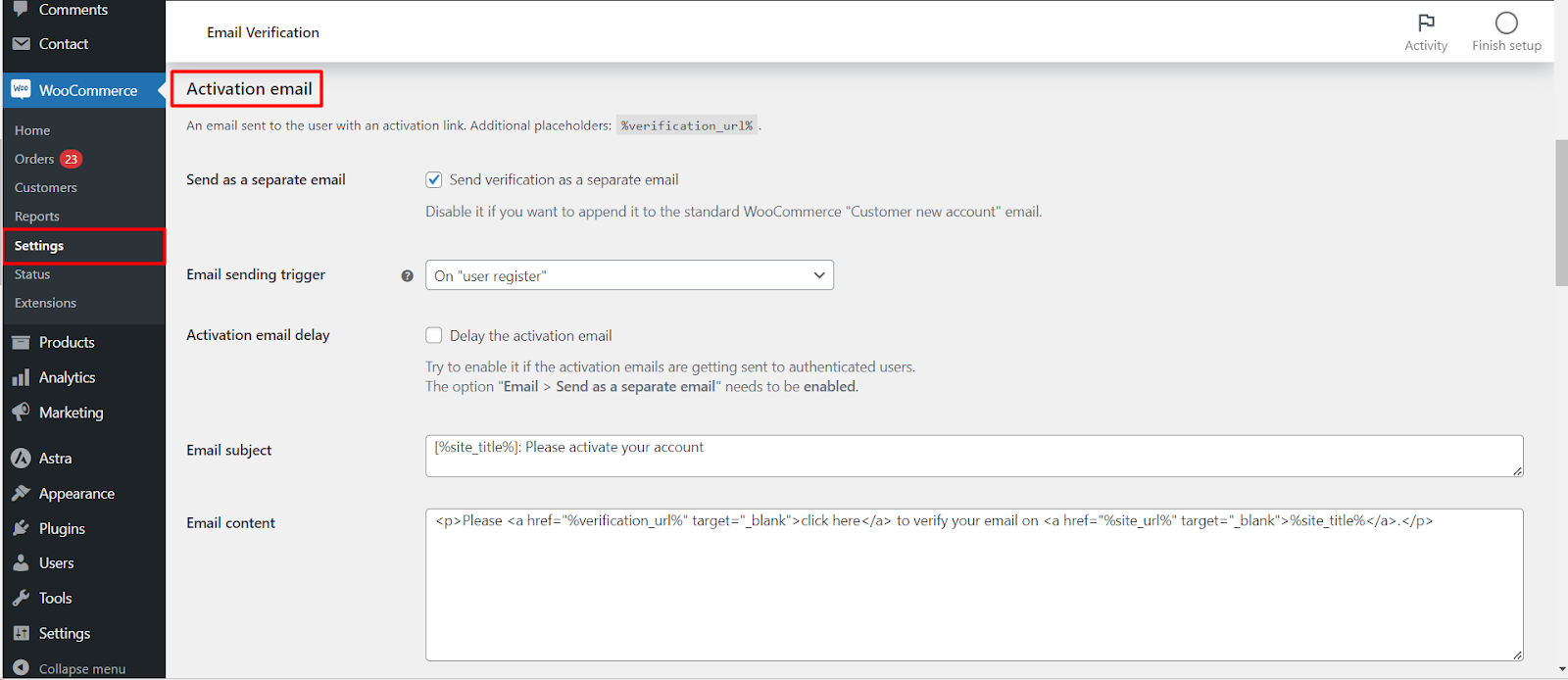
Go to WPFactory > Email Verification (also reachable at WooCommerce > Settings > Email Verification) and open the Email sub-tab.
Email options #
These sit at the top of the sub-tab and set the overall format.
| Label | Option ID | Default | Free/Pro |
|---|---|---|---|
| Email template | alg_wc_ev_email_template |
Plain | Pro |
| WC email template | alg_wc_ev_wc_email_template |
Email Verification plugin | Free |
| From email address | alg_wc_ev_wc_email_from |
Site admin email | Free |
Email template chooses how the activation email looks: Plain, WooCommerce (the styled WooCommerce wrapper), or Smart (plain when appended to another email, WooCommerce when sent on its own). Smart is usually the best choice.
Activation email #
The message that carries the verification link. It supports the %verification_url% placeholder plus the common placeholders.
| Label | Option ID | Default | Free/Pro |
|---|---|---|---|
| Send as a separate email | alg_wc_ev_send_as_separate_email |
Yes | Free |
| Customer new account email (delay) | alg_wc_ev_delay_wc_email |
No | Free |
| Email subject | alg_wc_ev_email_subject |
[%site_title%]: Please activate your account |
Pro (editing) |
| Email content | alg_wc_ev_email_content |
Built-in template | Pro (editing) |
| Email heading | alg_wc_ev_email_template_wc_heading |
Activate your account | Pro (editing) |
| Fine tune placement | alg_wc_ev_fine_tune_activation_email_placement |
No | Free |
| Email sending trigger | alg_wc_ev_new_user_action |
On “user register” | Free |
| Activation email delay | alg_wc_ev_delay_activation_email |
No | Free |
| Automatic resending | alg_wc_ev_activation_email_automatic_sending |
No | Pro |
Turn off Send as a separate email to append the activation content to the standard WooCommerce “Customer new account” email instead of sending a stand-alone message. Email sending trigger decides whether the email fires on WordPress user_register or on WooCommerce created customer.
Confirmation email #
Sent when an account is verified. Enable it with Confirmation email (alg_wc_ev_enable_confirmation_email, on by default). You can set the subject (alg_wc_ev_confirmation_email_subject), content (alg_wc_ev_confirmation_email_content), heading (alg_wc_ev_confirmation_email_heading) and an optional delay (alg_wc_ev_confirmation_email_delay).
Admin email #
Notifies you when a user verifies. The master toggle Admin email (alg_wc_ev_admin_email, default off) is a Pro option; the recipient (alg_wc_ev_admin_email_recipient), subject, content and heading are set below it.
Advanced (email delivery) #
At the bottom of the sub-tab, Mail function (alg_wc_ev_mail_function, default WooCommerce wc_mail()) chooses which function sends the emails, and Email wrap method (alg_wc_ev_email_template_wc_wrap_method, default Manual) sets how the WooCommerce header and footer are added.
Get more from Email Verification #
Sending, triggers and delivery settings are free. Editing the activation email subject, content and heading, plus the Email template choice and automatic resending, are unlocked with Customer Email Verification for WooCommerce Pro. See what Pro unlocks.