The products-list shortcode outputs a table of products with columns you choose, including price-by-quantity levels, so you can publish a wholesale price list on any page. This is a Pro shortcode in Price by Quantity & Bulk Quantity Discounts for WooCommerce. This article also covers the language shortcode.
[alg_wc_ppq_products_list] #
Renders a product table. Long-form alias: [alg_wc_wholesale_pricing_products_list]. Both names behave the same.
| Attribute | Description | Default |
|---|---|---|
columns |
Pipe-separated column definitions, each as value:Title. See the column values below. |
sku:SKU|name:Name|category:Category|price_with_add_to_cart_link:Price|levels:from %level_min_qty% pcs. |
levels |
Manual levels as qty:discount pairs joined by |, used to build the level columns when no category is given. |
false |
category_slug |
Limit the list to one product category and read its per-category levels. | false |
discount_type |
Force a discount type (percent, fixed or price_directly) for the level columns. |
false |
limit |
Maximum products to list. -1 means no limit. |
-1 |
orderby |
Product ordering field passed to WooCommerce. | date |
order |
ASC or DESC. |
DESC |
image_size |
Image size for image columns. | woocommerce_thumbnail |
use_transients |
Cache the rendered table for 10 minutes. yes or no. |
no |
Column values #
Each entry in columns starts with one of these values, followed by : and the heading text:
sku,name,category,price,image: the basic product fields.price_excl_tax,price_incl_tax: price with or without tax.levels: one column per pricing level, showing the discounted per-unit price.- Any of the above with the
_with_add_to_cart_linksuffix (for examplename_with_add_to_cart_link) wraps the cell in an add-to-cart link. Useimage_with_product_linkto link the image to the product page instead. meta:<meta_key>:Title: output a product meta value, for examplemeta:total_sales:Total sales.
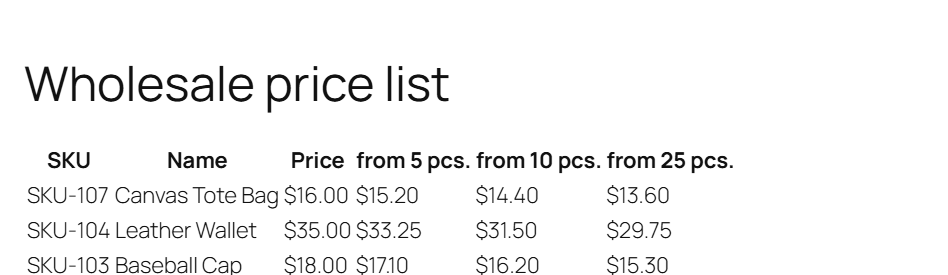
Example: [alg_wc_ppq_products_list columns="sku:SKU|name:Name|price:Price|levels:from %level_min_qty% pcs." category_slug="bulk-supplies"]
[alg_wc_ppq_translate] #
Shows or hides text based on the active WPML language, useful inside pricing tables and labels. It works two ways:
- With attributes only:
[alg_wc_ppq_translate lang="EN,DE" lang_text="Text for EN and DE" not_lang_text="Text for other languages"] - Wrapping content:
[alg_wc_ppq_translate lang="EN,DE"]Text for EN and DE[/alg_wc_ppq_translate], or usenot_lang="EN,DE"to show the wrapped text everywhere except those languages.
For the translation troubleshooting workflow, see how to translate the price by quantity table and plugin strings.
Note: the free [alg_wc_wholesale_pricing_table] and [alg_wc_product_wholesale_pricing_table] shortcodes are covered in the Price by Quantity shortcodes article.
Ready to set this up? #
The products-list shortcode is a Pro feature of Price by Quantity. Upgrading unlocks it along with per-variation, per-category and per-tag pricing. Get Price by Quantity Pro.