Hide the coupon field and redirect after applying #
Hiding the coupon field and redirecting after a coupon is applied give you a cleaner checkout when you drive discounts through links rather than a coupon box. Coupons & Add to Cart by URL Links for WooCommerce covers both from the General sub-tab. Hiding the coupon field is free; the redirect options are Pro.
Go to WPFactory > Coupons by URL (also reachable at WooCommerce > Settings > URL Coupons).
Hide Coupon Options (Free) #
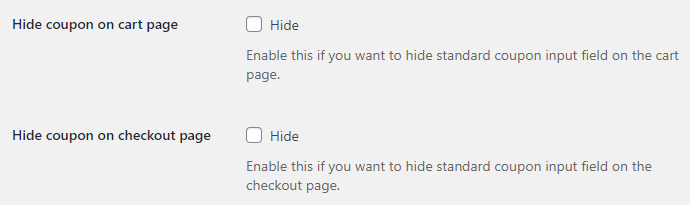
- Cart page: tick Hide to remove the standard coupon input field on the cart page.
- Checkout page: tick Hide to remove the standard coupon input field on the checkout page.
- Hide condition: choose Always hide to remove the field at all times, or Hide if coupon applied via URL to hide it only once a URL coupon has been applied.
| Label | Option ID | Default | Free/Pro |
|---|---|---|---|
| Hide coupon field: cart page | alg_wc_url_coupons_cart_hide_coupon |
No | Free |
| Hide coupon field: checkout page | alg_wc_url_coupons_checkout_hide_coupon |
No | Free |
| Hide condition | alg_wc_url_coupons_hide_coupon_condition |
Always hide | Free |
Redirect Options (Pro) #
- Redirect URL: after a coupon is applied, keep the customer where they are (No redirect), or send them to the cart, the checkout, or a custom local URL.
- Custom local URL: the page to use when Redirect URL is set to “Redirect to custom local URL”.
- Redirect URL per coupon: add a URL Coupons: Redirect URL field to each coupon, so a coupon’s own URL takes priority over the global setting. See the guide on setting a redirect URL per coupon.
| Label | Option ID | Default | Free/Pro |
|---|---|---|---|
| Redirect URL | alg_wc_url_coupons_redirect |
No redirect | Pro |
| Custom local URL | alg_wc_url_coupons_redirect_custom_url |
(empty) | Pro |
| Redirect URL per coupon | alg_wc_url_coupons_redirect_per_coupon |
No | Pro |
Note on notices #
Note: if you redirect to a page where WooCommerce notices are not shown, add the [alg_wc_url_coupons_print_notices] shortcode to that page’s content so the customer still sees the coupon message. This shortcode prints all available WooCommerce notices, not only coupon notices.
Each sub-tab also has a Reset section settings checkbox to return that section to its defaults.
Get more control #
Hiding the coupon field is free. The redirect options are part of URL Coupons Pro, which also adds custom notices and add-to-cart coupons. See what Pro unlocks.