The advanced options of Coupons & Add to Cart by URL Links for WooCommerce fine-tune how coupon links are detected and stored, and solve edge cases with caching and payment buttons. Every option on this sub-tab is free.
Go to WPFactory > Coupons by URL (also reachable at WooCommerce > Settings > URL Coupons) and open the Advanced sub-tab.
Advanced #
- Save on empty cart: keep coupons when the cart is emptied, and reapply them when a product is added again.
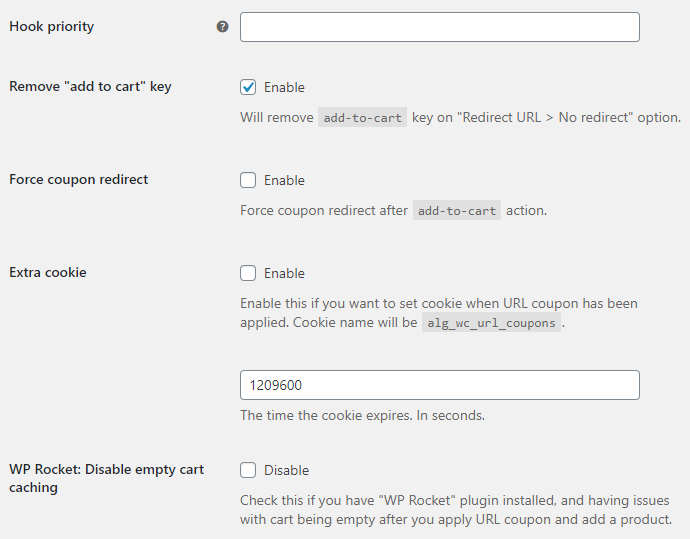
- Remove “add to cart” key: strip the
add-to-cartkey from the URL when Redirect URL is set to “No redirect”, for cleaner links. On by default. - Force coupon redirect: force a redirect after the
add-to-cartaction when a coupon is applied. - WP Rocket: Disable empty cart caching: stop WP Rocket serving a cached empty-cart page after a coupon is applied.
- Payment request buttons: apply coupons on single product pages that use the WooCommerce Stripe Gateway or WooCommerce Payments express buttons.
- Javascript reload: reload the page once via Javascript when a coupon is detected in the URL. Works best with Data storage type set to Cookie.
Main hook #
- Hook: the hook used to detect and handle the coupon, either WP Loaded (default) or Init.
- Hook priority: the priority for that hook. Leave empty for the default.
Data management #
- Data storage type: store coupon data in the Session (default) or a Cookie.
- Extra cookie: set an extra
alg_wc_url_couponscookie when a URL coupon is applied. - Cookie expiration: how long that cookie lasts, in seconds. The default is 1209600 (14 days).
Options reference #
| Label | Option ID | Default |
|---|---|---|
| Save on empty cart | alg_wc_url_coupons_save_empty_cart |
No |
| Remove “add to cart” key | alg_wc_url_coupons_remove_add_to_cart_key |
Yes |
| Force coupon redirect | alg_wc_url_coupons_add_to_cart_action_force_coupon_redirect |
No |
| WP Rocket: disable empty cart caching | alg_wc_url_coupons_wp_rocket_disable_cache_wc_empty_cart |
No |
| Payment request buttons: Stripe | alg_wc_url_coupons_payment_request_product_data[wc_stripe] |
No |
| Payment request buttons: WooCommerce Payments | alg_wc_url_coupons_payment_request_product_data[wcpay] |
No |
| Javascript reload | alg_wc_url_coupons_javascript_reload |
No |
| Main hook | alg_wc_url_coupons_main_hook |
wp_loaded |
| Hook priority | alg_wc_url_coupons_priority |
(empty) |
| Data storage type | alg_wc_url_coupons_data_storage_type |
session |
| Extra cookie | alg_wc_url_coupons_cookie_enabled |
No |
| Cookie expiration (seconds) | alg_wc_url_coupons_cookie_sec |
1209600 |
The Reset section settings checkbox at the bottom returns the Advanced section to its defaults.
Troubleshooting #
- Coupons drop on cached or guest sessions. Try Data storage type > Cookie and Javascript reload together, and see the guide on making URL coupons work for guests and cached sites.
- The cart looks empty after applying with WP Rocket. Enable WP Rocket: Disable empty cart caching.
Get more control #
These advanced options are free. Coupons & Add to Cart by URL Links for WooCommerce Pro adds add-to-cart coupons, redirects, and custom notices. See what Pro unlocks.