To set one Add to Cart label for all products, use the All Products section of Change Add to Cart Button Text for WooCommerce. It applies a single button label across your whole store in one place, which is the fastest way to replace the default “Add to cart” wording everywhere. This section is free.
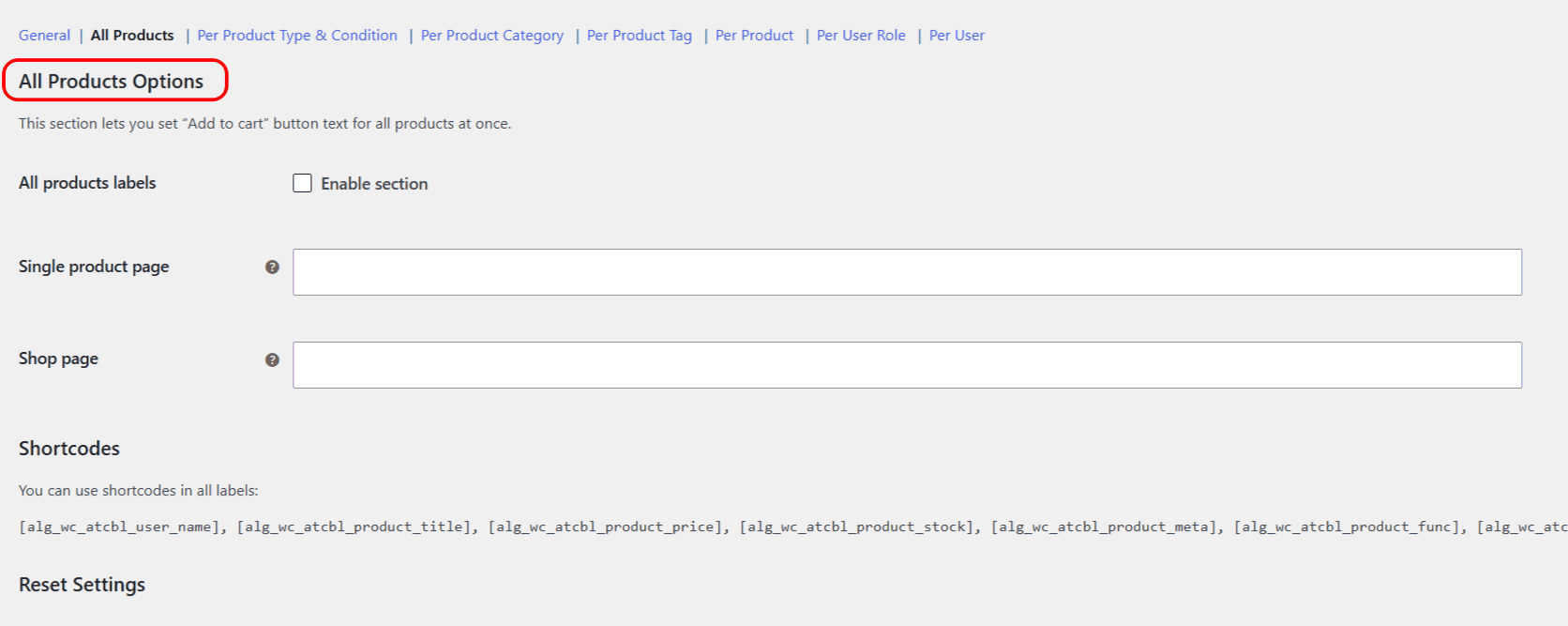
Step-by-step setup #
- Go to WPFactory > Add to Cart Button Labels (also reachable at WooCommerce > Settings > Add to Cart Button Labels).
- Open the All Products section.
- Tick Enable section.
- Enter your text in Single product page and Shop page.
- Click Save changes.
Options reference #
| Label | Option ID | Type | Default |
|---|---|---|---|
| All products labels (Enable section) | alg_wc_add_to_cart_button_labels_all_products_enabled |
Checkbox | no |
| Single product page | alg_wc_add_to_cart_button_labels_all_products_single |
Text | Empty |
| Shop page | alg_wc_add_to_cart_button_labels_all_products_archive |
Text | Empty |
Single product page sets the button on an individual product’s page. Shop page sets it on the shop, category and other archive listings. Either field is ignored if you leave it empty, so the default WooCommerce text stays for that view.
Dynamic labels with shortcodes #
You can add live product or customer details to the label using any of these shortcodes:
[alg_wc_atcbl_user_name]: the current customer’s username, or “Guest”.[alg_wc_atcbl_product_title]: the product title.[alg_wc_atcbl_product_price]: the product price.[alg_wc_atcbl_product_stock]: the product’s stock quantity.[alg_wc_atcbl_product_meta key="..."]: a custom field value.[alg_wc_atcbl_product_func name="..."]: the result of a product method.[alg_wc_atcbl_translate]: language-specific text on WPML or Polylang sites.
Remember precedence #
All Products is the broadest rule, so it is overridden by any more specific section you also enable (product type, category, tag, product, user role or user). Use it as your baseline, then override where needed.
Resetting the section #
To revert this section, tick Reset section settings at the bottom of the tab and click Save changes.
Get more control #
This section is free. Change Add to Cart Button Text for WooCommerce Pro adds unlimited category, tag, user role and user groups, plus separate labels for on-sale products. See what Pro unlocks.