To customize the Download ZIP link on the Plugins page, go to WPFactory > Download plugins and Themes, scroll to the Download plugin link section, and set Use custom color, Custom color, Font weight and Text. Click Save settings. Link styling requires Download Plugins and Themes in ZIP from Dashboard Pro and does not affect the Themes screen.
Before you start #
- Download Plugins and Themes Pro (these options are Pro only).
Customize the link #
- Go to WPFactory > Download plugins and Themes and scroll to the Download plugin link section.
- Set the options you want (see the table below).
- Click Save settings, then open Plugins > Installed Plugins to see the styled link.
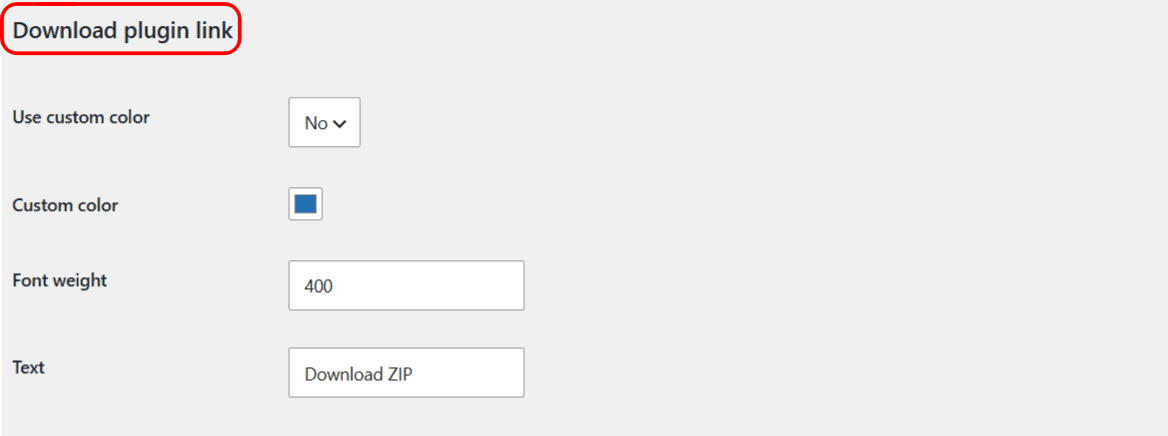
Options reference #
| Label | Option key | Default | What it does |
|---|---|---|---|
| Use custom color | alg_download_plugins_dashboard_download_plugin_btn_use_custom_color |
No | Master switch for the color. The Custom color value is only applied when this is set to Yes. |
| Custom color | alg_download_plugins_dashboard_download_plugin_btn_color |
#2271b1 |
The link text color, used only when Use custom color is Yes. |
| Font weight | alg_download_plugins_dashboard_download_plugin_btn_font_weight |
400 |
A CSS font-weight value. Use 700 for bold, or a numeric weight your admin font supports. |
| Text | alg_download_plugins_dashboard_download_plugin_btn_text |
Download ZIP | The label shown on the link, for example “Export ZIP” or “Backup”. |
Note: the font weight and color styling apply to the link on the Plugins screen only. The custom Text also changes what the per-plugin link says on that screen. The Download ZIP link on Appearance > Themes is not affected by these options.
Ready to set this up? #
Link customization is a Pro feature of Download Plugins and Themes. If you are still on the free version, upgrading takes a couple of minutes and unlocks this along with the rest of the Pro toolkit. Get the Pro version.