The Import Costs tool copies product costs from one meta key into the cost of goods meta, so you can bring costs across from another plugin without re-entering them. It is a free feature of Cost of Goods: Product Cost & Profit Calculator for WooCommerce, and it is the standard way to migrate from a different cost-of-goods plugin.
How it works #
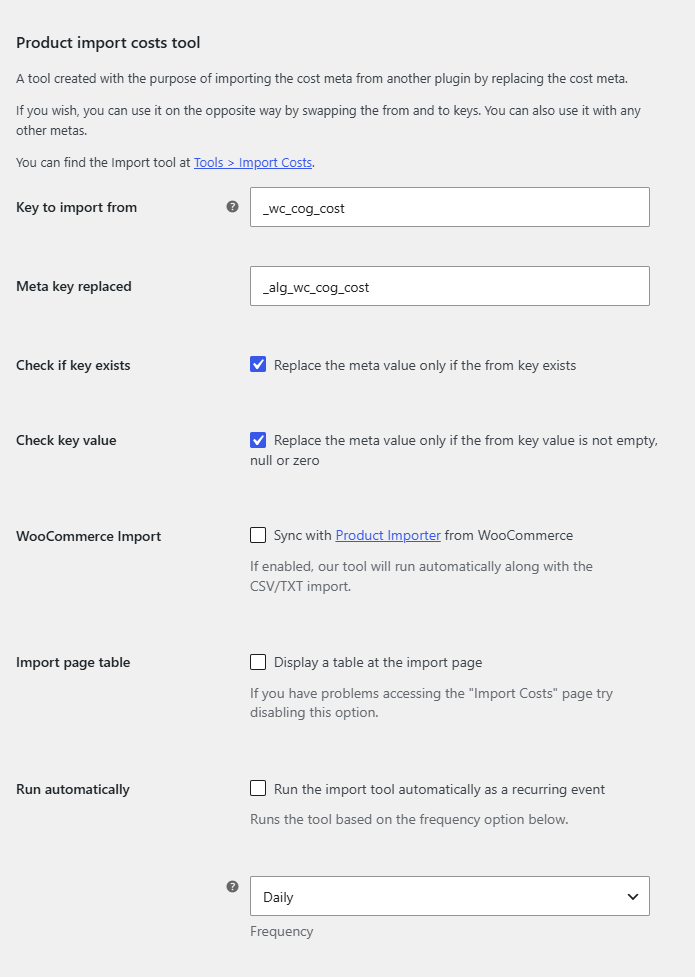
The tool reads a value from a meta key you name (the “from” key) and writes it into the plugin’s own cost meta (_alg_wc_cog_cost) on every matching product. By default it imports from _wc_cog_cost, the key used by another common cost plugin, into _alg_wc_cog_cost. You can swap the two keys to run the migration in the opposite direction, or point it at any other meta key.
Where to configure it #
Go to WPFactory > Cost of Goods (also reachable at WooCommerce > Settings > Cost of Goods), open the Tools sub-tab, and find the Product import costs tool group. The tool page itself runs at Tools > Import Costs (tools.php?page=wpfcogs-import-costs).
Options reference #
| Label | Option ID | Default | What it does |
|---|---|---|---|
| Key to import from | alg_wc_cog_tool_key |
_wc_cog_cost |
The meta key the cost value is read from. |
| Meta key replaced | alg_wc_cog_tool_key_to |
_alg_wc_cog_cost |
The meta key the value is written to. This is the plugin’s own cost meta. |
| Check if key exists | alg_wc_cog_import_tool_check_key |
Yes | Only replaces the value when the “from” key exists on the product. |
| Check key value | alg_wc_cog_import_tool_check_value |
Yes | Only replaces when the “from” value is not empty, null or zero. |
| WooCommerce Import | alg_wc_cog_import_tool_sync_wc_import |
No | Runs the tool automatically whenever you run the WooCommerce Product Importer. |
| Import page table | alg_wc_cog_import_tool_display_table |
No | Shows a table on the Import Costs page. Turn it off if that page is slow to open. |
| Run automatically | alg_wc_cog_import_tool_cron |
No | Runs the import on a recurring schedule. |
| Frequency | alg_wc_cog_import_tool_cron_frequency |
Daily | How often the recurring import runs: hourly, daily, twice daily or weekly. |
Step-by-step #
- Go to WPFactory > Cost of Goods > Tools and set Key to import from to the meta key that holds your existing costs.
- Leave Meta key replaced as
_alg_wc_cog_costunless you are exporting in the opposite direction. - Decide whether to keep Check if key exists and Check key value on. Both are on by default and protect products that have no cost from being overwritten with a blank.
- Click Save changes.
- Open Tools > Import Costs and run the tool.
Notes #
- You are not limited to cost keys. The tool copies any meta value from one key to another, so it also works as a general meta-migration helper.
- If you change the frequency after enabling Run automatically, turn the option off and on again so the new schedule takes effect.
- Migrating from ATUM Inventory Management? The Compatibility sub-tab has a dedicated ATUM “Import costs tool” option that pulls purchase price directly.
Get more from Cost of Goods #
The Import Costs tool is free. Cost of Goods: Product Cost & Profit Calculator for WooCommerce Pro adds cost and profit in WooCommerce Analytics, order-email cost and profit, and multicurrency support. See what Pro unlocks.