The Bulk Edit Costs tool lets you set the cost of goods for many products from a single screen, instead of opening each product one at a time. It is a free feature of Cost of Goods: Product Cost & Profit Calculator for WooCommerce, and it is the fastest way to enter costs across an existing catalog.
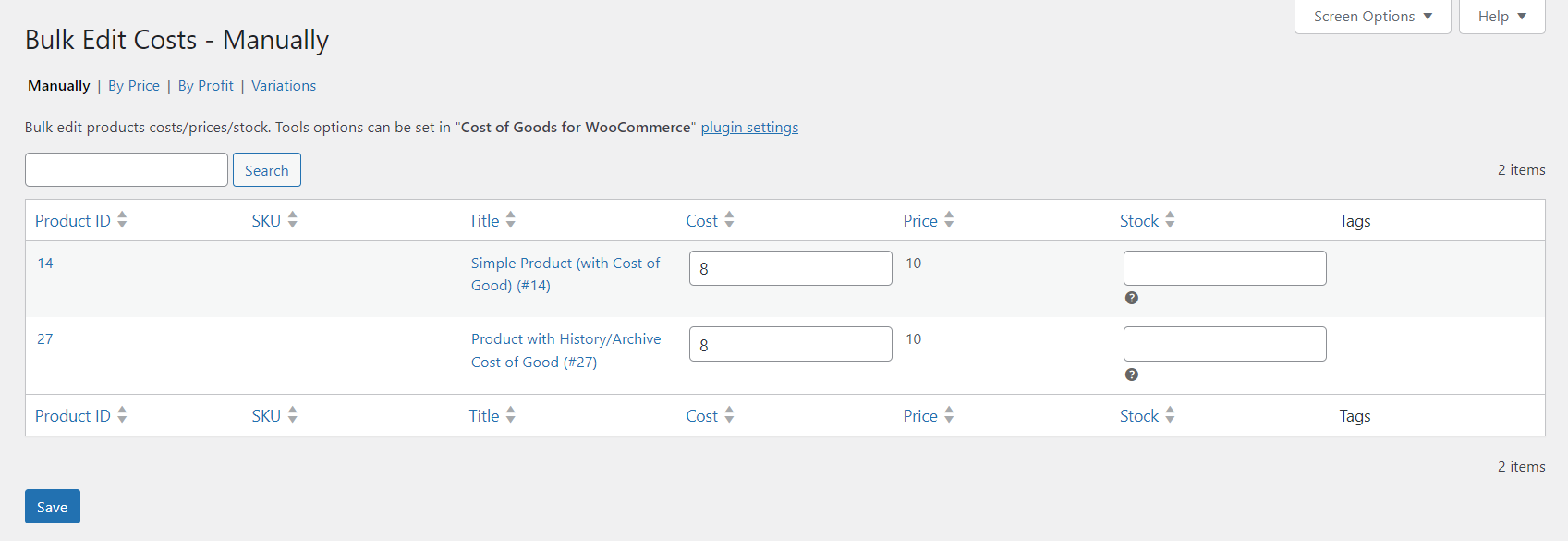
Where the tool lives #
The tool itself opens at Tools > Bulk Edit Costs in the WordPress admin menu (the URL is tools.php?page=bulk-edit-costs). Its behavior is configured separately, on the plugin’s own settings screen at WPFactory > Cost of Goods (also reachable at WooCommerce > Settings > Cost of Goods), under the Tools sub-tab.
Step-by-step #
- Go to WPFactory > Cost of Goods and open the Tools sub-tab to set which columns and filters the tool offers (see the options table below). Click Save changes.
- Open Tools > Bulk Edit Costs.
- Find the products you want to edit. The search behavior depends on the Product search option: Search by title looks up products by name, while Search all loads the full list.
- Enter or adjust the Cost for each product in the list.
- Save the changes on the tool page.
The cost you enter is stored in the same cost meta the rest of the plugin reads (_alg_wc_cog_cost), so profit, margin and the admin columns update straight away.
Options reference #
These options are on the Tools sub-tab and shape what the Bulk Edit Costs tool shows.
| Label | Option ID | Default | What it does |
|---|---|---|---|
| Product search | alg_wc_cog_bulk_edit_tool_search_method |
Search by title | Choose between searching by title or loading all products. |
| Product types | alg_wc_cog_bulk_edit_tool_product_types |
All types | Limit the tool to specific product types (including variations). Leave empty to show all. |
| Prices | alg_wc_cog_bulk_edit_tool_edit_prices |
No | Adds editable price fields to the tool so you can adjust prices alongside costs. |
| Tags | alg_wc_cog_bulk_edit_tool_edit_tags |
No | Adds editable product tag fields to the tool. |
| Costs | alg_wc_cog_bulk_edit_tool_profit_on_cost_desc |
No | Shows the calculated profit as a description under each cost field. |
| Stock | alg_wc_cog_bulk_edit_tool_manage_stock |
No | Adds a stock column so you can manage stock from the same screen. |
| Stock update method | alg_wc_cog_bulk_edit_tool_manage_stock_method |
Update product meta | How stock changes are written. Ignored unless Stock is enabled. |
| Filterable attributes | alg_wc_cog_bulk_edit_filterable_taxes |
None | Product attributes you can filter the tool by. Applies to Bulk Edit Costs and Bulk Edit Prices. |
Every option here is free. The tool writes directly to product cost meta, so a large edit can touch many rows at once. Back up your database before a big run, and consider narrowing the product-type filter first so you only load what you intend to change.
Related tools #
- Bulk Edit Prices sets selling prices from cost plus a target profit. See the Bulk Change Prices by Cost and Profit guide.
- Import Costs copies costs in from another meta key, useful when migrating from another plugin.
Get more from Cost of Goods #
Bulk Edit Costs is free. Cost of Goods: Product Cost & Profit Calculator for WooCommerce Pro adds cost and profit in WooCommerce Analytics, order-email cost and profit, the orders recalculation tool, and multicurrency support. See what Pro unlocks.