Add extra order costs #
Beyond the cost of the products themselves, most orders carry other costs: handling, packaging, a payment-processing fee. Cost of Goods: Product Cost & Profit Calculator for WooCommerce lets you fold those into your profit figure in three free ways, all on the Orders sub-tab.
These are internal cost figures used for profit calculation only. They do not change what the customer pays and are never added to the order total at checkout.
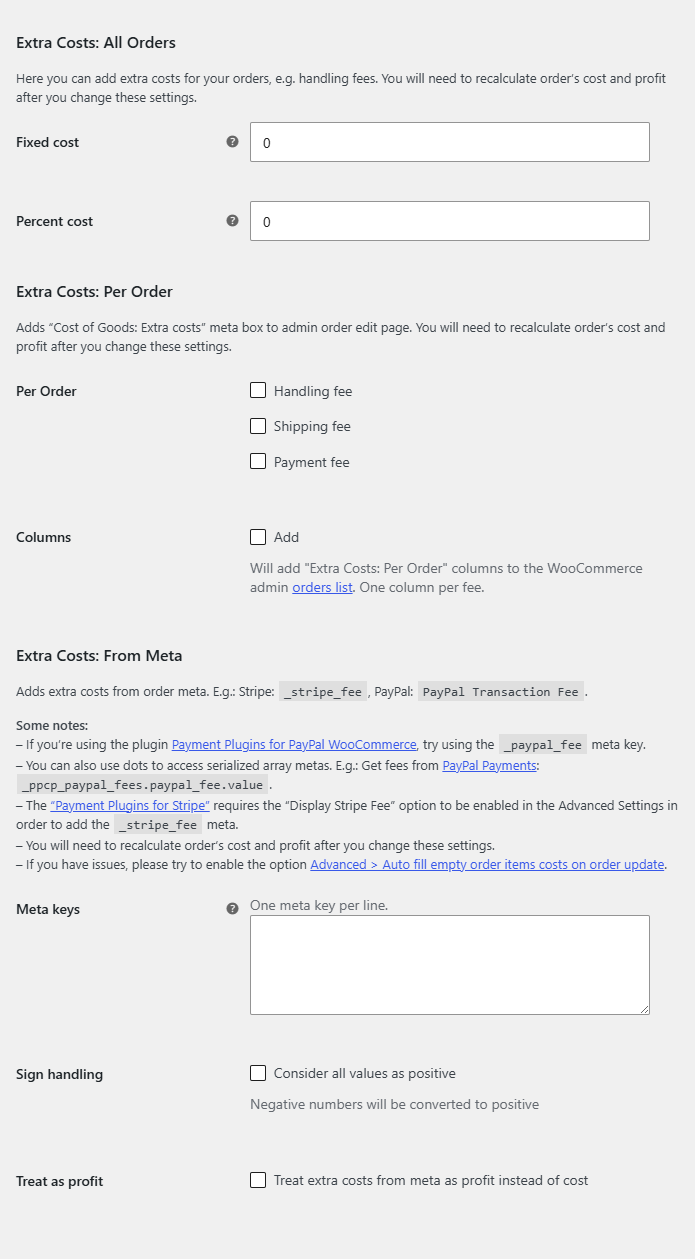
Where to find these settings #
Go to WPFactory > Cost of Goods (also reachable at WooCommerce > Settings > Cost of Goods) and open the Orders sub-tab. Three groups near the bottom control the three methods.
1. Extra Costs: All Orders #
Apply the same extra cost to every order, either as a flat amount or as a percentage.
| Label | Option ID | Default | What it does |
|---|---|---|---|
| Fixed cost | alg_wc_cog_order_extra_cost_fixed |
0 | A flat cost added to every order’s cost of goods. |
| Percent cost | alg_wc_cog_order_extra_cost_percent |
0 | A percentage cost added to every order. |
The percentage is taken from the basis set by the Order total option (alg_wc_cog_order_extra_cost_percent_total) in the Calculations group, which offers Order subtotal excl. tax (default), Order total excl. tax, and Order total incl. tax.
2. Extra Costs: Per Order #
Add a meta box to the order edit screen so you can record a handling, shipping or payment fee on an individual order. Each toggle enables one field on the order.
| Label | Option ID | Default |
|---|---|---|
| Per Order handling fee | alg_wc_cog_order_extra_cost_per_order_handling_fee |
No |
| Per Order shipping fee | alg_wc_cog_order_extra_cost_per_order_shipping_fee |
No |
| Per Order payment fee | alg_wc_cog_order_extra_cost_per_order_payment_fee |
No |
| Columns | alg_wc_cog_order_extra_cost_per_order_columns |
No |
Turn on Columns to also show these per-order fees as columns in the admin orders list.
3. Extra Costs: From Meta #
Pull an extra cost directly from a meta value already stored on the order. This is how you capture the exact fee a payment gateway charged, for example the Stripe fee saved as _stripe_fee.
| Label | Option ID | Default | What it does |
|---|---|---|---|
| Meta keys | alg_wc_cog_order_extra_cost_from_meta |
Empty | One or more order meta keys whose value is treated as an extra cost. |
| Sign handling | alg_wc_cog_order_extra_cost_from_meta_as_positive |
No | Treats a negative stored value as a positive cost. |
| Treat as profit | alg_wc_cog_order_extra_cost_from_meta_as_profit |
No | Adds the meta value to profit instead of to cost. |
How these interact with profit #
All three methods increase the order’s recorded cost of goods (or, for Treat as profit, adjust profit directly), which lowers the profit and margin the plugin reports. They apply when the order’s cost and profit are calculated, so newly placed orders pick them up automatically. To apply them to historic orders, use the Pro Orders recalculation tool at WPFactory > Cost of Goods > Tools.
Get more from Cost of Goods #
All three extra-cost methods are free. Cost of Goods: Product Cost & Profit Calculator for WooCommerce Pro adds the orders recalculation tool for applying costs to past orders, cost and profit in WooCommerce Analytics, and order-email cost and profit. See what Pro unlocks.