Adding extra shipping costs lets you fold the real cost of shipping into your WooCommerce profit figures, either per shipping method or per shipping class. Cost of Goods: Product Cost & Profit Calculator for WooCommerce has two separate sections for this: Shipping Methods (free) and Shipping classes (Pro).
Important: these costs feed profit calculation only. They are not charged to the customer and do not change the order total at checkout.
Option A: Extra shipping method costs (free) #
- Go to WPFactory > Cost of Goods (also reachable at WooCommerce > Settings > Cost of Goods).
- Open the Shipping Methods sub-tab.
- Tick Extra shipping costs > Enable section.
- Optionally tick Use shipping instances to target specific method instances within shipping zones instead of methods overall.
- Set Percent cost source (Order total or Shipping total), then Save changes.
- For each method, set a Fixed cost and/or Percent cost, and save.
| Label | Option ID | Default | Free/Pro |
|---|---|---|---|
| Extra shipping costs (enable) | alg_wc_cog_shipping_costs_enabled |
no |
Free |
| Use shipping instances | alg_wc_cog_shipping_use_shipping_instance |
no |
Free |
| Percent cost source | alg_wc_cog_shipping_percent_cost_source |
Order total | Free |
Option B: Extra shipping class costs (Pro) #
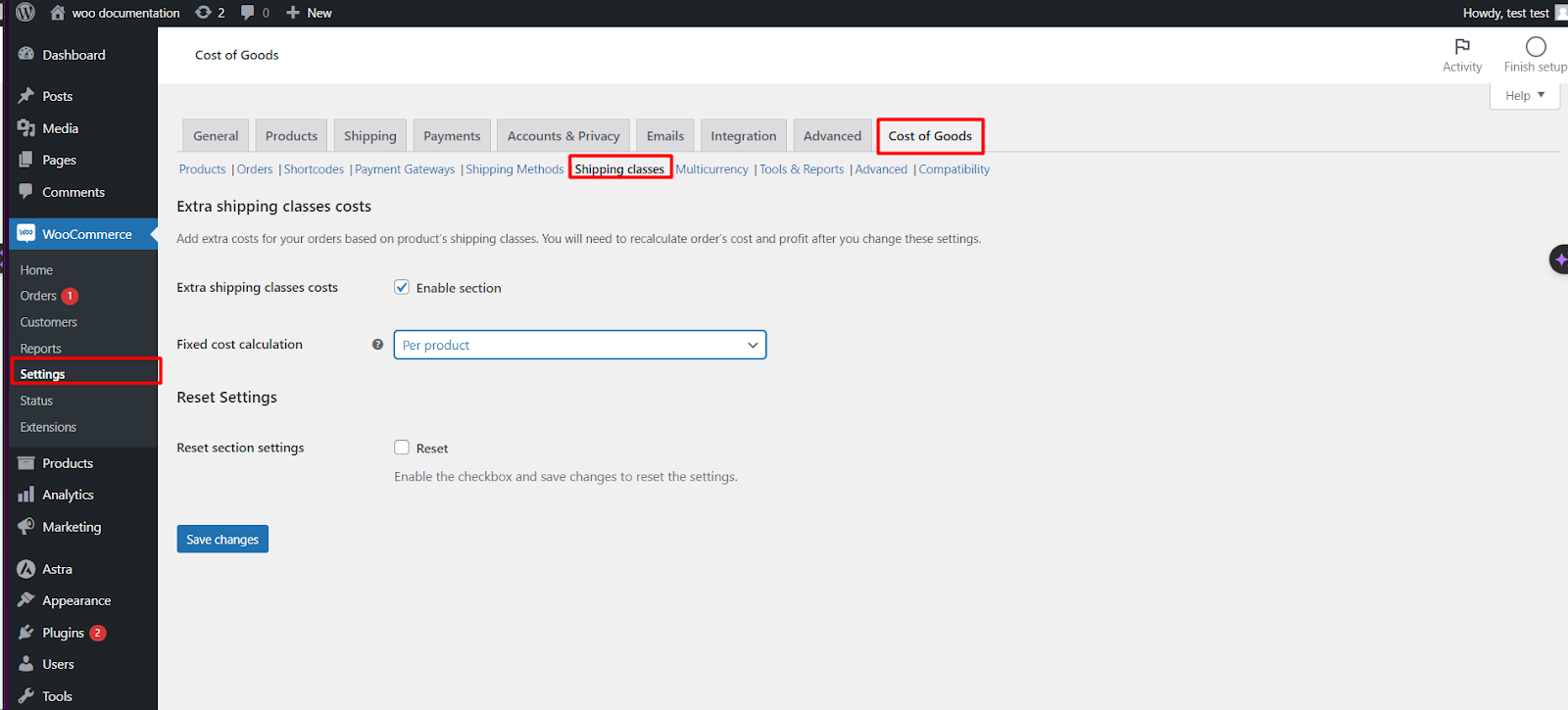
- Open the Shipping classes sub-tab.
- Tick Extra shipping classes costs > Enable section (Pro; disabled in the free version).
- Set Fixed cost calculation to one of Per product, Per shipping class, or Per item.
- Click Save changes, then set a Fixed cost and/or Percent cost for each shipping class.
| Label | Option ID | Default | Free/Pro |
|---|---|---|---|
| Extra shipping classes costs (enable) | alg_wc_cog_shipping_classes_enabled |
no |
Pro |
| Fixed cost calculation | alg_wc_cog_shipping_classes_fixed_cost_calculation |
Per product | Pro |
The three calculation modes decide how a fixed shipping-class cost is counted: Per product (each different product carrying the class), Per shipping class (once per class in the order), or Per item (each item in the class).
After changing costs #
Recalculate existing orders with the Tools > Orders recalculation tool (Pro) so past orders pick up the new figures.
Reset the section #
Each section has a Reset section settings checkbox at the bottom. Tick it and save to restore that section’s defaults.
Get more from Cost of Goods #
Shipping method costs are free; shipping class costs are Pro. Cost of Goods: Product Cost & Profit Calculator for WooCommerce Pro also adds the orders recalculation tool and WooCommerce Analytics integration. See what Pro unlocks.