Installing the WooCommerce Cost of Goods plugin lets you record a purchase cost for every product and turn it into profit and margin figures across your store. Cost of Goods: Product Cost & Profit Calculator for WooCommerce adds a cost field to each product and calculates profit automatically. This guide covers install, where the settings live, and how to enter your first cost.
Before you start #
- WooCommerce, active.
- The free version from, or the Pro version from your account.
Step 1: Install and activate #
- For the free version: in your dashboard go to Plugins > Add New, search for Cost of Goods for WooCommerce, then click Install Now and Activate.
- For Pro: download the ZIP from your WPFactory account, then go to Plugins > Add New > Upload Plugin, choose the ZIP, install, and activate.
There is no master “enable” switch to turn on. Once Cost of Goods is active, the cost field is available on your products right away.
Step 2: Open the settings #
Go to WPFactory > Cost of Goods (also reachable at WooCommerce > Settings > Cost of Goods). The settings open on the Products sub-tab, which is where the cost field options live.
Step 3: Set how the cost field looks (optional) #
Two options on the Products sub-tab control the cost field on the product edit screen:
| Label | Option ID | Default | Free/Pro |
|---|---|---|---|
| Cost field label | alg_wc_cog_product_cost_field_template |
Cost (excl. tax) (%currency_symbol%) |
Free |
| Cost field position | alg_wc_cog_product_cost_field_position |
General > Pricing | Free |
Cost field position can place the field under the product’s General > Pricing area (default), General, Inventory, Inventory > SKU, or Advanced tab. Click Save changes if you change anything.
Step 4: Enter a cost on a product #
- Open any product for editing.
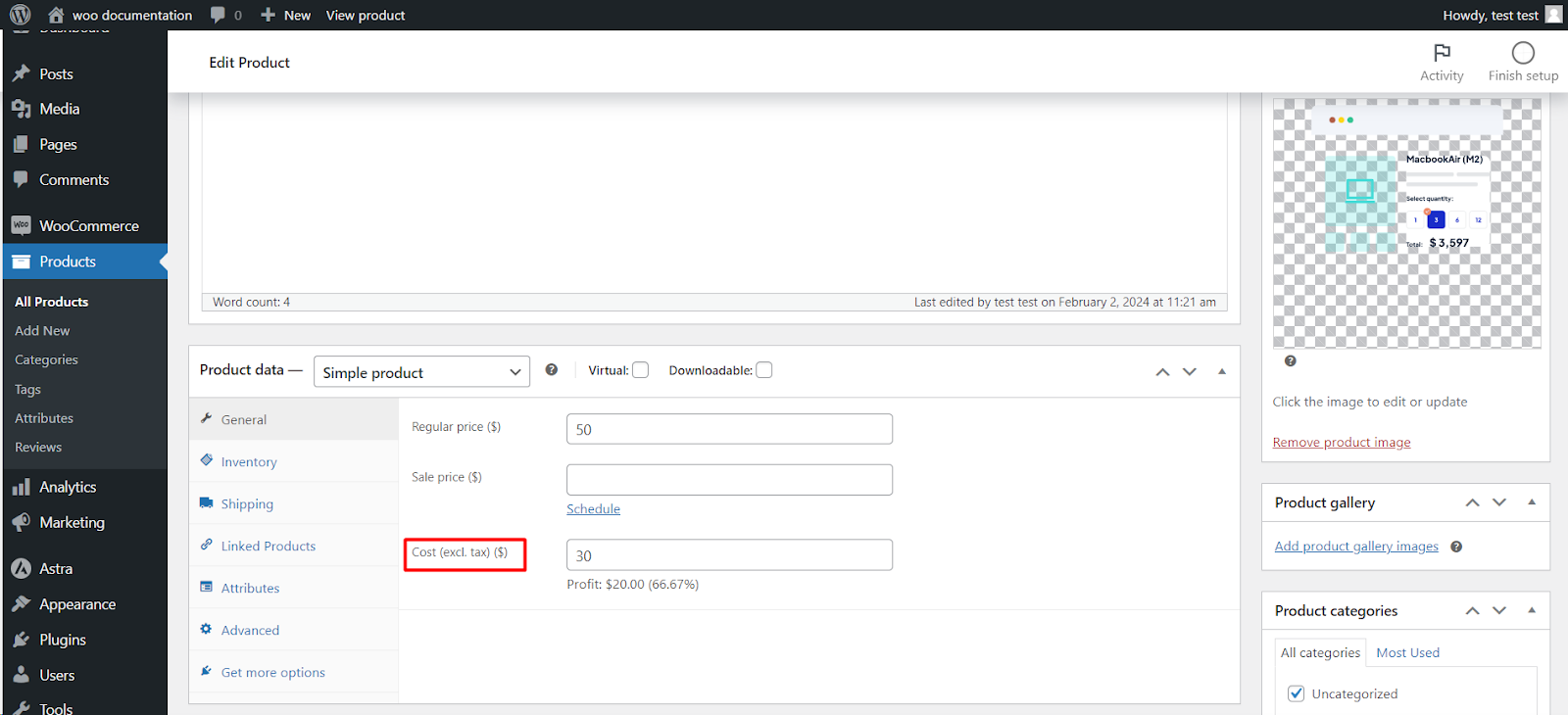
- In Product data, find the Cost field (in the General tab by default) and enter the purchase cost.
- Set the Regular price as usual, then click Update. Profit is calculated automatically from price minus cost.
For variable products you can set a cost on each variation, or a single cost on the parent to seed every variation.
Next steps #
- Show cost and profit in your product and order lists: see the admin column guides.
- Enter costs for many products at once with the free Bulk Edit Costs tool under Tools.
Get more from Cost of Goods #
The cost field and profit calculation are free. Cost of Goods: Product Cost & Profit Calculator for WooCommerce Pro adds cost and profit in WooCommerce Analytics, order-email cost and profit, multicurrency support, and the orders recalculation tool. See what Pro unlocks.