To restrict payment methods by shipping zone in WooCommerce, use Payment Gateways by Shipping Method for WooCommerce: go to WPFactory > Payment Gateways by Shipping (also reachable at WooCommerce > Settings > Payment Gateways by Shipping), check Use shipping instances and save. You can then allow a gateway for, say, Flat rate in one zone only.
Method types vs shipping instances #
| Mode | What the list shows | Best for |
|---|---|---|
| Method types (default) | One entry per shipping method type, for example Flat rate, Free shipping, Local pickup | Rules that should apply in every zone |
| Shipping instances | One entry per method inside each zone, labeled with the zone name and method title, including the zone for locations not covered by your other zones | Rules that differ between zones or between two methods of the same type |
Steps #
- Go to WPFactory > Payment Gateways by Shipping (also reachable at WooCommerce > Settings > Payment Gateways by Shipping).
- In General Options, check Use shipping instances.
- Click Save changes. The page reloads and the gateway fields now list zone methods.
- In the Payment Gateways section, open the field of the gateway you want to restrict and pick the zone methods that allow it. Example: for Cash on delivery select only “Domestic: Flat rate” and “Domestic: Free shipping”.
- Click Save changes.
- Test checkout with an address in each zone.
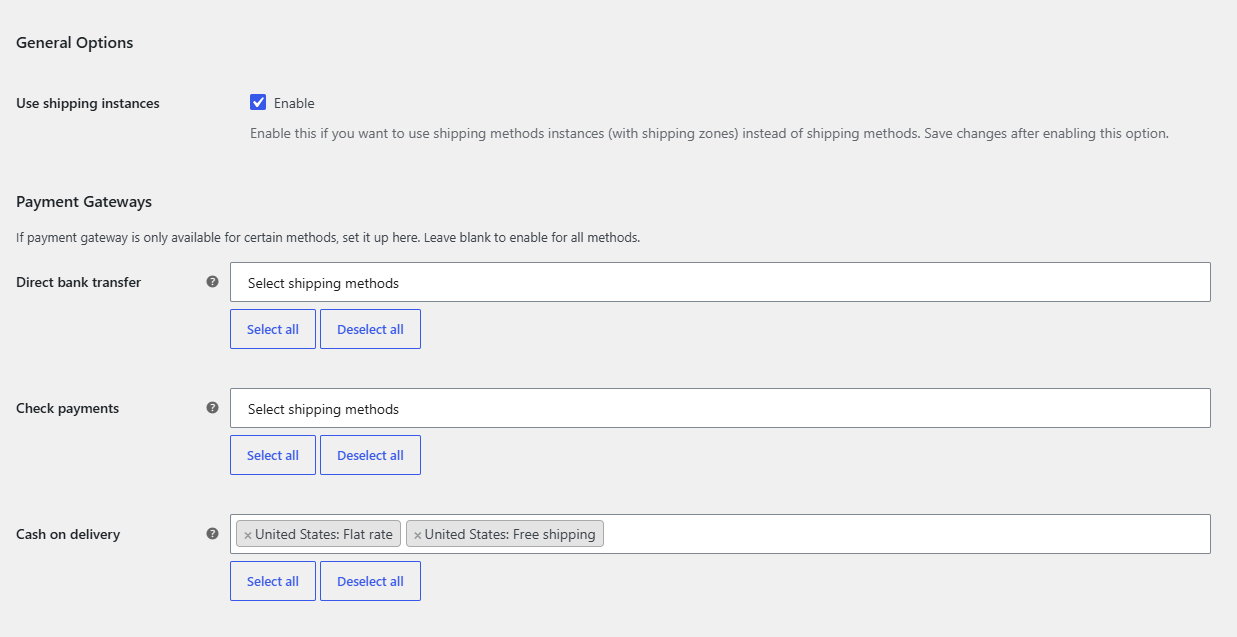
Note: rules saved in method type mode and rules saved in shipping instance mode are stored under different option names. Switching modes does not convert them, so rebuild your rules after switching. Switching back restores the rules you saved in the other mode.
Third-party shipping methods #
In shipping instance mode the plugin reads the instance number from the chosen method ID. It also recognizes the rate IDs of the Table Rate Shipping for WooCommerce plugin by WebFactory. Methods that do not use an instance number in their rate ID cannot match in this mode; use method type mode for them.
FAQ #
Why is a shipping method missing from the list in shipping instance mode? #
This mode lists only methods added to shipping zones in WooCommerce > Settings > Shipping. Methods that live outside zones do not appear. Switch back to method type mode to use them.
I renamed a shipping zone. Do I need to update the rules? #
No. Rules are saved by the method instance ID, not by the label, so renaming a zone or method keeps the rule. Deleting and recreating a method creates a new ID, which you must select again.
Can I combine method types and instances? #
No. The plugin uses one mode at a time for all gateways.
What happens to a gateway if the customer’s address matches no configured method? #
If no shipping method is chosen, every gateway with a non-empty field is hidden. Gateways with an empty field stay available.
Get Payment Gateways by Shipping #
Every feature described here is included in Payment Gateways by Shipping. Set a rule once and WooCommerce checkout hides the wrong payment methods on its own.
Need a hand? Our team answers every ticket on the Payment Gateways by Shipping support forum.