General options: choose which products accept offers #
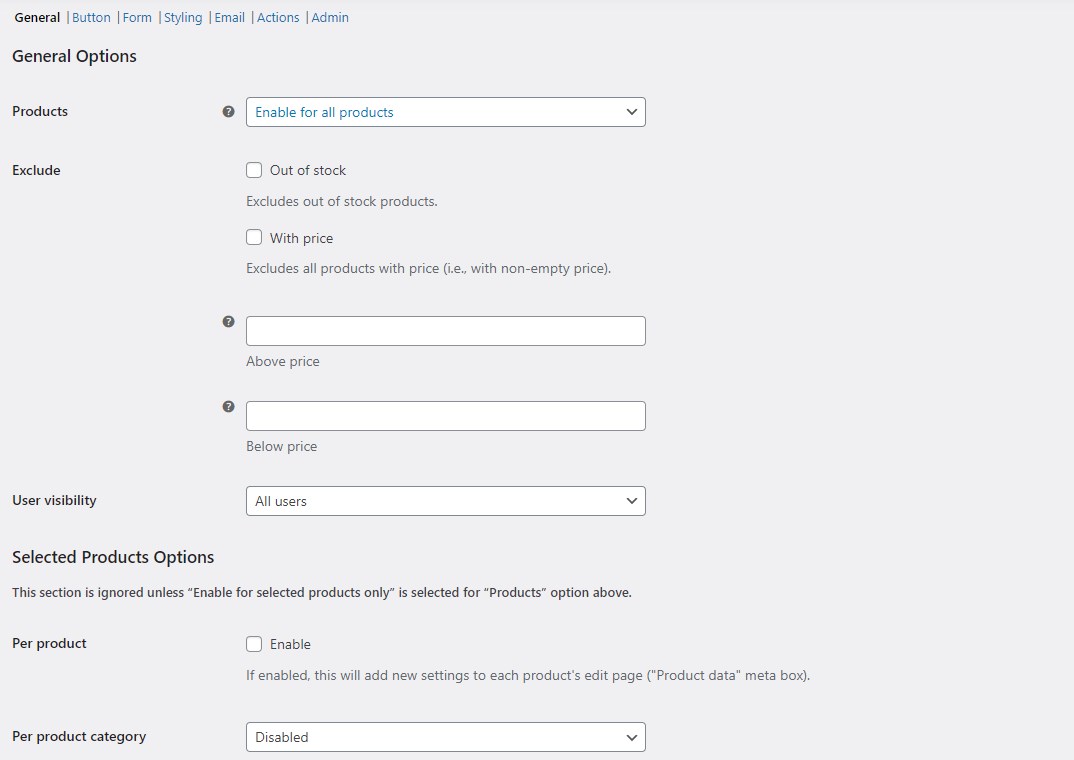
The General options in Name Your Price: Make Your Own Offer for WooCommerce, at WPFactory > Price Offers > General, decide which products show the Make an offer button. Enable for all products is the free default, and Enable for selected products only is Pro. Free exclusions hide it by stock status, existing price, or a price range.
Go to WPFactory > Price Offers (also reachable at WooCommerce > Settings > Price Offers). The General section is the first one.
Products #
The Products setting controls the scope:
- Enable for all products (default, free): every product shows the offer button, subject to the exclusions below.
- Enable for selected products only (Pro): you pick which products, categories, or variations accept offers. See Enable price offers for selected products.
Exclusions (all free) #
These four options remove products from the offer pool even when the button is enabled for all products. They are all available in the free version.
| Label | Option ID | Default | What it does |
|---|---|---|---|
| Out of stock | alg_wc_price_offerings_exclude[out_of_stock] |
No | Hides the button on out-of-stock products. |
| With price | alg_wc_price_offerings_exclude[with_price] |
No | Hides the button on any product that has a (non-empty) price. |
| Above price | alg_wc_price_offerings_exclude[above_price] |
Empty | Excludes products priced higher than this value. Ignored when set to zero or empty. |
| Below price | alg_wc_price_offerings_exclude[below_price] |
Empty | Excludes products priced lower than this value. Ignored when set to zero or empty. |
Correction to an earlier version of this article: Above price and Below price are free options, not Pro. They live in the free General section.
User visibility (free) #
User visibility (alg_wc_po_offer_price_button_user_visibility, default All users) decides who sees the button:
- All users: anyone, including guests, can make an offer.
- Logged-in users only: only signed-in customers see the button.
Selected Products Options (Pro) #
The Selected Products Options group is ignored unless Products is set to Enable for selected products only, which is a Pro setting. It adds per-product (alg_wc_price_offerings_per_product), per-variation (alg_wc_price_offerings_per_product_variation), and per-category (alg_wc_price_offerings_per_category) targeting. These are covered in Enable price offers for selected products.
Managing offers #
Every submitted offer is saved to the Offers dashboard in your admin menu, where you accept, reject, or counter it. Each section also has a Reset section settings checkbox to restore its defaults.
Get more control #
Choosing which products accept offers site-wide is free. Name Your Price: Make Your Own Offer for WooCommerce Pro adds per-product, per-category, and per-variation targeting. See what Pro unlocks.