How to customize the Make an Offer button #
To customize the Make an offer button in Name Your Price: Make Your Own Offer for WooCommerce, go to WPFactory > Price Offers and open the Button section. There you set the button label, HTML class, HTML style, position on the single product page, and position priority, all free. Positions on archive pages and custom hooks are Pro.
Go to WPFactory > Price Offers (also reachable at WooCommerce > Settings > Price Offers) and open the Button section.
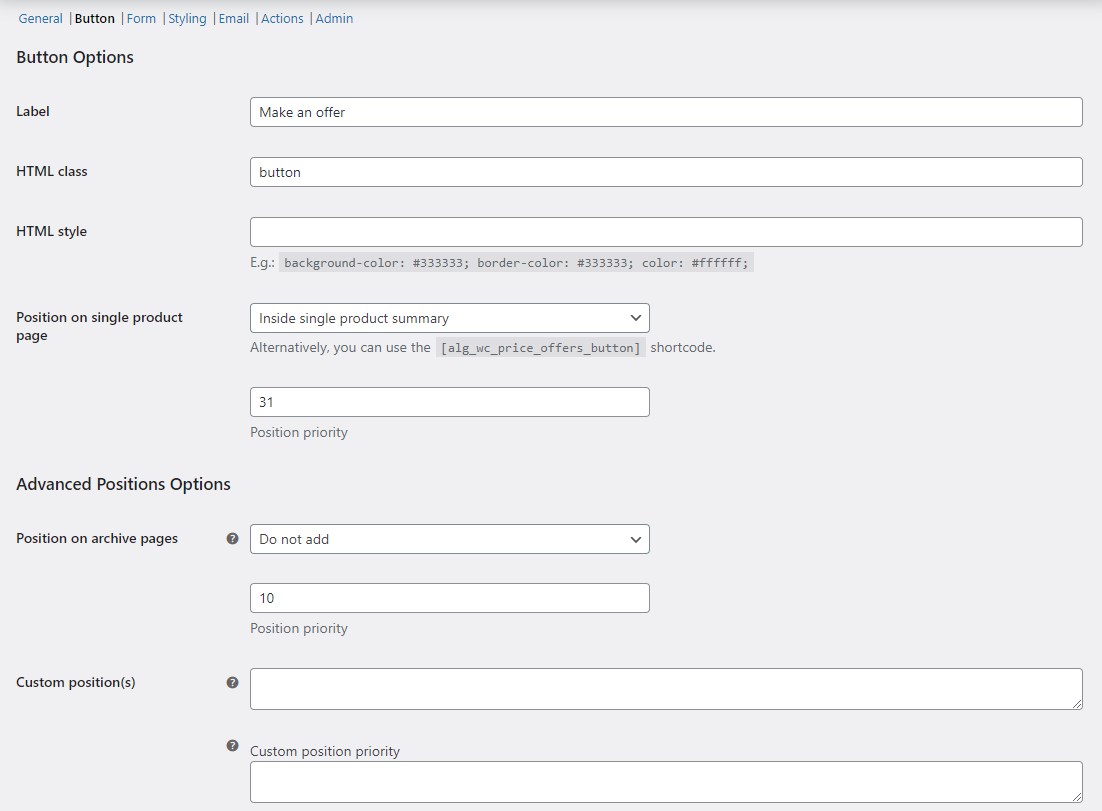
Button options (all free) #
| Label | Option ID | Default |
|---|---|---|
| Label | alg_wc_price_offerings_button[label] |
Make an offer |
| HTML class | alg_wc_price_offerings_button[class] |
button |
| HTML style | alg_wc_price_offerings_button[style] |
Empty |
| Position on single product page | alg_wc_price_offerings_button[position_single_hook] |
Inside single product summary |
| Position priority | alg_wc_price_offerings_button[position_single_priority] |
31 |
HTML class and HTML style are free. For example, set the style to background-color: #333333; border-color: #333333; color: #ffffff; to match a dark theme.
Position on the single product page (free) #
Position on single product page offers eight placements, all free: Do not add, Before single product, Before single product summary, Inside single product summary (default), Before add to cart form, After add to cart form, After single product summary, and After single product. Set Position priority to control the order relative to other elements added by your theme or other plugins.
Advanced Positions Options (Pro) #
The Advanced Positions Options group is Pro. It adds:
- Position on archive pages (
alg_wc_price_offerings_button[position_archives_hook]): show the button before or after products on shop and category pages. - Custom position(s) (
alg_wc_price_offerings_button[position_custom_hook]): hook the button onto any action hook you name. Separate multiple hooks with a vertical bar (|), with matching priorities in Custom position priority.
Note: custom positions use WordPress action hooks, not a shortcode. If you want to place the button by shortcode instead, use [alg_wc_price_offers_button] anywhere on a single product page (see the Shortcodes guide). The shortcode is free.
Get more control #
Button label, styling, and single-product placement are free. Name Your Price: Make Your Own Offer for WooCommerce Pro adds archive-page and custom-hook placement. See what Pro unlocks.