To check low stock in WooCommerce, go to WPFactory > Stock Manager in Products Stock Manager with Excel for WooCommerce and open the Report tab. It lists stock-managed products from the lowest stock up, with sales totals. Set your low stock threshold on the Settings tab.
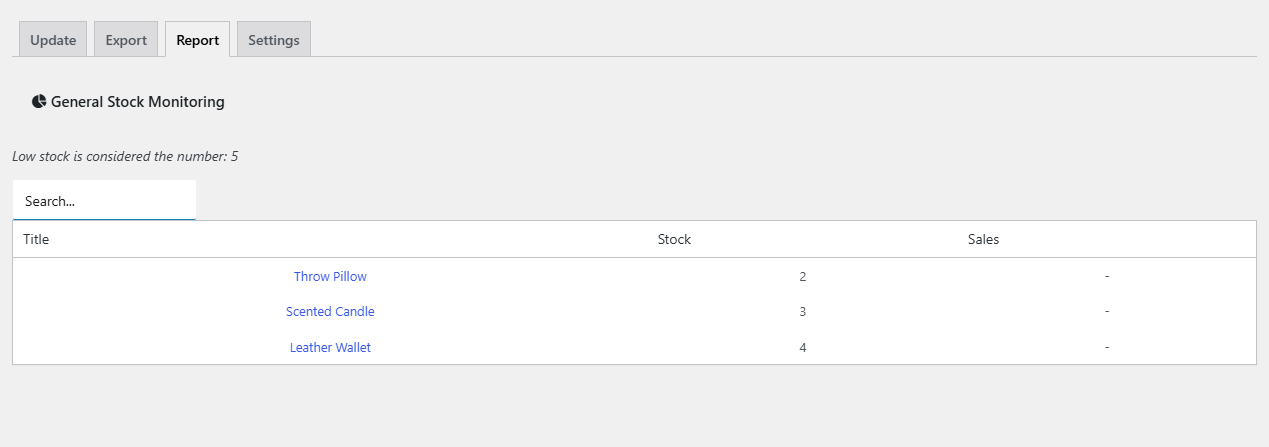
What the stock report shows #
The General Stock Monitoring table has three columns:
| Column | Content |
|---|---|
| Title | The product name, linked to the product page |
| Stock | The current stock quantity |
| Sales | The total value of the product in Completed orders, or “-” when it has none |
Which products appear:
- Only products with Manage stock? enabled.
- Products with sales in Completed orders are always listed.
- Products without sales are listed only when their stock is at or below the low stock value.
- Products are sorted by stock quantity, lowest first. Variable products appear as one row for the parent product.
The line above the table shows the threshold in use, for example “Low stock is considered the number: 5”.
How to use the low stock report #
- Go to WPFactory > Stock Manager and click the Settings tab.
- Enter your threshold in Low Stock Value Identifier for Reports, for example 3. Leave it empty to use the default of 5.
- Click Save Changes.
- Click the Report tab.
- Start at the top of the table, where the lowest stock is. Type in the Search… box to shortlist products by name or value.
- Restock the products you need, then update their quantities with a bulk Excel update.
FAQ #
Why is a product missing from the report? #
Either Manage stock? is off for it, or it has no completed sales and its stock is above your low stock value.
Why is the Sales column empty for every product? #
The report reads Completed orders from the WordPress posts table. On stores using WooCommerce High-Performance Order Storage without compatibility mode (order data sync), those orders are not found. Enable compatibility mode in WooCommerce > Settings > Advanced > Features if you need sales figures here.
Can I export the report to Excel? #
The report has no export button. Use the Export tab to download stock levels for all products.
Does the report send low stock alerts? #
No. It is an on-screen report. Open the Report tab whenever you want to review stock.
Get more control #
The stock report comes with Products Stock Manager with Excel for WooCommerce. Pro adds scheduled stock updates from a remote file. See what Pro unlocks.
Need a hand? Our team answers every ticket on the Stock Manager support forum.