Table of Contents
Some themes and AJAX filter plugins reload product listings without a full page refresh, which can leave the wishlist buttons out of sync. Wishlist for WooCommerce can re-scan the page when specific JavaScript events fire, so the buttons update automatically.
Before you start #
- WooCommerce, active.
- The JavaScript update events feature requires Wishlist for WooCommerce Pro. The toggle events settings below are available in the free version.
JavaScript update events (Pro) #
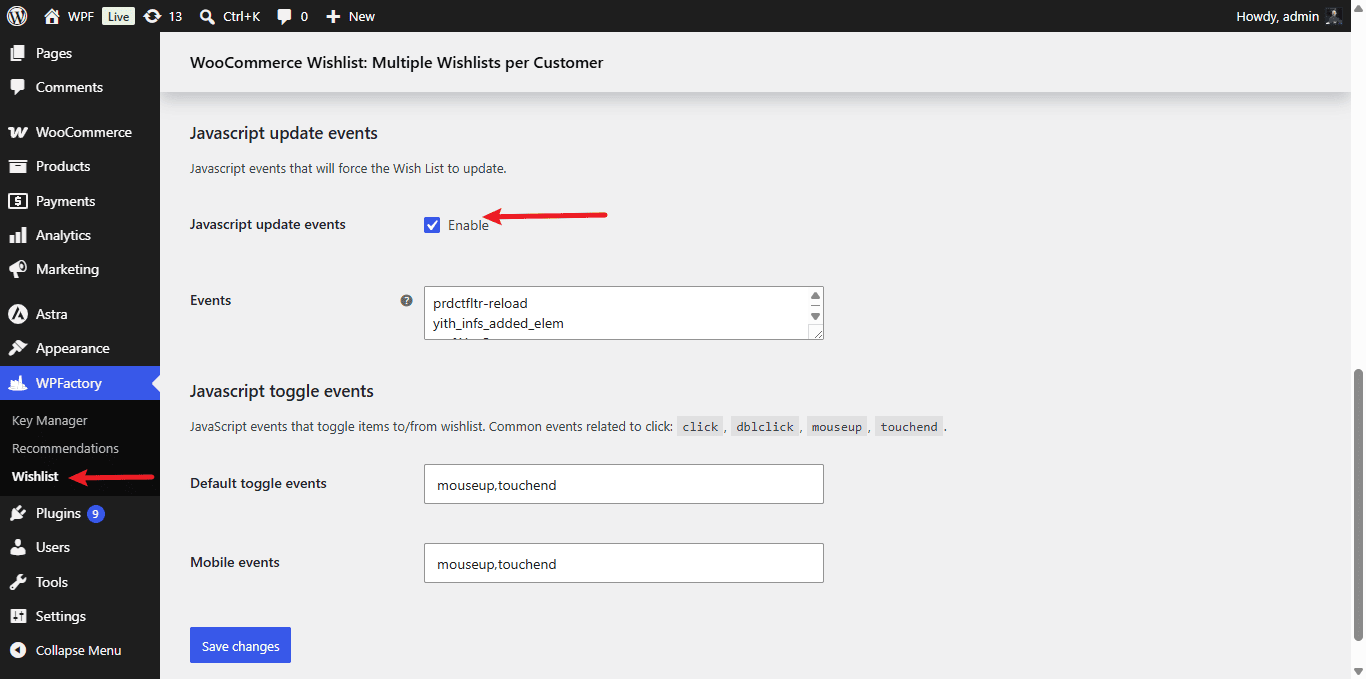
- Go to WPFactory > Wishlist (also reachable at WooCommerce > Settings > Wishlist) and open the Advanced tab.
- In the Javascript update events section, enable the feature (
alg_wc_wl_updater_events_enable). - In Events (
alg_wc_wl_updater_events), list one JavaScript event per line. The built-in defaults areprdctfltr-reload,yith_infs_added_elem, andwpfAjaxSuccess. - Add the event your theme or filter plugin triggers after it swaps in new products, then save.
JavaScript toggle events #
The same tab controls which browser events add or remove an item when a button is clicked. This is useful if taps are not registering on some devices.
| Label | Option ID | Default |
|---|---|---|
| Default toggle events | alg_wc_wl_default_js_toggle_events |
mouseup,touchend |
| Mobile events | alg_wc_wl_mobile_js_toggle_events |
mouseup,touchend |
Common click-related events you can use include click, dblclick, mouseup, and touchend. Separate multiple events with commas.
Need a hand? #
Our team answers every ticket on the Wishlist for WooCommerce support forum.