To set the invoice number format in PDF Invoices & Packing Slips Generator for WooCommerce, go to WPFactory > PDF Invoicing, open the Doc: Invoice section, and edit the Number format field (default INV-[doc_counter format=”%06d”]). Manage the running counter in the Counters section, where the value you set is assigned to the next document created.
Set the number format #
Go to WPFactory > PDF Invoicing (also reachable at WooCommerce > Settings > PDF Invoicing), open the Doc: Invoice section, and edit the Number format field (number_format). The default is:
INV-[doc_counter format="%06d"]This produces numbers like INV-000001. The pieces are:
INV-: a fixed prefix (change it to anything you like).[doc_counter]: the running counter for this document.format="%06d": pads the counter with leading zeros to six digits.
Add a year that resets annually #
There is no [Y] shortcode. To include the year, use a date shortcode with a datetime_format attribute:
INV-[current_time datetime_format="Y"]-[doc_counter format="%04d"]This yields numbers like INV-2026-0001. Other useful pieces: [doc_formatted_date datetime_format="Y-m"] for a year-month prefix, or [order_number] to tie the number to the order.
Note: you cannot use the doc_nr property inside Number format, because that property is the number this field produces.
Manage the counter #
Open the Counters section of the settings. It shows the current counter for each document. The value you set here is assigned to the next document created, and then increased automatically.
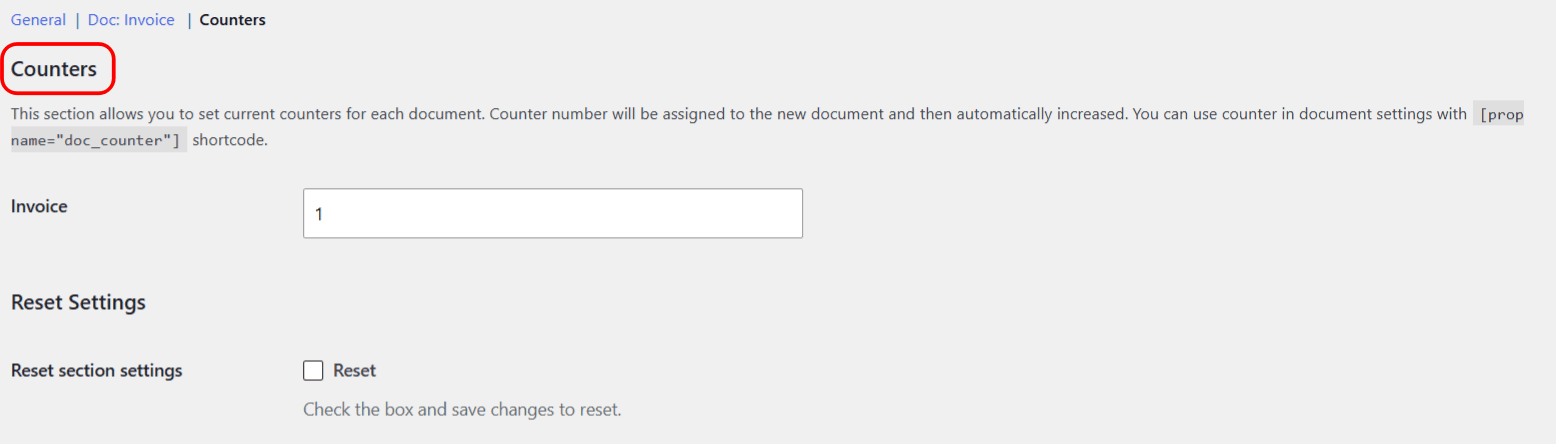
To restart numbering for a new fiscal year, set the counter back to 1 (or your chosen start) and save. Because the year in the format above comes from a date shortcode, the counter does not reset by itself, so this manual step is how you begin a new sequence.
Use cases #
- Sequential invoice numbers for tax reporting: keep the default counter format.
- Year-based numbering: add the year prefix and reset the counter each January.
- Match invoice numbers to order numbers: use
INV-[order_number].
Get more control #
Numbering is free for one document. PDF Invoicing Pro gives each document type its own independent counter and format. See what Pro unlocks.