Add the products per page selector as a widget #
To add the products per page selector as a widget in Number of Products per Page – Pagination Manager for WooCommerce Pro, go to WPFactory > Products per Page, check Widget in the Position Options block, and save. Then go to Appearance > Widgets and add the Products per Page widget to a sidebar or block area.
Before you start #
- WooCommerce, active.
- Number of Products per Page – Pagination Manager for WooCommerce Pro (the widget is disabled in the free version).
Enable the widget #
- Go to WPFactory > Products per Page (also reachable at WooCommerce > Settings > Products per Page).
- In the Position Options block, check Widget (option id
alg_wc_products_per_page_widget_enabled) and save. - Go to Appearance > Widgets and add the Products per Page widget to a sidebar or block area.
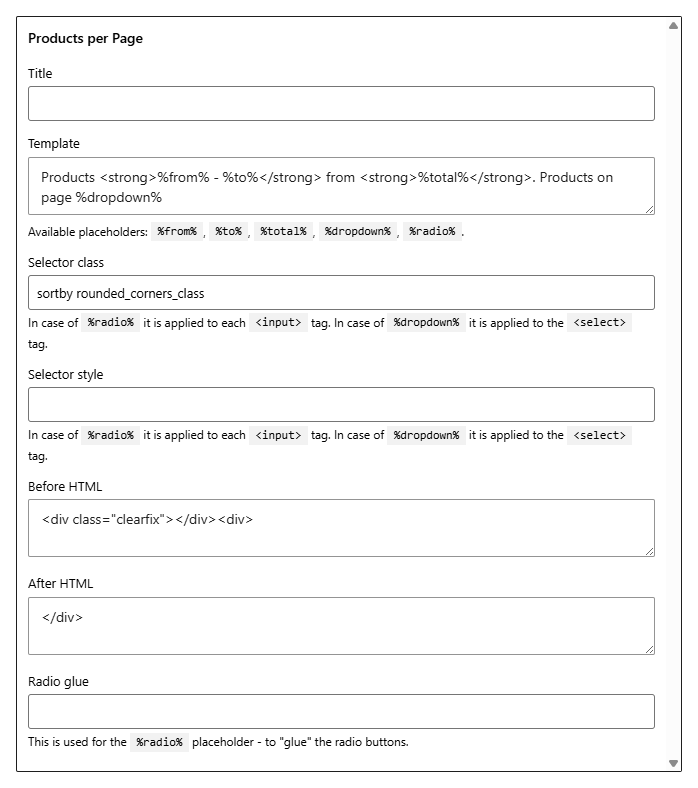
Widget options #
The widget offers the same presentation controls as the Template Options block, so you can tune this instance without touching the global template.
| Field | Sets |
|---|---|
| Title | The heading shown above the selector |
| Template | The text and placeholders (%from%, %to%, %total%, %dropdown%, %radio%) |
| Selector class | CSS class on the control |
| Selector style | Inline style on the control |
| Before HTML / After HTML | Markup around the control |
| Radio glue | Separator between radio buttons |
Each field defaults to the matching global setting, so a widget you leave untouched looks like the rest of your selectors. The widget follows the same Form method and Select options as the global configuration.
Note: the widget only outputs when products are being displayed on the current view, so it stays hidden on pages without a product loop.
Ready to set this up? #
The widget is a Pro feature of Products per Page. If you are still on the free version, upgrading takes a couple of minutes and unlocks the widget along with the editable options list. Get Products per Page Pro.