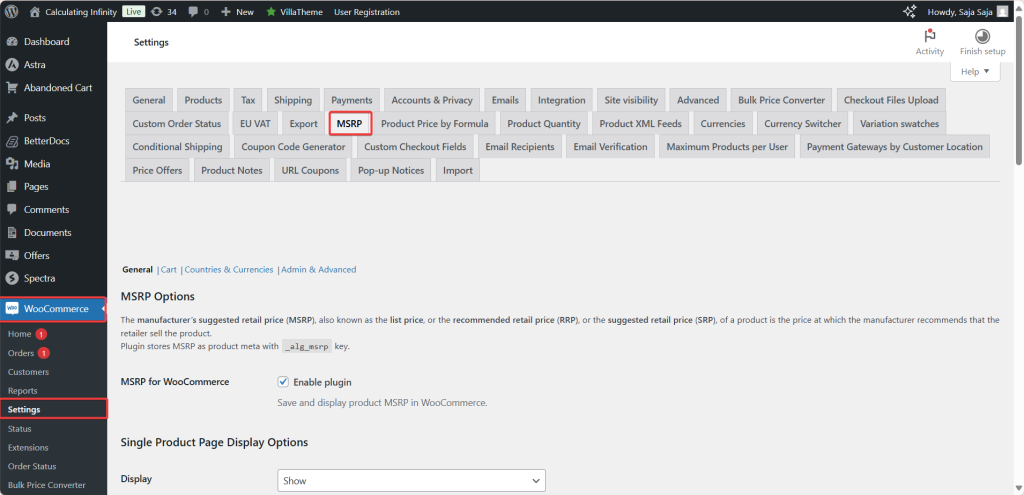
To show MSRP (RRP) prices in WooCommerce, install MSRP (RRP) Pricing for WooCommerce, enter an MSRP on each product’s General tab, and choose where it appears at WPFactory > MSRP (also reachable at WooCommerce > Settings > MSRP). By default the MSRP shows struck through after your price, with the saving in brackets.
What it does #
MSRP (manufacturer’s suggested retail price), also called RRP (recommended retail price), is the price a manufacturer recommends a product should sell for. MSRP Pricing stores an MSRP for each product or variation (in the _alg_msrp product meta) and shows it next to your selling price on product pages, shop and category archives, and optionally in the cart. For example:
MSRP: $100
Your price: $79
The shopper sees your price is $21 below the suggested price, without you running a discount.
Install and activate #
- Free: go to Plugins > Add New, search for MSRP (RRP) Pricing for WooCommerce by WPFactory, then install and activate it.
- Pro: download MSRP (RRP) Pricing for WooCommerce Pro from your WPFactory account, upload the ZIP at Plugins > Add New > Upload Plugin and activate it. When Pro is active, the free version stops loading, so your settings carry over. WooCommerce must be active.
For more detail, see How to install MSRP Pricing.
First setup #
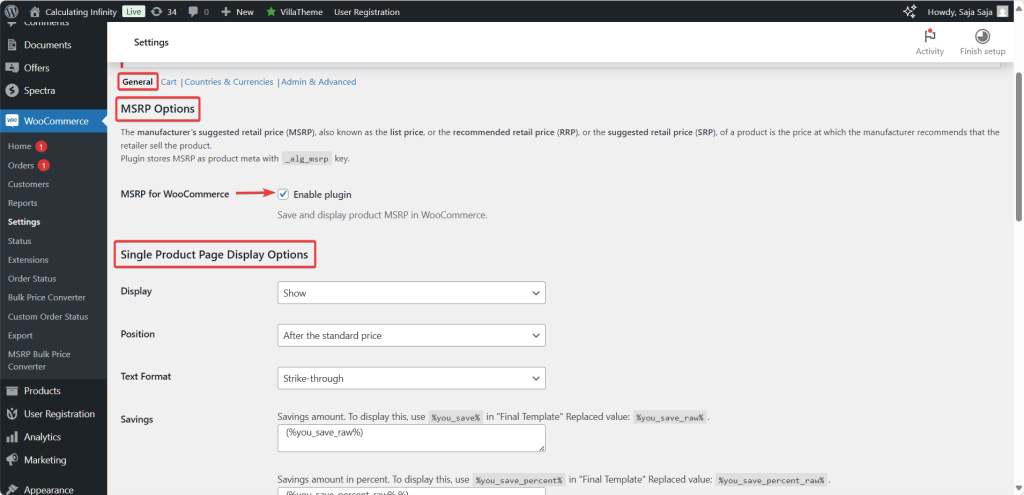
- Go to WPFactory > MSRP. On the General section, confirm Enable plugin is ticked (it is on by default).
- Under Single Product Page Display Options, leave Display at Show (the default) or pick Only show if MSRP is higher than the standard price.
- Leave Position at After the standard price and Text Format at Strike-through (both defaults), then click Save changes.
- Edit a product. On the General tab, enter a value in the new MSRP field (the label shows your currency symbol, for example MSRP ($)) and update the product. For variable products, each variation has its own MSRP field.
- View the product. The MSRP line appears after the price, with the saving in brackets when the MSRP is higher than the price.
Main features #
Display options for product pages and archives (free) #
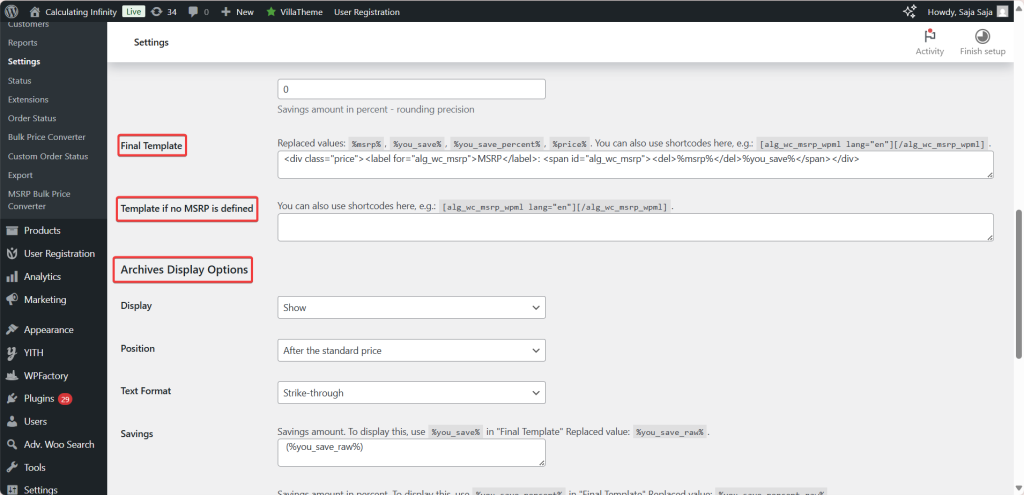
The General section has a Single Product Page Display Options block and a matching Archives Display Options block, each with Display, Position (before, after or instead of the standard price), Text Format (No format, Bold, Italic, Strike-through or Underlined) and Savings fields. See MSRP Pricing general settings.
Savings and templates #
The Savings fields set how %you_save% and %you_save_percent% look, and a savings value only appears when the MSRP is higher than the price. Final Template and Template if no MSRP is defined are read-only in the free version and editable in Pro. See the MSRP template placeholders reference.
Cart display and cart total savings #
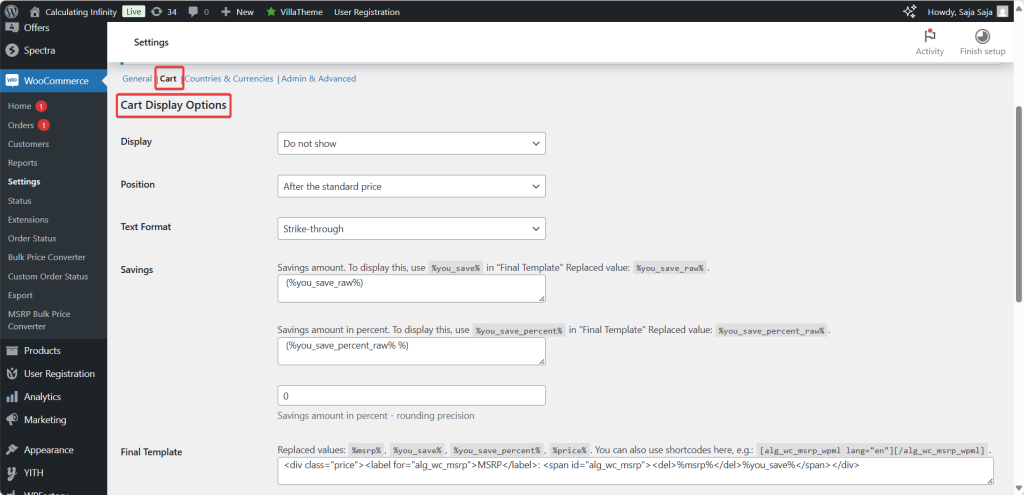
The Cart section repeats the display controls for cart item prices. Its Display option defaults to Do not show, so turn it on if you want MSRP in the cart. Cart total savings (Pro) adds a “You save” total at the cart positions you pick. See cart display options and how to show total savings in the cart.
MSRP by country and by currency (Pro) #
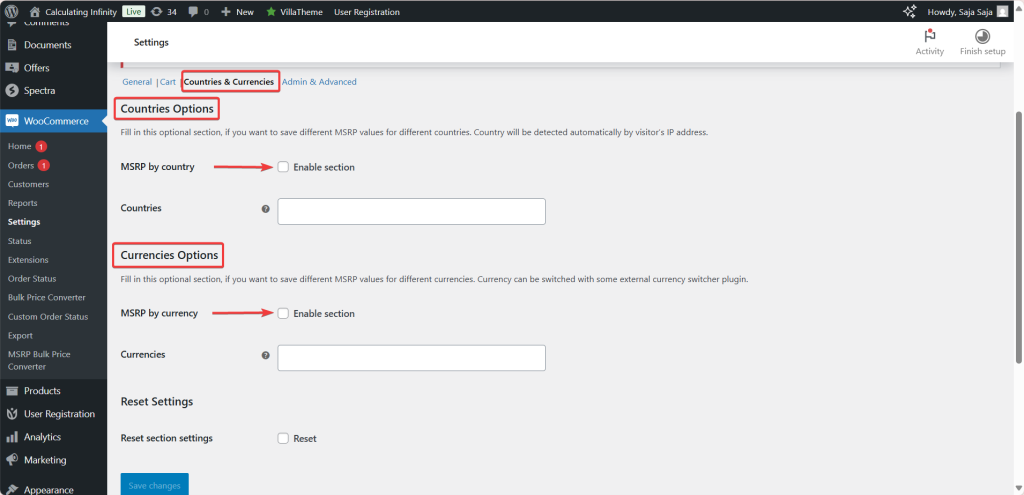
On the Countries & Currencies section, MSRP by country lets you store a separate MSRP per country, with the visitor’s country detected by IP address. MSRP by currency adds an MSRP field per currency for use with a currency switcher plugin. Values are stored as entered, not converted by exchange rate. See countries options and currency options.
Tools and admin options (free) #
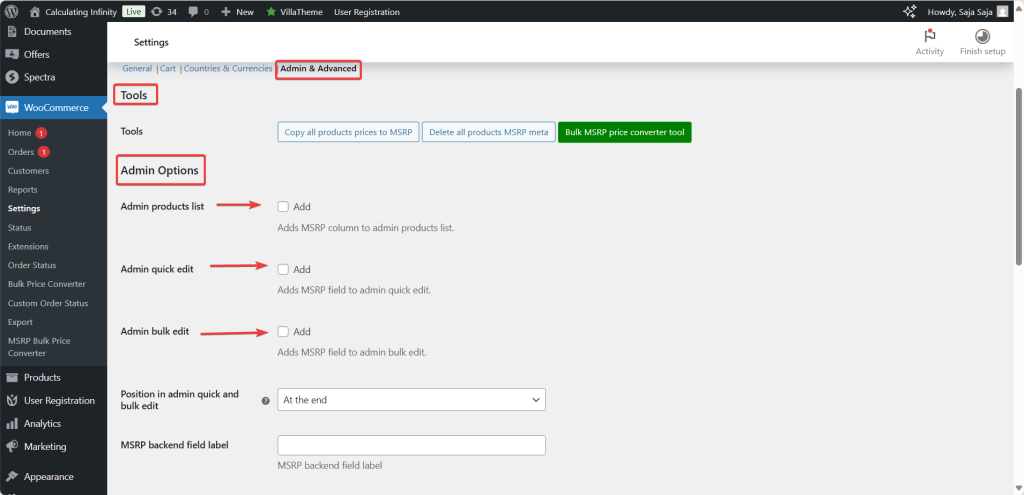
The Admin & Advanced section has the Copy all products prices to MSRP and Delete all products MSRP meta tools, a link to the Bulk MSRP price converter tool, and options to add MSRP to the products list, Quick Edit and Bulk Edit, plus a custom MSRP backend field label. See tools and admin options and the MSRP Price Converter guide.
Advanced options #
Free options hide MSRP for products with an empty price, hide the regular price for products on sale, set a Custom range format for variable products (default From %from%) and apply the WooCommerce price filter to MSRP. Required user role(s) is Pro. See advanced options, MSRP on variable products and MSRP for specific user roles.
Shortcode and developer functions #
The only shortcode is [alg_wc_msrp_wpml], which shows content by language inside a template. See MSRP shortcodes and the developer hooks and functions reference.
Free vs Pro #
| Feature | Free | Pro |
|---|---|---|
| MSRP field for simple products and variations | Yes | Yes |
| Display, Position, Text Format and Savings for product pages, archives and cart | Yes | Yes |
| Edit Final Template and Template if no MSRP is defined | No (read-only) | Yes |
| Cart total savings | No | Yes |
| MSRP by country and MSRP by currency | No | Yes |
| Required user role(s) | No | Yes |
| Copy and delete tools, admin column, Quick Edit and Bulk Edit | Yes | Yes |
| Bulk MSRP price converter: Multiply, Add and Base Price options | Yes | Yes |
| Bulk MSRP price converter: category, tag, rounding and pretty price filters | No | Yes |
For the full list, see MSRP Free vs Pro comparison.
FAQ #
I entered an MSRP but nothing shows. Why? #
Check that Enable plugin is on and that Display is not set to Do not show. If Display is Only show if MSRP is higher than the standard price, the line is hidden when the MSRP is equal to or lower than the price. See MSRP price not appearing.
Why does the MSRP not show in the cart? #
The Cart section’s Display option defaults to Do not show. Set it to Show and save.
Can I change the “MSRP:” wording? #
The wording comes from the Final Template, which is editable in Pro only. In the free version you can change the Text Format and the Savings text.
Does MSRP by currency convert the value with exchange rates? #
No. You enter a separate MSRP for each selected currency. If your currency switcher converts prices by exchange rate instead, enable Apply price filter on the Admin & Advanced section.
Can I fill in MSRP for many products at once? #
Yes. Copy all products prices to MSRP copies each product’s price into its MSRP, and the Bulk MSRP price converter sets each MSRP from the regular or sale price, multiplied by or increased by a value you enter.
Get more control #
The core display features are free. MSRP (RRP) Pricing for WooCommerce Pro adds template editing, cart total savings, MSRP by country, currency and user role, and the converter’s category and rounding filters. See what Pro unlocks.
Need a hand? Our team answers every ticket on the MSRP Pricing support forum.