Every Catalog Health Scanner setting lives on one screen: WPFactory > Catalog Health > Settings in Catalog Health Scanner for WooCommerce Pro. This page lists each field with its label, the option key it is stored under, its type, and its default value, so you know what a setting does before you change it and what it will fall back to if you clear it.
If the shared WPFactory admin menu is not present on your site, the same screens appear under a standalone Catalog Health top-level menu instead. The page slug is wpfchs-settings either way, so the URL is wp-admin/admin.php?page=wpfchs-settings.
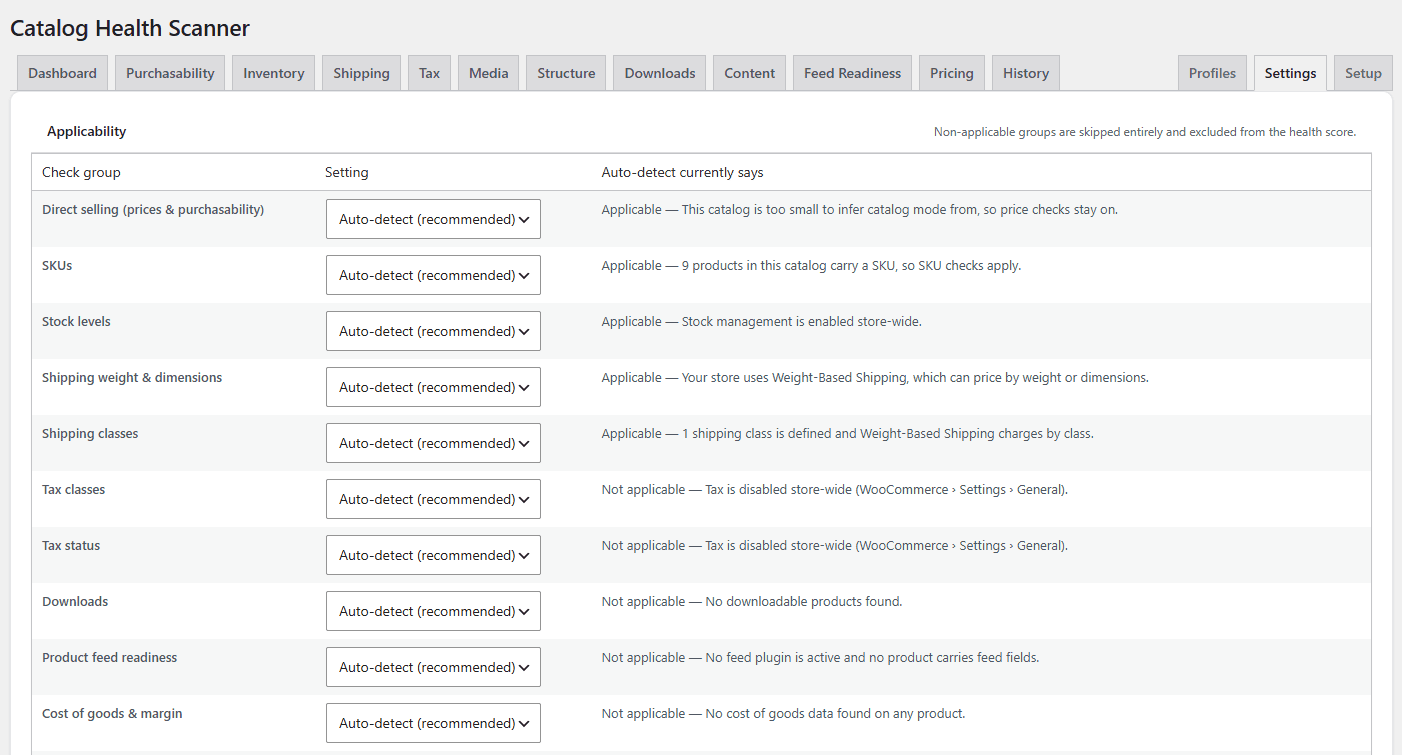
Applicability #
Eight check groups can be switched on, switched off, or reported without scoring. All eight are stored in a single option, wpfchs_applicability, as a group key to state map. Each group defaults to auto, which means Catalog Health Scanner decides from your store configuration and shows you the reason it decided that way.
| Group label | Group key | Auto-detect turns it on when |
|---|---|---|
| Inventory & stock | inventory |
Stock management is enabled store-wide. |
| Shipping weight & dimensions | shipping |
An enabled shipping method could depend on weight or dimensions. Flat rate, free shipping, local pickup, and pickup location do not count. |
| Tax | tax |
Tax is enabled and at least one tax class beyond standard exists. |
| Downloads | downloads |
At least one downloadable product exists. |
| Product feed readiness | feed |
A known feed plugin is active, or a feed identifier field is populated on any product. |
| Cost of goods & margin | cog |
Cost of goods data is present on products. |
| Product reviews | reviews |
Product reviews are enabled store-wide. |
| FAQ / Q&A content | faq |
Always, since question-and-answer content helps AI assistants answer buyer questions. |
Each group takes one of four values:
| Setting | Stored value | Behaviour |
|---|---|---|
| Auto-detect (recommended) | auto |
Catalog Health Scanner decides, and re-decides after every scan and every settings save. |
| Applicable | yes |
Checks run and count toward the score, whatever auto-detect thinks. |
| Report, but do not score | report_only |
Checks run and issues are listed, but they leave the score untouched and cannot cap it. |
| Not applicable | no |
Checks do not run at all and leave both sides of the score fraction. |
Auto-detect results are cached for one hour, and the cache is cleared whenever you save settings and after every completed scan. Saving a change to any group also recalculates historic scores so the trend line stays comparable. See Applicability: why checks are skipped.
Individual checks #
| Label | Option key | Type | Default |
|---|---|---|---|
| Individual checks | wpfchs_disabled_checks |
Array of check IDs | Empty, so all 70 checks are enabled |
The panel shows a tick box per check, grouped by category, with a severity badge. The form posts the checks you leave ticked, and everything unticked is written to wpfchs_disabled_checks. A disabled check does not run in any profile and does not appear in any score.
Disabling a check silences it everywhere. To silence one check on one product, use Ignore on the issue instead. See Ignore false positives.
Thresholds #
All numeric thresholds live in one grouped option row, wpfchs_thresholds, keyed as shown. Clearing a field restores the default rather than storing an empty value.
| Label | Threshold key | Type | Default | What it controls |
|---|---|---|---|---|
| Minimum margin (%) | min_margin_percent |
Decimal | 0 | The margin floor for margin_below_threshold. At 0 the check does not run at all. |
| Minimum image resolution (px) | min_image_width |
Integer | 500 | Featured images below this width or height are flagged by image_low_res. |
| Minimum description length (characters) | min_description_chars |
Integer | 200 | The thin-content floor for description_thin, measured on stripped text. |
| Long-term out of stock after (days) | oos_age_days |
Integer | 30 | How long an out of stock product must sit unmodified before out_of_stock_stale flags it. |
| Grace period for new products (days) | grace_period_days |
Integer | 0 (off) | How long a newly created product is excluded from scans. Off by default, so an import you just ran is audited rather than hidden. |
| Fix undo window (days) | undo_window_days |
Integer | 30 | How long a logged fix batch can still be undone from the History tab. |
| Maximum plausible weight | max_weight |
Decimal | 1000 | Upper bound for weight_implausible, in your store weight unit. 0 removes the upper bound, leaving only zero and negative weights flagged. |
| Price deviation factor | price_deviation_factor |
Decimal | 8 | How many times above or below the category median a price must be for price_outside_median to flag it. Values below 2 are treated as 2. |
| Image reuse threshold (products) | image_reuse_count |
Integer | 5 | How many published products must share one featured image before image_reused_across_products flags them. Values below 2 are treated as 2. |
| Feed description limit (characters) | max_feed_desc_chars |
Integer | 5000 | The limit for feed_description_too_long. 0 disables the check. |
The grace period deserves a note. It is off by default on purpose: most people install Catalog Health Scanner to audit a catalog they have just imported, migrated, or bulk-edited, and those are exactly the products a grace window would hide. It also never applies to your first scan, because a store with no scan history would otherwise report a meaningless score having checked nothing. Turn it on if you publish products one at a time and want a working window before they count.
Scheduled scans and email digest #
All scheduling and email fields are stored in one option, wpfchs_schedule, under the keys below.
| Label | Key in wpfchs_schedule |
Type | Default |
|---|---|---|---|
| Scheduled scans (Run scans automatically) | enabled |
Checkbox (yes / no) |
no |
| Frequency | frequency |
Select: daily, weekly, monthly |
weekly |
| Profile | profile |
Select of any built-in or custom profile ID | revenue_blockers |
| Email digest | digest_enabled |
Checkbox (yes / no) |
yes, but nothing is sent until scheduled scans are on |
| Digest recipients | digest_recipients |
Comma-separated email addresses | The site admin email |
| Immediate critical alerts | alerts_enabled |
Checkbox (yes / no) |
no |
| Alert recipients | alert_recipients |
Comma-separated email addresses | The site admin email |
| Auto-fix after scheduled scans | auto_fix_enabled |
Checkbox (yes / no) |
no |
Behaviour worth knowing:
- The digest is only sent after a scheduled scan, and only when that scan found issues that were not there before. A clean catalog produces silence rather than a “nothing to report” email.
- Immediate critical alerts fire after any completed scan, manual or scheduled, as soon as new critical issues appear, and are independent of the digest.
- Auto-fix only applies the one-click fixes, only after a scheduled scan, and runs before the digest so the email reflects the post-fix state. Every change is logged as its own batch and stays undoable.
- Recipient fields accept addresses separated by commas, semicolons, or spaces, and are normalised to a comma-separated list on save.
- Scheduling uses WP-Cron. If your site has no traffic and no system cron, scans will not start on time.
PDF report branding (white label) #
Stored in wpfchs_branding. These fields only affect the PDF audit report cover and footer.
| Label | Key in wpfchs_branding |
Type | Default |
|---|---|---|---|
| Agency / brand name | agency_name |
Text | Empty, which falls back to the store name |
| Logo | logo_id |
Media library attachment ID | 0 (no logo) |
| Report footer line | footer |
Text | Empty |
JPEG, PNG, WebP, and GIF logos all work when the GD image library is available, and transparent areas are flattened onto white. Without GD, only JPEG logos can be rendered.
Scan scope #
| Label | Option key | Type | Default |
|---|---|---|---|
| Exclude product categories | wpfchs_scan_scope, key exclude_cats |
Array of product category term IDs | Empty |
Products in an excluded category are skipped, counted separately, and declared on the dashboard. A scan that skipped anything never auto-resolves issues, so a product you excluded is never reported as fixed. The picker lists up to 500 product categories.
Ignored issues #
The ignore list is not an option: it is the set of rows in the issues table with a status of ignored. The panel at the bottom of the settings screen shows the 200 most recent, with who ignored each one and when, and lets you restore one, restore the selection, or restore every ignored issue at once. Ignored issues count as passing and never resurface until restored.
Reset and setup #
Reset & re-run setup deletes the following options and sends you back to the setup wizard. Scan history, issues, and the fix log are kept: this is a settings reset, not a data wipe.
wpfchs_applicability, wpfchs_disabled_checks, wpfchs_thresholds, wpfchs_schedule, wpfchs_scan_scope, wpfchs_custom_profiles, wpfchs_default_profile, wpfchs_last_profile, wpfchs_dismissed_recs, wpfchs_branding, wpfchs_setup_complete.
Options set outside the settings screen #
These are written by other parts of the plugin. They are listed here so you can recognise them in the database or in a migration.
| Option key | Type | Default | Written by |
|---|---|---|---|
wpfchs_custom_profiles |
Array of profile ID to definition | Empty | Saving a custom profile on the Profiles screen. |
wpfchs_default_profile |
Profile ID | revenue_blockers |
The Profiles screen, when you mark a profile as the default. |
wpfchs_last_profile |
Profile ID | Empty | Starting a manual scan, so the dashboard dropdown stays on your last choice. |
wpfchs_dismissed_recs |
Array of check IDs | Empty | Dismissing a plugin recommendation line under an issue group. |
wpfchs_setup_complete |
Flag | Not set | Finishing the setup wizard. |
wpfchs_activation_redirect |
Flag | Not set | Activation, to send a first-time user to the wizard. |
wpfchs_version |
Version string | Not set | The version update routine, which also creates or updates the database tables. |
Related reading #
- Check library: all 70 checks
- How the health score is calculated
- Scheduled scans, digest and alerts
- CSV export and PDF audit report
- Developer reference, for the filters behind these defaults
Need help? #
If a setting does not behave as described here, contact Catalog Health Scanner support with the option key and the value you set.