What Catalog Health Scanner does #
Catalog Health Scanner audits your WooCommerce catalog and reports the products that are quietly broken: unbuyable variations, negative margins, dead downloads, duplicate SKUs, missing images. Catalog Health Scanner for WooCommerce Pro runs 70 checks across 10 categories against every published product and variation, scores the result out of 100, and gives you a safe way to fix what it finds.
Why catalogs decay #
A WooCommerce catalog does not stay correct on its own. It degrades through completely normal work:
- Imports. A CSV column maps to the wrong field, prices land as text, weights arrive in the wrong unit.
- Migrations. A move from another platform leaves orphaned variations, encoding artefacts in titles, and image records pointing at files that never came across.
- Bulk edits. A bulk action runs against a wider selection than intended, and the difference only shows up in next month’s sales.
- Plugins added and removed. The meta stays behind, the feature that read it does not.
- Multi-user editing. Several people touch the same catalog, each following a slightly different convention.
None of this produces an error message. WooCommerce does not warn you that a variable product has no purchasable variation, or that a sale price expired in the past, or that a downloadable product points at a file that no longer exists. The store keeps running, the product page keeps loading, and the order simply never happens.
Catalog Health Scanner is the thing that goes looking. It reads product data, compares it against a fixed library of checks, and turns every finding into plain language: this product cannot be bought right now, you lose money on every unit of this one, customers who bought this got a broken download.
70 checks across 10 categories #
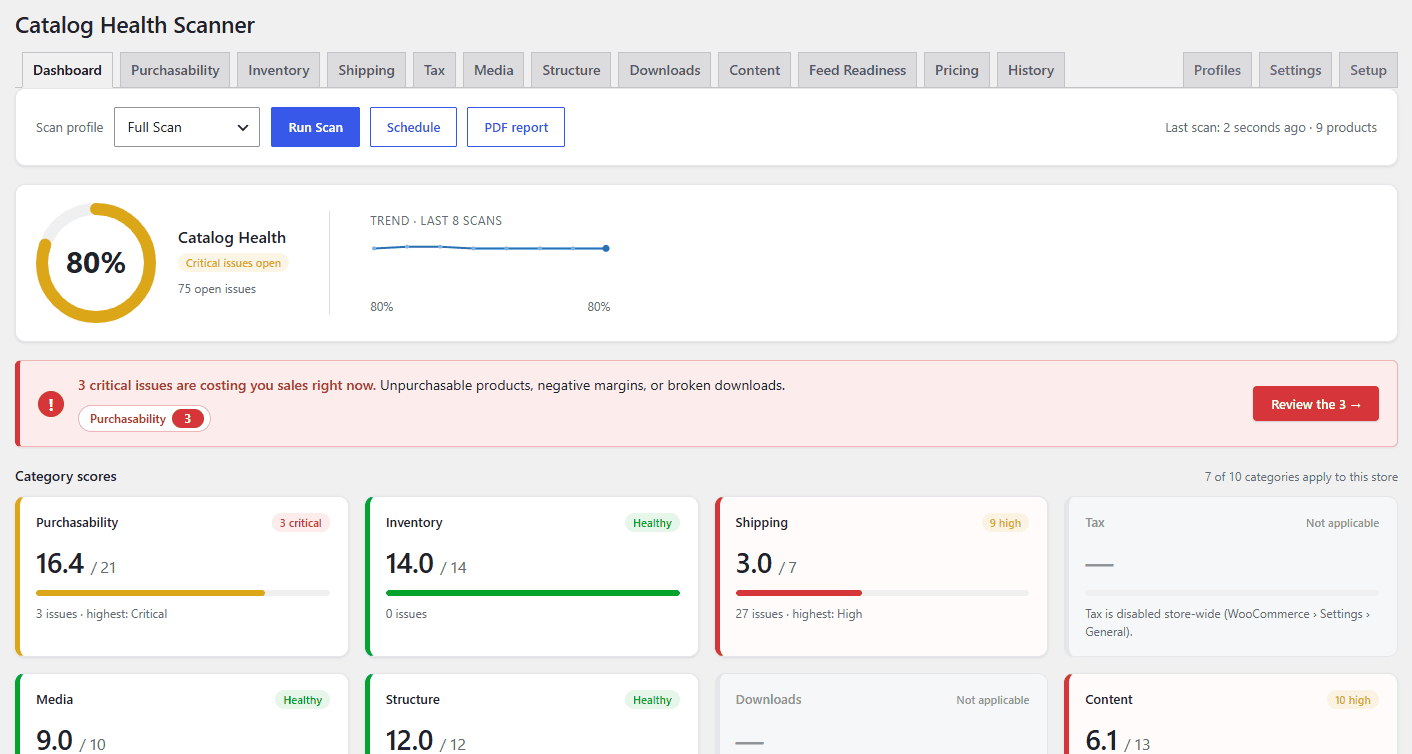
Every check belongs to exactly one category. The category is also a tab in the admin and a card on the dashboard, so a score always points at a place you can go and act.
| Category | Category ID | Checks | What it covers |
|---|---|---|---|
| Purchasability | purchasability |
10 | Products a customer cannot actually buy: no price, no purchasable variation, broken sale schedules, hidden products, empty grouped and external products. |
| Inventory | inventory |
7 | SKUs (missing, duplicate, near-duplicate) plus stock quantity and stock status contradictions. |
| Shipping | shipping |
7 | Weights, dimensions, and shipping classes, on stores whose rates depend on them. |
| Tax | tax |
3 | Tax status and tax class consistency. |
| Media | media |
8 | Featured images, galleries, placeholder-only products, resolution, alt text. |
| Structure | structure |
8 | Categories, attributes, variations, orphans, and broken product-to-product references. |
| Downloads | downloads |
4 | Downloadable products whose files are missing, unreachable, or publicly exposed. |
| Content | content |
11 | Descriptions, duplicate titles, encoding artefacts, placeholder text, structured data, attributes, reviews, and question-and-answer content. |
| Feed Readiness | feed |
6 | The fields shopping feeds reject products over: identifiers, brand, condition, category mapping, description length. |
| Pricing | pricing |
6 | Zero prices, prices far outside the category median, excess decimals, and cost or margin problems where cost data exists. |
Every check carries a severity: Critical, High, Medium or Low. Severity drives the health score, the sort order in the category tabs, and whether a finding triggers a critical alert. The complete list is in the check library reference.
Checks that do not apply are skipped, not failed #
A store that ships flat rate does not need product weights. A store with no feed does not need GTINs. Catalog Health Scanner groups those checks and works out, from your own store configuration, which groups apply. A group that does not apply is skipped during the scan and removed from both sides of the score fraction, so it cannot drag your score down and cannot inflate it either. Every decision is shown with its reasoning and can be overridden. See applicability: why checks are skipped.
What it does not do #
Knowing the boundaries matters as much as knowing the features.
- No frontend output. Catalog Health Scanner adds nothing to your shop pages, product pages, widgets or emails to customers. Every screen it has is inside wp-admin.
- No cart or checkout involvement. It does not filter prices, gate purchases, alter availability, or hook anything in the buying flow. It reports on data, it does not change what a shopper sees.
- No third-party services. Nothing is sent anywhere. Scans run on your own server against your own database. The only outbound HTTP requests are optional local probes: a HEAD request to verify a remote download URL you configured, and one request to your own product page to see whether structured data is present.
- Products only. It scans published products and their variations. Orders, customers, coupons and posts are never touched, which is also why High-Performance Order Storage is a non-event for it.
- Not an SEO plugin. It flags missing descriptions, duplicate titles, missing alt text and absent structured data as data-quality problems. It does not rewrite content, generate meta tags, or manage redirects.
- Not a legal or compliance tool. Nothing it reports is a compliance verdict.
- No promises about sales. Catalog Health Scanner finds problems, explains them, and helps you fix them safely. What that is worth depends on your catalog and what you choose to act on. A high score means the checks passed, not that your store will sell more.
Scanning is read-only until you ask for a fix #
A scan never modifies a product. It reads product data, writes rows into its own tables (wpfchs_scans, wpfchs_issues, wpfchs_fixlog) and updates one postmeta counter (_wpfchs_open_issues) that powers the Health column on the products list.
Changes only happen when you apply a fix, and every fix is previewed with the exact before and after value per product, logged as a batch, and reversible with one click for 30 days by default. The only fixer that removes anything is the orphaned-variation cleanup, and it moves variations to the trash rather than deleting them. See fix issues safely.
Who it is for #
- Store owners after an import or migration, who need to know what did not survive the move.
- Agencies handing a store over, or auditing one they just inherited. The white-label PDF report exists for exactly this.
- Anyone running shopping feeds, who would rather find the disapproval reasons before the feed does.
- Teams with a large catalog and more than one person editing it.
Where to go next #
- Install Catalog Health Scanner and answer the setup wizard
- Run your first scan
- Read the dashboard and the health score
- Triage issues in the category tabs
- How the health score is calculated
Need a hand? Our team answers every ticket on the Catalog Health Scanner support forum.