The cost archive saves a dated snapshot of a product’s cost every time that cost changes, so you keep a running history of what each item cost you over time. It is a free feature of Cost of Goods: Product Cost & Profit Calculator for WooCommerce.
Turn it on #
- Go to WPFactory > Cost of Goods (also reachable at WooCommerce > Settings > Cost of Goods).
- On the Products sub-tab, find the Cost archive group.
- Tick Save cost archive to start recording history.
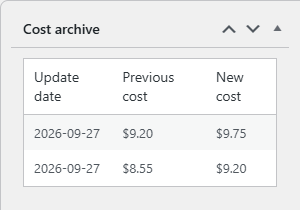
- Optionally tick Meta box to show the history in a box on the product edit screen.
- Click Save changes.
From then on, each time a product’s cost is updated the plugin writes a new dated entry. Nothing is recorded retroactively, so history starts from the moment you enable the feature.
Options reference #
| Label | Option ID | Default | What it does |
|---|---|---|---|
| Cost archive | alg_wc_cog_save_cost_archive |
No | Saves a history entry whenever a product cost changes. |
| Meta box | alg_wc_cog_cost_archive_metabox |
No | Shows a cost archive meta box on the product edit screen. |
| Date format | alg_wc_cog_save_cost_archive_date_format |
Y-m-d |
The date format used for each archived entry. |
| Date order | alg_wc_cog_cost_archive_date_order |
Descending | Whether the newest or oldest entry is listed first. |
| MySQL | alg_wc_cog_save_cost_archive_mysql_regexp_substr |
Yes | Uses the MySQL REGEXP_SUBSTR function to read dates. Turn off if your database does not support it. |
| Last update date | alg_wc_cog_last_update_date_as_cost_input_desc_on_admin_product_page |
No | Shows the date the cost was last changed as a description under the cost field. |
| Last update date template | alg_wc_cog_last_update_date_template |
Last update date: %last_update_date% |
The wording of that description. %last_update_date% is replaced with the date. |
Reading the history #
With the Meta box option on, open any product and the cost archive box lists each recorded cost with its date, ordered as set by Date order. This gives you a clear record of price rises from suppliers, which is useful when reviewing margins or explaining a change in profitability.
Cost archive and Add stock #
The cost archive and the Add stock feature complement each other. Add stock keeps a single up-to-date average cost, while the cost archive keeps the full trail of every value that cost has held. You can use either or both.
Get more from Cost of Goods #
The cost archive is free. Cost of Goods: Product Cost & Profit Calculator for WooCommerce Pro adds cost and profit in WooCommerce Analytics, order-email cost and profit, and multicurrency support. See what Pro unlocks.