Set a different redirect URL for each coupon #
Setting a redirect URL per coupon lets you send customers to a different page depending on which coupon they used, so a summer-sale link and a free-shipping link can each land on their own landing page after the discount is applied. This is a Pro feature of Coupons & Add to Cart by URL Links for WooCommerce.
Before you start #
- WooCommerce, active.
- URL Coupons Pro (this option is disabled in the free version).
- At least one WooCommerce coupon to edit.
Step-by-step setup #
- Go to WPFactory > Coupons by URL (also reachable at WooCommerce > Settings > URL Coupons).
- On the General sub-tab, find the Redirect Options group.
- Tick Redirect URL per coupon > Enable, then click Save changes. This adds a field to every coupon’s edit screen.
- Go to Marketing > Coupons and open the coupon you want to target (or create a new one).
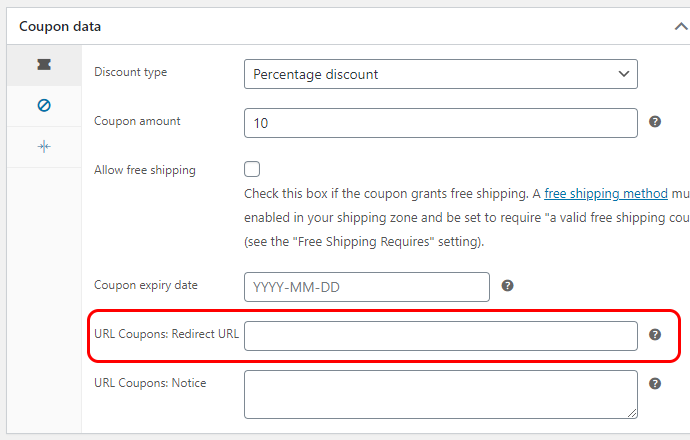
- In the coupon’s General options you will now see a field labelled URL Coupons: Redirect URL. Enter the URL to send customers to after this coupon is applied.
- Update the coupon.
Options reference #
| Label | Option ID | Default | Free/Pro |
|---|---|---|---|
| Redirect URL per coupon (Enable) | alg_wc_url_coupons_redirect_per_coupon |
No | Pro |
| Per-coupon field (stored as coupon meta) | _alg_wc_url_coupons_redirect_url |
(empty) | Pro |
How it interacts with the global Redirect URL #
The plugin also has a global Redirect URL option (No redirect, cart, checkout, or a custom local URL). The per-coupon URL wins: if a coupon has a value in its URL Coupons: Redirect URL field, the customer is sent there. If that field is empty, the plugin falls back to the global Redirect URL setting. If neither is set, the customer stays on the current page.
Use cases #
- Route a wholesale coupon to a wholesale catalog page and a retail coupon to the normal shop.
- Send a free-shipping coupon straight to checkout while a browse-and-save coupon lands on a category page.
- Give each marketing campaign its own themed landing page after the discount applies.
Troubleshooting #
- The field does not appear on the coupon. Confirm you enabled Redirect URL per coupon and saved the settings, then reload the coupon edit page.
- The redirect does not happen. The redirect only runs when the coupon is applied successfully. Check that the coupon code in the URL is valid and not already applied.
- The customer lands on the wrong page. Remember the per-coupon URL overrides the global setting. Clear the coupon’s field to fall back to the global Redirect URL.
Ready to set this up? #
This is a Pro feature of URL Coupons. If you are still on the free version, upgrading takes a couple of minutes and unlocks this along with add-to-cart coupons and custom notices. Get URL Coupons Pro.