WooCommerce Minimum Order Amount by Country (Free Tool)

Quick Answer: WooCommerce Minimum Order Amount by Country
WooCommerce has no built-in way to set a different minimum order amount for each country. The workable route is shipping zones.. you group countries into zones, then set a separate minimum for each zone with an Order Minimum/Maximum Amount Limits for WooCommerce plugin.
The detail that catches store owners out is that WooCommerce ties the rule to the shipping zone, not to the country field directly, so a customer whose address has not yet placed them in a zone can slip past the limit unless you configure the fallback correctly.
- Shipping zones are the mechanism: Each zone holds one or more countries and carries its own minimum.
- One minimum per market: A high floor for costly-to-ship regions, a lower one for your home market.
- Clear customer messaging: Show the shortfall and the zone so shoppers know why checkout is held.
The free country minimum checker below lets you set two market floors and test any cart against either one, so you can see exactly what a shopper in each region would face before you build it.
You sell to customers at home and abroad. A local order of $30 is fine, because shipping across town costs you almost nothing.
Then an order comes in from three countries away. Same $30 cart. But now shipping eats most of the margin, and the order is barely worth fulfilling.
The problem is that a single, global minimum order amount treats every market the same. It cannot know that $30 works at home and loses money overseas.
What you actually need is a different floor for each market.. a modest minimum where fulfillment is cheap, and a higher one where it is not. In WooCommerce, that is done by country, and the tool that gets you there is the shipping zone.
This guide covers how a WooCommerce minimum order amount works by country, why shipping zones are the mechanism behind it, and how to set a separate floor for each market without blocking the customers you actually want.
Why a Single Minimum Order Amount Falls Short
A flat minimum order amount is the right first step for most stores. It lifts average order value and filters out orders too small to be worth packing.
The moment you ship internationally, though, a single number stops fitting.
Fulfillment cost is not uniform across markets. A domestic parcel might cost a few dollars. The same parcel to another continent can cost many times that, plus customs handling and longer transit.
A minimum that protects your margin at home is often too low abroad, and a minimum set high enough for overseas orders would scare off the local customers who are your core business.
So the goal is not one number. It is one number per market. And in WooCommerce, markets are defined through shipping zones.
How “By Country” Actually Works in WooCommerce
Here is the part that trips people up, so it is worth being precise.
WooCommerce does not offer a setting that reads “minimum order amount for Germany” directly.
There is no country dropdown attached to an order minimum in the core platform, and the plugins that add order minimums do not add a raw country field either.
Instead, the country-level control comes through shipping zones. A shipping zone in WooCommerce is a geographic area you define, made up of countries, states, or postcodes.
You might have a zone for your home country, one for the rest of your continent, and one for everywhere else.
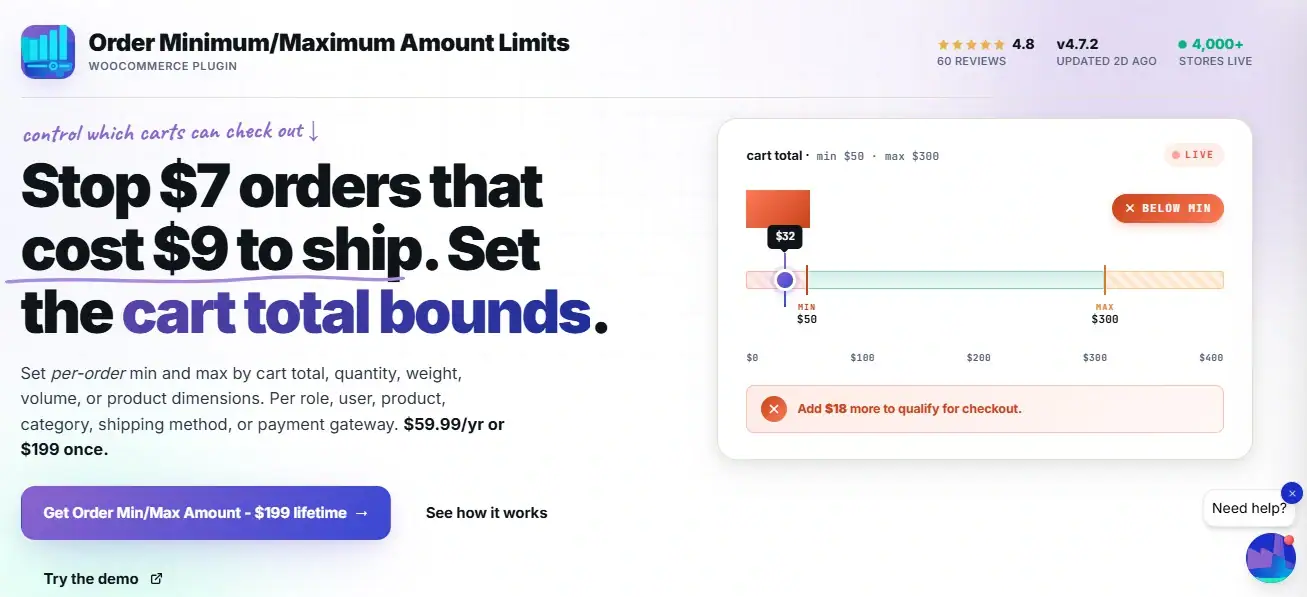
The Order Minimum/Maximum Amount Limits for WooCommerce plugin lets you set a separate minimum for each of those zones. Because each zone is built from countries, setting a minimum per zone is how you set a minimum by country in practice.
This is the honest mechanism. Anyone who tells you WooCommerce has a direct country-by-country order minimum is describing something the platform does not have.
The zone route is how it is really done, and it works well once you understand it.
Set a Different Order Minimum for Every Market
The Order Minimum/Maximum Amount Limits for WooCommerce plugin sets a separate minimum per shipping zone, which is how you enforce a country-level floor. It also handles limits by user role, payment method, and currency from the same settings area. Pair it with your existing WooCommerce shipping zones and the rule follows the customer’s address automatically.
A Worked Example: Three Markets, Three Minimums
Say you run a store based in one country and ship to two other regions. Your fulfillment costs differ sharply across the three.
You set up three shipping zones and give each its own minimum order amount:
| Shipping Zone | Countries | Typical Shipping Cost | Minimum Order Amount |
|---|---|---|---|
| Home Market | Your own country | Low | $30 |
| Regional | Neighboring countries | Medium | $75 |
| International | Rest of world | High | $150 |
Now the same cart behaves differently depending on where the customer is.
A $50 cart sails through for a home customer, because it clears the $30 floor. The same $50 cart is held for a regional customer, who needs to reach $75. And it is held further for an international customer, who needs $150.
Each customer sees a message telling them their region’s minimum and how much more they need to add. Nobody is charged a fee. They simply cannot check out until the cart clears the floor for their market.
Step-by-Step: Setting a Minimum Order Amount by Country
The setup has two halves. First you define your markets as shipping zones, then you attach a minimum to each. The country-level minimum is available in the free version of the plugin.
Step 1: Define Your Shipping Zones
Before touching the plugin, make sure your markets exist as shipping zones. Go to WooCommerce → Settings → Shipping → Shipping Zones.
Create a zone for each market you want to treat differently. Add the relevant countries to each zone. If you have not set these up before, the full walkthrough in the WooCommerce shipping setup guide covers zones from the ground up.
Step 2: Install the Order Min/Max Amount Plugin
Install the plugin from your WPFactory account “Order Minimum Maximum Amount”. Activate it.
Step 3: Set the General Options
Go to WooCommerce → Settings → Order Min/Max Amount. In the General tab, enable the plugin. Under Amount Limits, select Min. Under Amount Types, select Sum, so the rule checks the cart total.
Step 4: Enable the Shipping Zone Section
Open the Shipping sub-tab inside the plugin settings. Enable the section, then set the Type to Per shipping zone.
The plugin now lists every shipping zone you defined in Step 1. Each one gets its own field.
Step 5: Enter a Minimum for Each Zone
Type the minimum order amount for each zone. Following the worked example, that is $30 for your home zone, $75 for the regional zone, and $150 for the international zone.
A value of zero means no minimum for that zone. A value of -1 removes any minimum requirement for that zone entirely, which is useful if one market should have no floor at all.
Step 6: Write Zone-Aware Messages
Go to the Messages tab and enable shipping messages. The plugin gives you placeholders built for this exact case: %amount% for the zone’s minimum, %total% for the current cart, and %shipping_zone% for the zone name.
A message such as “Orders shipping to %shipping_zone% require a minimum of %amount%. Your cart is currently %total%” tells the customer precisely what applies to their region and why.
Step 7: Set the Priority and Test
If you also run other minimums, such as a limit by user role, the Priority setting controls which rule wins. Lower numbers apply first.
Then test with addresses in each zone. Add products, enter a shipping address for each market, and confirm the correct minimum fires. This is the step that catches configuration errors before your customers do.
Free Tool: Country Minimum Order Checker
Set a minimum for two markets, then enter a cart value and pick the market to see whether the order would be allowed or held.
Comparison: By Country vs Other Ways to Set a Minimum
A minimum by country is one of several ways to scope an order floor. Each answers a different question, and they can run together.
Read the “Best for” column closely. The country route solves a geographic cost problem specifically. If your real issue is customer type or payment risk rather than location, one of the other rows is the better fit.
| Scope | How It Is Set | Best For | Free or Pro |
|---|---|---|---|
| By country (zone) | Per shipping zone | Different fulfillment costs across markets | Free |
| By user role | Per role in the User Roles tab | Separating wholesale from retail buyers | Free |
| By payment method | Per gateway in the Payment tab | Managing risk on methods like cash on delivery | Pro |
| By currency | Per currency in the Currency tab | Multi-currency stores with per-market pricing | Pro |
| Store-wide | A single global value | Single-market stores with uniform costs | Free |
The country route pairs naturally with a store-wide floor. Set a global minimum as your baseline, then let the per-zone values override it for the markets that need a different number.
Minimums by Store Type
The right per-country floors depend on what you sell and how you ship it. Here is how the thinking shifts across common setups.
Physical Goods with Real Shipping Weight
This is the classic case for country-level minimums.
Heavy or bulky products cost far more to ship abroad, so international zones should carry noticeably higher floors than your home market.
Base each zone’s minimum on your real average shipping cost to that region, not a guess.
The minimum should cover shipping and still leave the order worth fulfilling.
Small, Light, High-Value Items
For light products like jewelry or cosmetics, shipping cost is a smaller share of the order, so the gap between zones can be narrower.
Here the country minimum is less about shipping and more about customs handling and the overhead of international returns.
Stores Testing New Markets
If you are expanding into a new region and unsure of demand, a higher minimum for that zone lets you accept only orders large enough to justify the fulfillment learning curve.
As you get comfortable, lower it to open the market wider.
Digital or Low-Shipping Products
If shipping is cheap or irrelevant, country-level minimums matter far less.
A single store-wide floor, or a rule scoped by user role rather than location, usually fits these stores better than a per-country setup.
Common Mistakes with Country-Level Minimums
A few errors show up repeatedly when store owners first build this.
- Forgetting the “rest of the world” zone
If a customer’s country is not in any zone you defined, no per-zone minimum applies to them. Always include a catch-all zone so no market slips through with no floor at all.
- Setting international minimums from a guess
A floor pulled from thin air either blocks good orders or fails to cover cost. Base each number on your actual shipping cost to that region.
- Writing one generic message for all zones
A message that does not name the region leaves international customers confused about why their cart is held. Use the %shipping_zone% placeholder so the message names their market.
- Setting the floor so high it kills the market
A minimum meant to protect margin can quietly end all sales to a region if set too high. Watch the numbers after launch and adjust. A minimum that produces zero orders is not protecting anything.
Related Resources
- WooCommerce Quantity Rules: The Complete Guide – the hub covering every order and quantity rule in one place
- How to Set Minimum Order Amount per Shipping Zone – the technical walkthrough of the shipping-zone mechanism behind this article
- How to Set Maximum Order Value in WooCommerce – the ceiling that pairs with the floor, for fraud and stock control
- WooCommerce Minimum Order Amount by User Role – scope a minimum by customer type instead of location
- WooCommerce Shipping Setup Guide – build the shipping zones this rule depends on
Ready to Set a WooCommerce Minimum Order Amount by Country?
The Order Minimum/Maximum Amount Limits for WooCommerce plugin sets a separate minimum per shipping zone, so each market gets the floor that fits its fulfillment cost. Per-zone minimums are free. Limits by payment method and currency are available in the Pro version at $59.99 per year or $199 for a lifetime license on unlimited sites.
Every purchase comes with a 14-day money-back guarantee.
FAQs About WooCommerce Minimum Order Amount by Country
Can I set a different minimum order amount for each country in WooCommerce?
Yes, through shipping zones.
WooCommerce does not offer a direct per-country order minimum, but you can group countries into shipping zones and set a separate minimum for each zone using the Order Minimum/Maximum Amount plugin.
Because zones are built from countries, this gives you a country-level minimum in practice.
Does WooCommerce have a built-in minimum order amount by country?
No. Core WooCommerce has no minimum order amount feature at all, and no country-specific version of one.
You need a plugin to add order minimums, and the country-level control is achieved by setting a minimum per shipping zone rather than per country directly.
How does WooCommerce know which country minimum to apply?
It reads the customer’s shipping address and matches it to the shipping zone that contains that country. The minimum set for that zone is the one enforced.
This is why a catch-all “rest of the world” zone matters: without one, a customer in an unlisted country falls outside every zone rule.
Is setting a minimum order amount by shipping zone a free feature?
Yes. The per-shipping-zone minimum is available in the free version of the Order Minimum/Maximum Amount plugin.
More advanced scopes, such as minimums by payment method or by currency, require the Pro version.
Can I combine a country minimum with a store-wide minimum in WooCommerce?
Yes. Set a global minimum as your baseline, then set higher or lower values per shipping zone to override it for specific markets.
The Priority setting controls which rule applies when more than one could match, with lower numbers taking precedence.
What message do customers see when their order is below the country minimum?
A message you customize in the plugin’s Messages tab. Using placeholders like %shipping_zone% and %amount%, you can show the customer their region’s name and its required minimum, so they understand exactly why checkout is held and how much more to add.