Advanced options in Rename Media Files #
Rename Media Files: Improve Your WordPress SEO goes beyond renaming the file itself. Its advanced options let you generate ALT text and media titles automatically, pull in custom field and taxonomy data, schedule updates, and limit renaming to specific user roles and post types. These options are part of Pro and live on the General Settings tab.
Where the settings live #
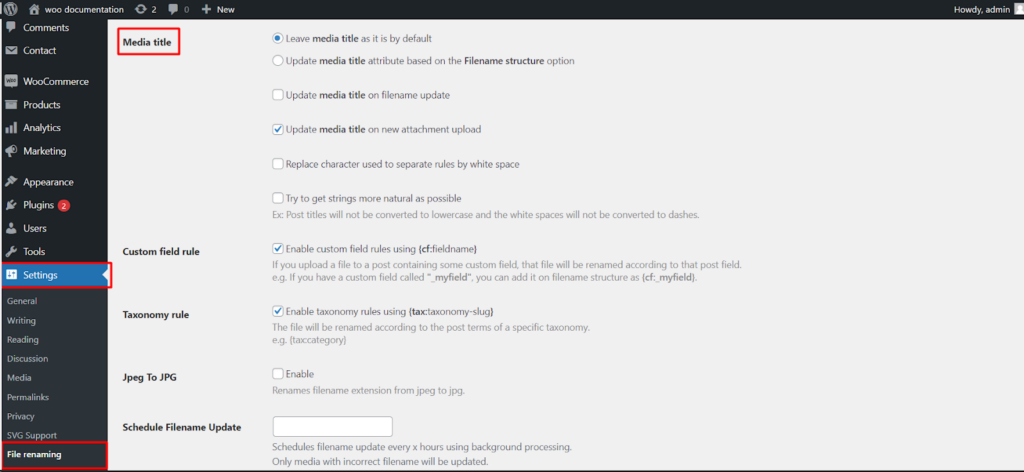
Go to WPFactory > File Renaming in your WordPress admin. The settings page is titled File Renaming on Upload. The options below are on the General Settings tab.
ALT attribute #
The change_image_alt_method radio controls how the image ALT attribute is set. The default is default_mechanism, which leaves the ALT text as entered on upload. Other choices generate ALT text from the original filename or from your defined filename structure. Two sub-options refine the behavior: update_on_filename_update (off by default) updates the ALT text when a filename changes, and update_on_new_attachment (on by default) applies the chosen method to newly uploaded files. alt_separator_whitespaces replaces the separator character with a space for a more natural reading.
Media title #
The change_media_title_method radio works the same way for the media title. The default is default_mechanism. Sub-options include update_media_title_on_filename_update (off by default), update_media_title_on_new_attachment (on by default), title_separator_whitespaces, and get_natural_string.
Custom field and taxonomy rules #
custom_field_rule enables {cf:fieldname} tokens so you can pull a custom field value into filenames, ALT text, and titles, for example {cf:_myfield}. taxonomy_rule enables {tax:taxonomy-slug} tokens to bring in a post term from a chosen taxonomy, for example {tax:category}.
Jpeg To JPG #
jpeg_to_jpg converts an uploaded jpeg extension to the more common jpg. It is off by default.
Schedule Filename Update #
schedule_filename_update sets an interval, in hours, for a background process that finds and corrects filenames that do not match your current rules. Pair it with filter_by_last_x_hours to limit the scan to recently modified media.
Allowed user roles and post types #
restrict_user_role limits renaming to uploads made by the selected user roles, and restrict_post_type limits renaming to the selected post types. Leave either blank to apply renaming to all roles or all post types.
Options reference #
| Setting | Option ID | Type | Default | Free/Pro |
|---|---|---|---|---|
| Alt attribute (method) | change_image_alt_method |
Radio | default_mechanism |
Pro |
| Media title (method) | change_media_title_method |
Radio | default_mechanism |
Pro |
| Custom field rule | custom_field_rule |
Checkbox | On | Pro |
| Taxonomy rule | taxonomy_rule |
Checkbox | On | Pro |
| Jpeg To JPG | jpeg_to_jpg |
Checkbox | Off | Pro |
| Schedule Filename Update | schedule_filename_update |
Number (hours) | Blank | Pro |
| Allowed user roles | restrict_user_role |
Multiselect | Blank (all) | Pro |
| Allowed post types | restrict_post_type |
Multiselect | Blank (all) | Pro |
Ready to set this up? #
These are Pro features of Rename Media Files. If you are still on the free version, upgrading unlocks them along with the rest of the Pro toolkit. Get Rename Media Files Pro.