Rename Media Files: Improve Your WordPress SEO lets you define exceptions so certain files are left untouched. The Advanced tab controls which extensions and filenames are skipped during renaming. This guide covers each option and clears up how the filename exclusions actually match.
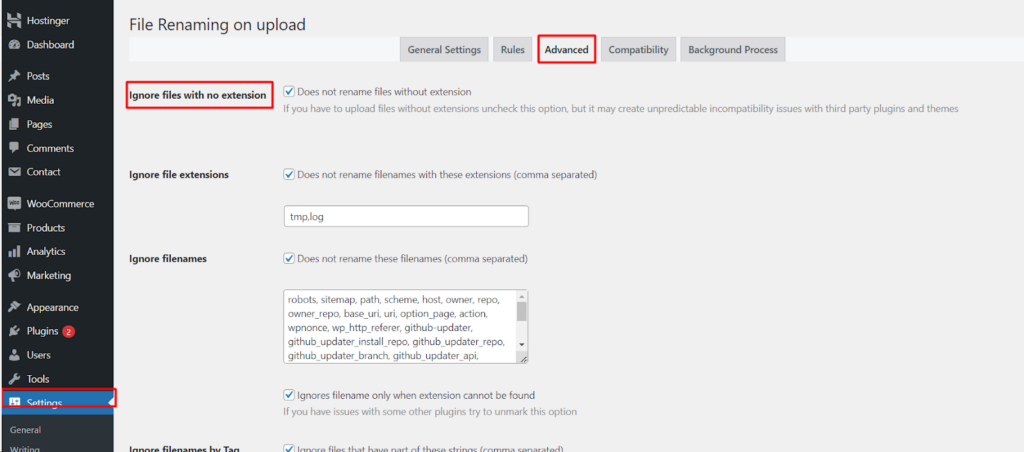
Where the settings live #
Go to WPFactory > File Renaming in your WordPress admin. The settings page is titled File Renaming on Upload. Open the Advanced tab.
Ignore files with no extension #
ignore_empty_extensions stops the plugin from renaming files that have no extension, for example a file simply named myfile. It is on by default and helps avoid conflicts with other plugins that rely on those files.
Ignore file extensions #
Turn on ignore_extensions to skip renaming for specific file types. List the extensions in extensions_ignored as a comma-separated list of bare extensions with no leading dots, for example psd,ai. The default list is tmp,log.
Ignore filenames #
Turn on ignore_filenames to skip renaming for specific filenames, listed in filenames_ignored. The default list includes common system files such as robots and sitemap names. Note that this list matches all files, whether or not they have an extension.
Ignores filename only when extension cannot be found #
This is a separate sub-option, ignore_without_extension, and it is what controls the scope of the Ignore filenames list. It is on by default. When on, a name in the Ignore filenames list is skipped only when the file has no extension. When off, a listed name is skipped whether or not it has an extension. In other words, the Ignore filenames list matches every file by itself, and this checkbox is what restricts matching to extensionless files.
Ignore filenames by Tag #
ignore_filenames_by_tag skips any file whose name contains one of the strings listed in tags_ignored, for example a file with original or backup anywhere in its name. This option is Pro.
Options reference #
| Setting | Option ID | Default | Free/Pro |
|---|---|---|---|
| Ignore files with no extension | ignore_empty_extensions |
On | Free |
| Ignore file extensions | ignore_extensions |
On | Free |
| Extensions to ignore | extensions_ignored |
tmp,log |
Free |
| Ignore filenames | ignore_filenames |
On | Free |
| Filenames to ignore | filenames_ignored |
System filenames | Free |
| Ignores filename only when extension cannot be found | ignore_without_extension |
On | Free |
| Ignore filenames by Tag | ignore_filenames_by_tag |
On | Pro |
Get more control #
The core renaming rules are free. Rename Media Files: Improve Your WordPress SEO Pro adds manual filename and permalink editing, bulk renaming of existing media, automatic ALT text and titles, custom field, taxonomy and SKU rules, and more. See what Pro unlocks.