Rename Media Files: Improve Your WordPress SEO builds each new filename from tokens you enable on the Rules tab. Each rule you turn on makes a {token} available to place in your filename structure. This guide explains the tokens, which are free and which are Pro, and how to format the datetime output correctly.
Where the settings live #
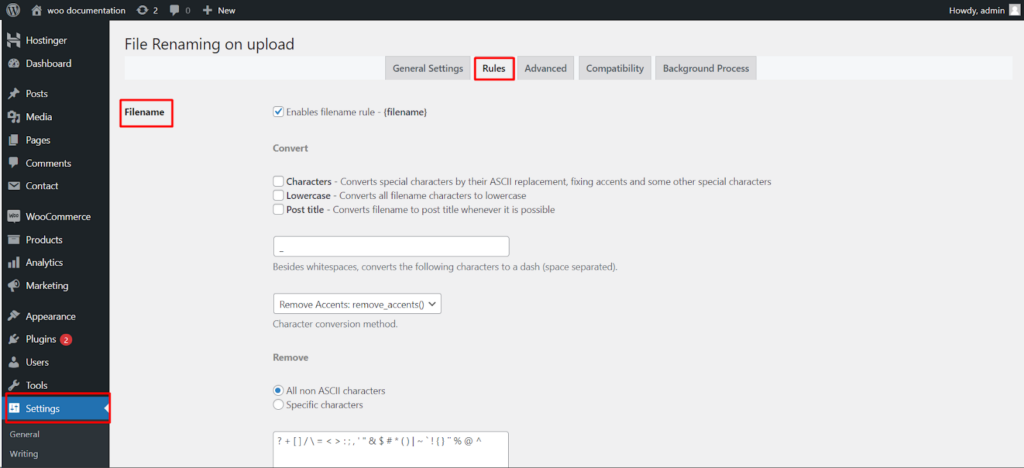
Go to WPFactory > File Renaming in your WordPress admin. The settings page is titled File Renaming on Upload. Open the Rules tab, enable the rules you want, then reference their tokens in the filename_structure field on the General Settings tab.
Available tokens #
| Rule | Token | Option ID | Default | Free/Pro |
|---|---|---|---|---|
| Filename | {filename} |
filename |
On | Free |
| Site URL | {siteurl} |
siteurl |
On | Free |
| Post title | {posttitle} |
posttitle |
On | Free |
| Datetime | {datetime} |
datetime |
Off | Free |
| Upload date | {uploaddate} |
uploaddate |
Off | Pro |
| Custom string | {custom_string} |
custom_string |
Off | Pro |
| Post Slug | {postslug} |
postslug |
Off | Pro |
| Post ID | {postid} |
postid |
Off | Pro |
| User ID | {userid} |
userid |
Off | Pro |
| User Role | {userrole} |
userrole |
Off | Pro |
| Username | {username} |
username |
Off | Pro |
| Product SKU (WooCommerce) | {wc_prod_sku} |
wc_prod_sku |
Off | Pro |
Formatting the datetime output #
The Datetime rule accepts a PHP date() format string in its datetime_format field. The default is Y-m-d_H-i-s_u, which produces output such as 2026-07-21_14-30-05_123456 (year, month, day, hour, minute, second, microseconds). Use standard PHP date characters here, not literal placeholders like YYYY or HH.
{uploaddate} vs {datetime} #
These two tokens look similar but capture different moments. {datetime} uses the time the renaming rule runs. {uploaddate} uses the time the file was originally uploaded. If you rename existing media later, {datetime} reflects the moment of that rename while {uploaddate} stays fixed to the original upload. The Upload date rule has its own uploaddate_format field, defaulting to Y-m-d_H-i-s.
Refining filenames #
The Filename rule includes conversion options (convert): convert special characters to ASCII replacements, force lowercase, and remove accents or specific characters. The Post title rule includes use_filename_on_empty_title (on by default), the fallback that keeps filenames from coming out blank when a post has no title.
Get more control #
The core renaming rules are free. Rename Media Files: Improve Your WordPress SEO Pro adds manual filename and permalink editing, bulk renaming of existing media, automatic ALT text and titles, custom field, taxonomy and SKU rules, and more. See what Pro unlocks.