To schedule automatic downloads with Download Plugins and Themes in ZIP from Dashboard Pro, go to WPFactory > Download plugins and Themes and scroll to Periodical Downloads. Set Periodical plugins downloads or Periodical themes downloads to an interval, from once a minute to every 4 weeks, optionally set the downloads path, and click Save settings.
Before you start #
- Download Plugins and Themes Pro (periodical downloads are Pro only).
- A writable destination folder on the server (a default under
wp-content/uploadsis provided). - WordPress cron running on your site (periodical downloads use WP-Cron events).
Set up a schedule #
- Go to WPFactory > Download plugins and Themes and scroll to Periodical Downloads.
- Set Periodical plugins downloads and/or Periodical themes downloads to an interval: once a minute, hourly, twice daily, daily, weekly, or every 4 weeks. Leave on Do not download to disable.
- Optionally set the Plugins downloads path and Themes downloads path, the format options below, then click Save settings.
- Use the Run now button next to a schedule to trigger a download immediately without waiting for the next run.
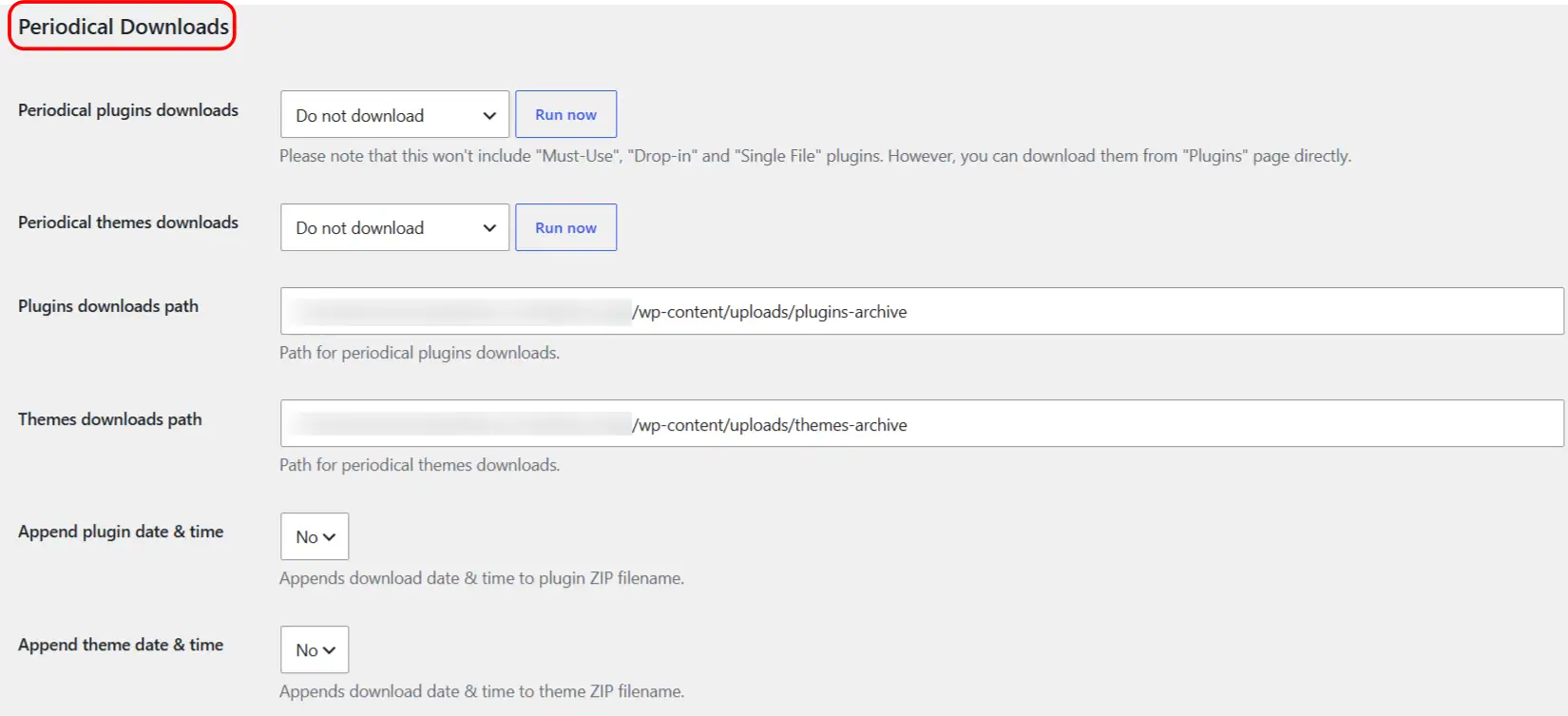
Note: periodical plugin downloads do not include Must-Use, Drop-in or single-file plugins. You can still download those manually from the Plugins screen.
Filename and packaging options #
- Append plugin/theme date & time: adds the download date and time to each ZIP filename, so versions stay separated (for example
my-plugin-2026-07-21-13-30-00.zip). - Plugins/Themes output file(s): choose Each plugin’s zip (one ZIP per item), All plugins in single zip (one combined ZIP), or Each plugin’s zip + All plugins in single zip (both).
- Plugins/Themes single ZIP file name: the name used for the combined ZIP when you pick an “all” option (defaults:
pluginsandthemes).
Options reference #
| Label | Option key | Default | Free/Pro |
|---|---|---|---|
| Periodical plugins downloads | alg_download_plugins_dashboard_plugins_bulk_period |
Do not download | Pro |
| Periodical themes downloads | alg_download_plugins_dashboard_themes_bulk_period |
Do not download | Pro |
| Plugins downloads path | alg_download_plugins_dashboard_plugins_bulk_dir |
uploads/plugins-archive |
Pro |
| Themes downloads path | alg_download_plugins_dashboard_themes_bulk_dir |
uploads/themes-archive |
Pro |
| Append plugin date & time | alg_download_plugins_dashboard_plugins_append_date_time |
No | Pro |
| Append theme date & time | alg_download_plugins_dashboard_themes_append_date_time |
No | Pro |
| Plugins output file(s) | alg_download_plugins_dashboard_plugins_output_files |
Each plugin’s zip | Pro |
| Themes output file(s) | alg_download_plugins_dashboard_themes_output_files |
Each theme’s zip | Pro |
| Plugins single ZIP file name | alg_download_plugins_dashboard_plugins_single_zip_file_name |
plugins |
Pro |
| Themes single ZIP file name | alg_download_plugins_dashboard_themes_single_zip_file_name |
themes |
Pro |
Housekeeping #
Frequent schedules and combined archives can build up disk usage. Clean out the download folders from time to time, and pick an interval that matches how often your plugins actually change.
Ready to set this up? #
Periodical downloads are a Pro feature of Download Plugins and Themes. If you are still on the free version, upgrading unlocks scheduled downloads along with the rest of the Pro toolkit. Get the Pro version.