To download all plugins at once with Download Plugins and Themes in ZIP from Dashboard, go to WPFactory > Download plugins and Themes, scroll to the Tools section, and click Download all next to Plugins. Your browser downloads one ZIP of your regular plugins, without Must-Use or Drop-in plugins. This tool is free.
How to download all plugins #
- Go to WPFactory > Download plugins and Themes.
- Scroll to the Tools section.
- Next to Plugins, click Download all.
- Your browser downloads one ZIP containing all of your regular plugins.
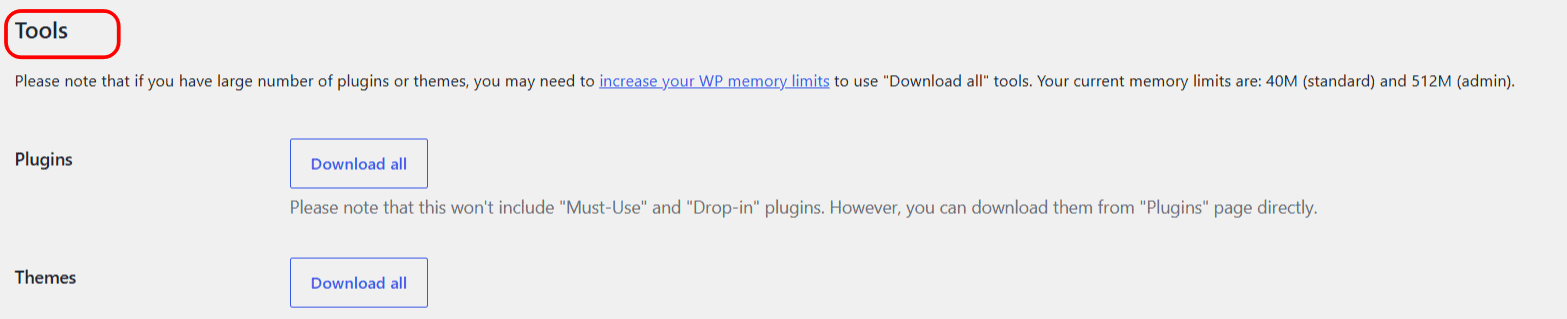
Note: the archive does not include Must-Use or Drop-in plugins. Download those individually from the Plugins screen using the per-item Download ZIP link.
If the download fails #
Creating one archive of every plugin uses server memory. On a site with many plugins you may need to increase your WordPress memory limit. See the troubleshooting guide on fixing Download all on large sites if you get an empty ZIP or an error.
Get more from Download Plugins and Themes #
Download all is free. Download Plugins and Themes in ZIP from Dashboard Pro can run this on a schedule and lets you bulk download only the plugins you select. See what Pro unlocks.