To configure Feed #1 in Product XML Feeds Manager for WooCommerce, go to WPFactory > Product XML Feeds and open the XML Feed #1 section. Turn the feed on, give it an Admin title, build the XML header, item, and footer templates, set the XML file path and name, and click Create now to generate it.
Go to WPFactory > Product XML Feeds (also reachable at WooCommerce > Settings > Product XML Feeds) and open the XML Feed #1 section.
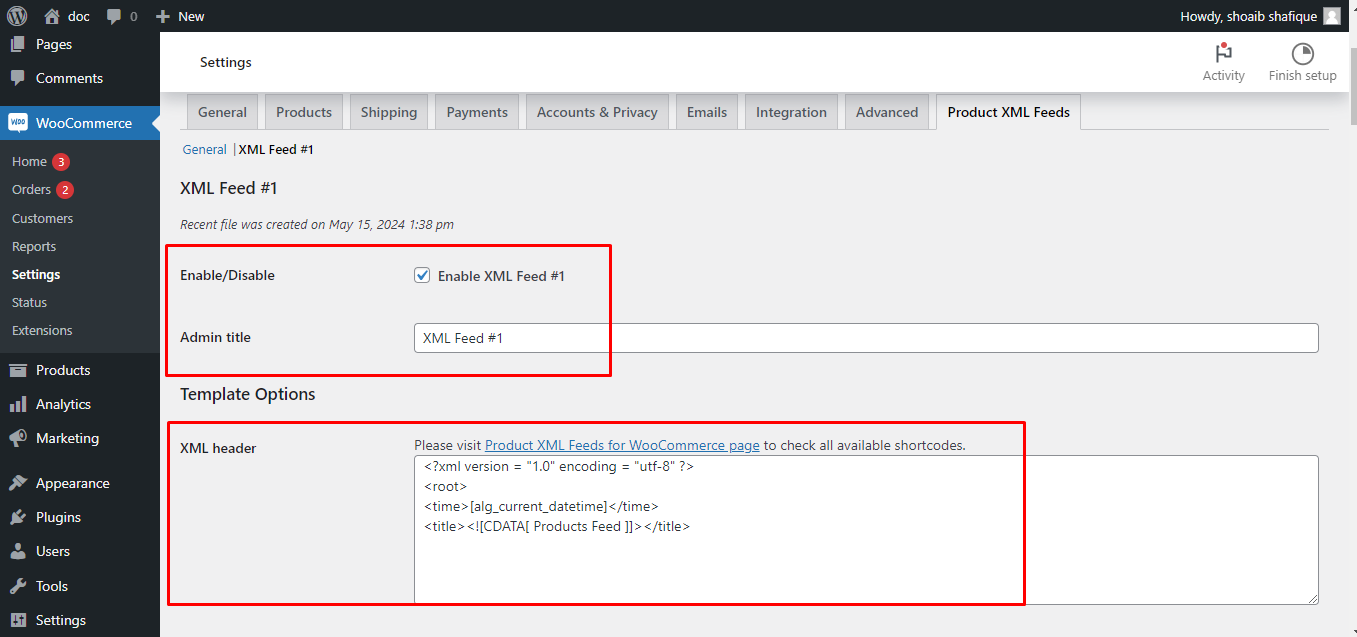
Name and template #
- Enable/Disable: turn Feed #1 on.
- Admin title: an internal label such as “Main Product Feed”.
- Template Options: set the XML header, XML item, optional Variation XML item (used when Variable products is set to Both variable and variations products) and XML footer. Click any template field to open the shortcode picker.
- Hide XML tags if empty: comma-separated tag names to drop when their value is empty, for example
stock, sku. - Create text feed: also output a plain-text file (a Pro feature).
General Options #
- XML file path and name: the filename for the feed, for example
products.xml. - Text file path and name: the filename for the text feed, used only when the Pro text feed is enabled.
- Use Site Address (HOME_URL): base the path on the Site Address instead of the WordPress address.
Update period #
Sets how often the feed regenerates automatically. On the free version this is fixed at Weekly. Changing the frequency is a Pro feature, and the available intervals are:
- Every minute
- Hourly
- Twice daily
- Daily
- Weekly
Use the Create now button to regenerate the feed on demand. There is no “monthly” interval and no custom day count; the five options above are the full set.
Manual cron and schedule #
- Manual Cron Job Command: a
wgetcommand for triggering the feed from a server cron. - Turn off WP schedule: disable WordPress scheduling for this feed when you use a server cron instead.
Sorting #
- Sorting: Order by (default Date): Product ID, Title, Slug, Date, Last modified date, Number of comments, Author, Random or None.
- Sorting: Order (default Descending): Ascending or Descending.
Set your product filters below (see Filter Products and Schedule a Product XML Feed), click Save changes, then Create now.
Need more than one feed? #
Feed #1 with weekly updates is free. Product XML Feeds Manager for WooCommerce Pro adds unlimited feeds and a flexible schedule. See what Pro unlocks.