To create multiple feeds in Product XML Feeds Manager for WooCommerce Pro, go to WPFactory > Product XML Feeds, set Total XML files (feeds) on the General section to the number you need, and click Save changes. A new XML Feed section appears for each feed. The free version is capped at one feed.
Before you start #
- WooCommerce, active.
- Product XML Feeds Manager for WooCommerce Pro (running more than one feed is a Pro feature).
How the feed count works #
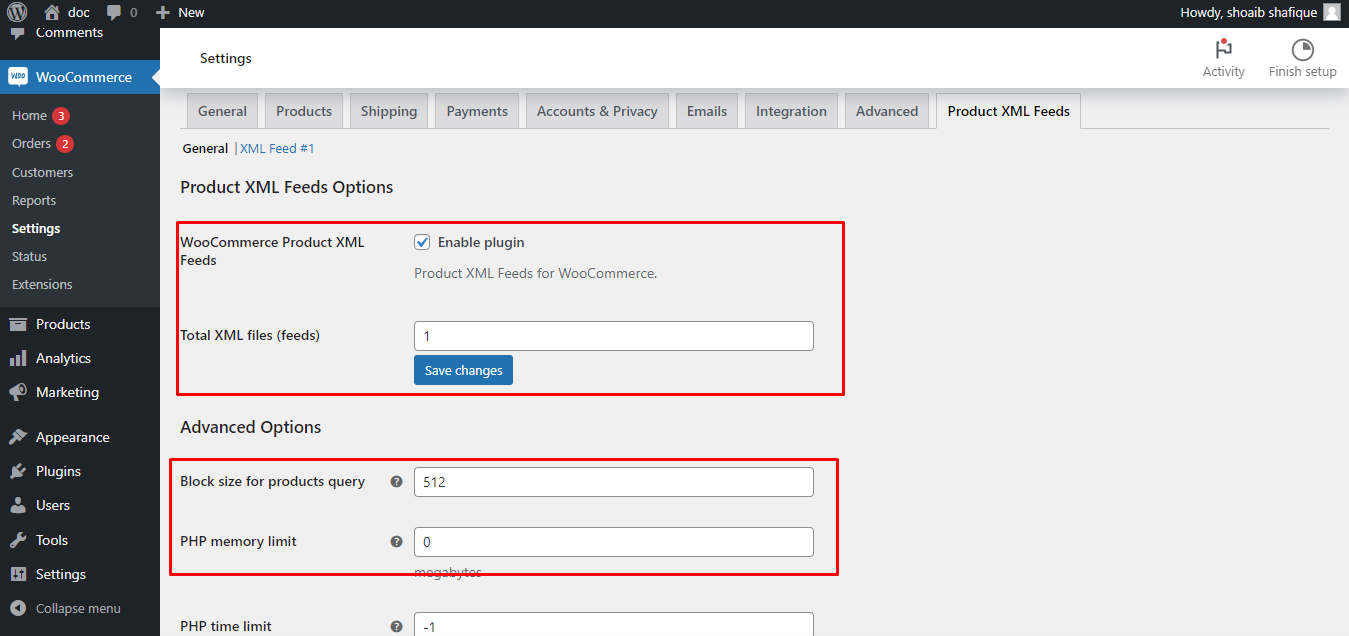
The number of feeds is set by Total XML files (feeds) (alg_products_xml_total_files, default 1) in the General section. On the free version this field is capped at 1. Pro removes the cap, so you can enter any number.
Go to WPFactory > Product XML Feeds (also reachable at WooCommerce > Settings > Product XML Feeds). You land on the General section by default.
Step by step #
- On the General section, set Total XML files (feeds) to the number of feeds you need.
- Click Save changes. A new XML Feed #n section appears for each feed.
- Open each XML Feed #n section and configure it independently: its own XML file path and name (
alg_products_xml_file_path_{n}, defaulting toproducts_2.xml,products_3.xmland so on), template, filtering, and update period. - Use the Admin title field (
alg_products_xml_feed_title_{n}) to give each feed a recognizable name in the section tabs. - Click Create now in each section, or let each feed rebuild on its own schedule.
Note: every feed carries the same option ids with its own number as a suffix. Feed 1 uses alg_products_xml_file_path_1, feed 2 uses alg_products_xml_file_path_2, and so on. Each feed can be enabled or disabled separately with alg_products_xml_enabled_{n}.
Use cases #
- A Google Shopping feed and a separate Facebook catalog feed, each with the fields those platforms require.
- One full-catalog feed plus a smaller “on sale only” feed for a promotions partner.
- Region-specific feeds, each filtered to different categories or currencies.
Ready to set this up? #
Running more than one feed is a Pro feature of Product XML Feeds Manager for WooCommerce. If you are still on the free version, upgrading takes a couple of minutes and unlocks unlimited feeds along with the rest of the Pro toolkit. Get Product XML Feeds Pro.