Counter offer email and sender options #
To set up counter offer emails in Name Your Price: Make Your Own Offer for WooCommerce, go to WPFactory > Price Offers and open the Actions section. Write the counter subject, heading, and content, using %counter_price% and %add_to_cart_url%, and set the “From” name and “From” address used on all offer emails. These options are free.
Go to WPFactory > Price Offers (also reachable at WooCommerce > Settings > Price Offers) and open the Actions section.
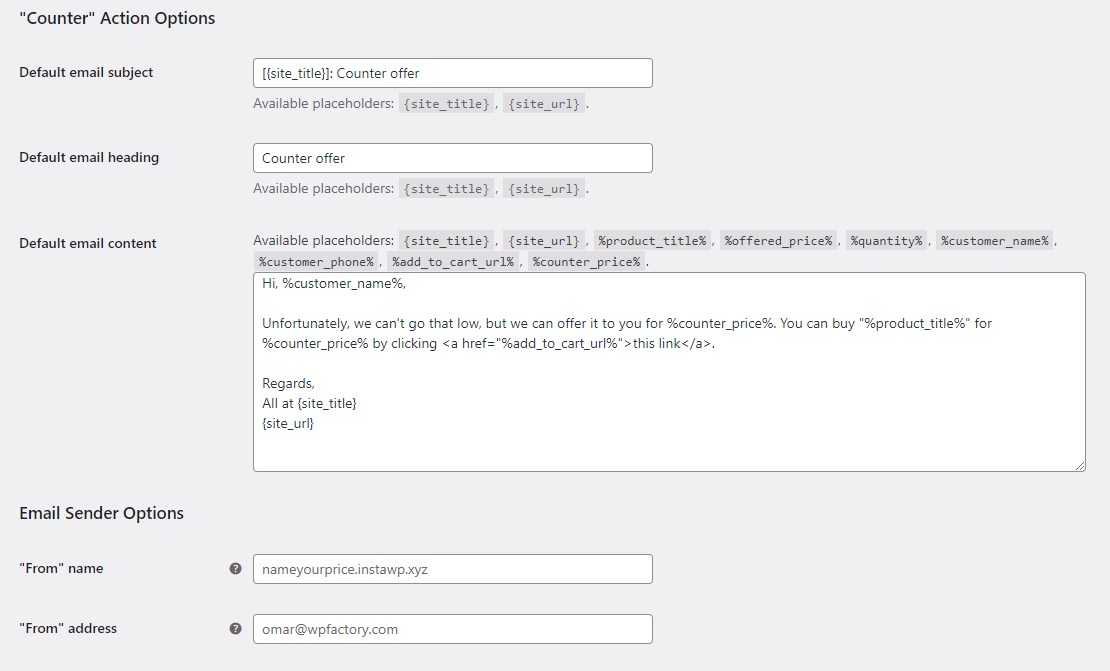
Counter action options (free) #
- Default email subject (
alg_wc_po_actions[counter_default_email_subject]): default “[{site_title}]: Counter offer”. - Default email heading (
alg_wc_po_actions[counter_default_email_heading]): default “Counter offer”. - Default email content (
alg_wc_po_actions[counter_default_email_content]): the counter message body.
The counter content accepts all the standard placeholders plus two specific to this action:
%counter_price%– the price you are proposing back to the customer.%add_to_cart_url%– a link that adds the product to the cart at your counter price.
Correction to an earlier version of this article: %add_to_cart_url% is a free placeholder and is part of the default counter-offer content in the free version.
Email sender options (free) #
- “From” name (
alg_wc_po_actions_email_from_name): the sender name on outgoing offer emails. Leave blank to use your WooCommerce email sender name. - “From” address (
alg_wc_po_actions_email_from_address): the sender email address. Leave blank to use your WooCommerce email sender address.
When these fields are empty, Name Your Price falls back to the WooCommerce email settings, and then to your site title and admin email.
Get more control #
Countering offers and customizing the sender identity is free. Name Your Price: Make Your Own Offer for WooCommerce Pro adds automatic accept and reject rules on top of the manual actions. See what Pro unlocks.