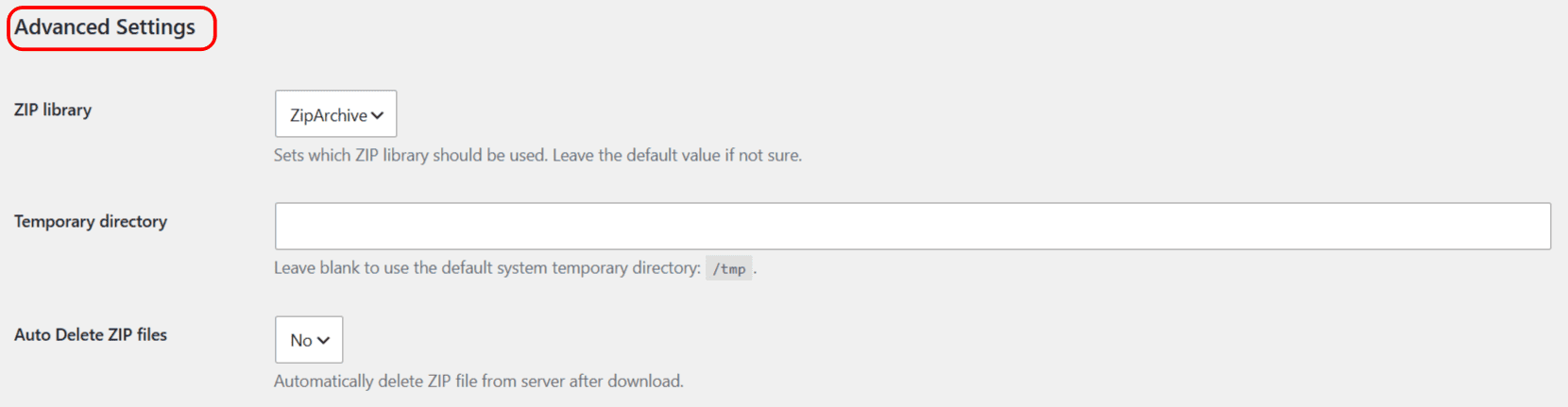
The Advanced Settings of Download Plugins and Themes in ZIP from Dashboard are at WPFactory > Download plugins and Themes, under Advanced Settings. ZIP library (ZipArchive or PclZip) and Temporary directory are free; leave ZIP library on its default unless you are troubleshooting a ZIP error. Auto Delete ZIP files, which removes the ZIP after download, is Pro.
Where the settings are #
Go to WPFactory > Download plugins and Themes and scroll to Advanced Settings.
ZIP library (free) #
ZIP library chooses the software used to build the archive:
- ZipArchive: the default when your server has the ZipArchive class. Compatible with most hosts.
- PclZip: a pure-PHP fallback bundled with WordPress. Use it if ZipArchive is unavailable or is failing on your server.
Leave this on the default unless you are troubleshooting a ZIP creation error.
Temporary directory (free) #
Temporary directory lets you set where the ZIP is built before it is sent to your browser. Leave it blank to use the server’s system temporary directory. The settings page shows the detected default path. Set a custom path only if the default is not writable, or your host restricts it with open_basedir. Make sure any custom directory exists and is writable by the web server.
Auto delete ZIP files (Pro) #
Auto Delete ZIP files removes the generated ZIP from the server immediately after it has been downloaded, so temporary archives do not pile up. This option is available in the Pro version. It is powered by the alg_download_plugins_after_download action, which fires once the file has finished streaming to the browser.
Options reference #
| Label | Option key | Default | Free/Pro |
|---|---|---|---|
| ZIP library | alg_download_plugins_dashboard_zip_library |
ZipArchive (if available) | Free |
| Temporary directory | alg_download_plugins_dashboard_temp_dir |
Empty (system temp) | Free |
| Auto Delete ZIP files | alg_download_plugins_dashboard_delete_zip |
No | Pro |
Ready to set this up? #
Auto-delete is a Pro feature of Download Plugins and Themes. Upgrading also unlocks scheduled downloads, bulk selected downloads and download-link styling. Get the Pro version.