To filter products in a feed with Product XML Feeds Manager for WooCommerce, go to WPFactory > Product XML Feeds, open the feed’s section, and use the free Products Filtering Options to include or exclude products, categories, and tags. For scheduling, add the Manual Cron Job Command to a server cron. Extra filters such as stock status are Pro.
Go to WPFactory > Product XML Feeds (also reachable at WooCommerce > Settings > Product XML Feeds) and open the feed’s section, for example XML Feed #1.
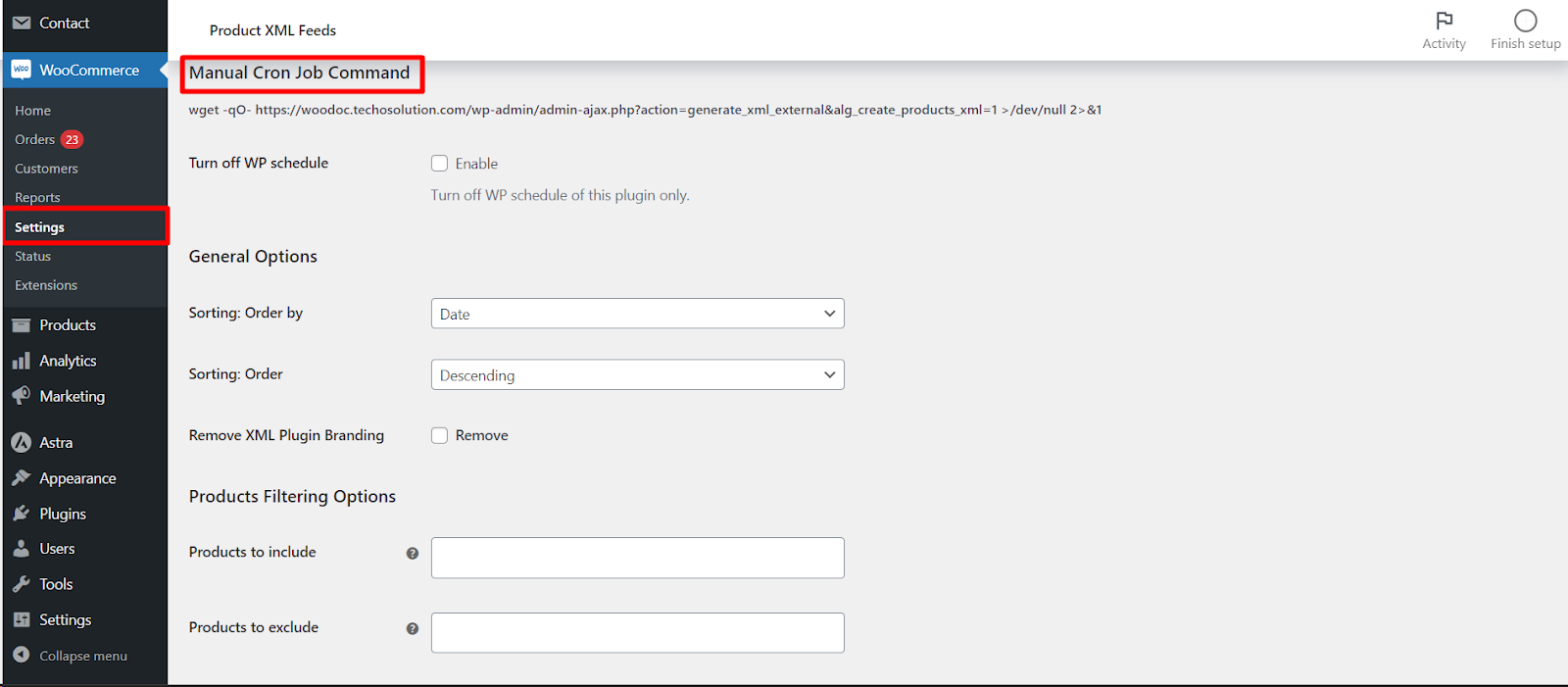
Manual Cron Job Command and Turn off WP schedule #
- Manual Cron Job Command: a ready-made
wgetcommand that regenerates this feed. It includes asecretderived from your Security Key so the URL cannot be triggered by strangers. Add it to a real server cron for reliable timing. - Turn off WP schedule (
alg_products_xml_turn_off_wp_schedule_1, default No): stops WordPress from scheduling this feed. Enable it when you drive updates entirely from a server cron.
Sorting #
- Sorting: Order by (
alg_products_xml_orderby_1, default Date): Product ID, Title, Slug, Date, Last modified date, Number of comments, Author, Random or None. - Sorting: Order (
alg_products_xml_order_1, default Descending): Ascending or Descending.
Remove XML Plugin Branding #
Remove XML Plugin Branding (alg_products_xml_enabled_branding_1) is a Pro option that removes the plugin’s credit comment from the footer.
Products Filtering Options (free) #
These filters are all available in the free version:
- Products to include / exclude (
alg_products_xml_products_incl_1/_excl_1): pick specific products. You can search by name, ID or SKU. - Categories to include / exclude (
alg_products_xml_cats_incl_1/_excl_1). - Tags to include / exclude (
alg_products_xml_tags_incl_1/_excl_1). - Variable products (
alg_products_xml_variable_1, default Variable product only): choose Variable product only, Variation products only, or Both variable and variations products. - Products scope (
alg_products_xml_scope_1, default All products): filter by sale or featured status (All, only on sale, only not on sale, only featured, only not featured). - Offset products (
alg_products_xml_offset_1, default 0): skip this many products from the start. - Total products (
alg_products_xml_total_products_1, default 0): limit the feed to this many products; 0 means all.
Product types to include (Pro) #
Product types to include (alg_products_xml_product_type_include_1) is an include-only multiselect (Simple, Variable, Grouped, External and any custom types). It is a Pro option; the free version includes all product types.
Extra Products Filtering Options (Pro) #
The entire Extra Products Filtering Options block is Pro. On the free version these fields are visible but locked:
| Setting | Option ID | What it filters by |
|---|---|---|
| Stock status | alg_products_xml_stock_status_1 |
In stock, Out of stock, On backorder |
| Min price / Max price | alg_products_xml_min_price_1 / alg_products_xml_max_price_1 |
Price range (ignored if empty) |
| Catalog visibility | alg_products_xml_catalog_visibility_1 |
Shop and search, Shop only, Search only, Hidden |
| Custom taxonomy to include (+ slugs) | alg_products_xml_custom_taxonomy_incl_1 |
A custom taxonomy such as pwb-brand |
| Attribute to include (+ values) | alg_products_xml_attribute_incl_1 |
A product attribute (for example color) and its values |
| Custom meta filter | alg_products_xml_custom_meta_incl_1 |
Meta key, compare, value (for example _on_sale, =, yes) |
Note: the Update period selector also lives in this feed section. On the free version it is fixed at Weekly; changing the frequency is a Pro feature. See Schedule Automatic Feed Updates and Use a Manual Cron Job.
Click Save changes to apply the filters, then use Create now to regenerate the feed.
Ready for finer control? #
The core include and exclude filters are free. Stock, price, catalog visibility, attribute, custom meta and product-type filters are part of Product XML Feeds Manager for WooCommerce Pro. Get Product XML Feeds Pro.