Import simple products with attributes from one Excel row #
You can add simple products that carry attributes, without creating variations, using a single Excel row per product with WooCommerce Products Import & Export with Excel. Put each attribute’s values comma separated in one cell, and Products Import & Export with Excel creates one simple product with those attribute values selectable on the product page.
Prepare the Excel file #
Use one row per product. Give each attribute its own column, and enter the attribute’s values comma separated in that cell. For example:
| Title | SKU | Weight | Regular price | Size | Color |
|---|---|---|---|---|---|
| product | 123 | 2 | 9 | M,L,XL,XXL | BLUE,RED,GREEN,YELLOW |
A ready-made template is linked at the top of the Import/Update Products screen as Simple Products with Attributes Sample.
Tick the right checkbox #
On the mapping screen you must tick the checkbox Create only Simple Product with Attributes, if any ONLY, Not Variations. This tells Products Import & Export with Excel to add the attributes to a simple product rather than build variations.
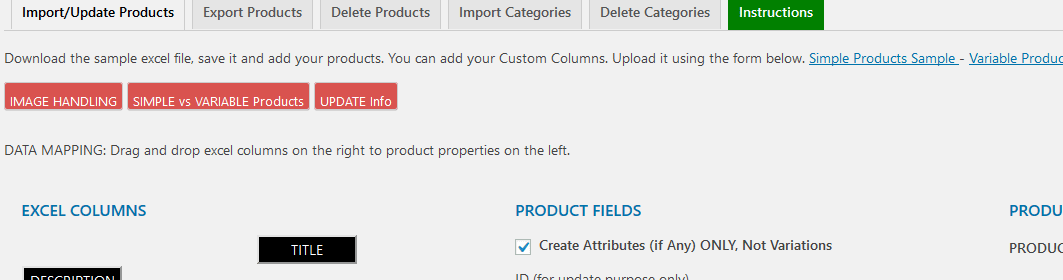
Your Excel file should not include variable products in the same run, since you are importing simple products only.
Get the most from Products Import & Export with Excel #
WooCommerce Products Import & Export with Excel imports simple, variable, external, and subscription products from Excel, and can update them later just as easily. See everything it can do.