Table of Contents
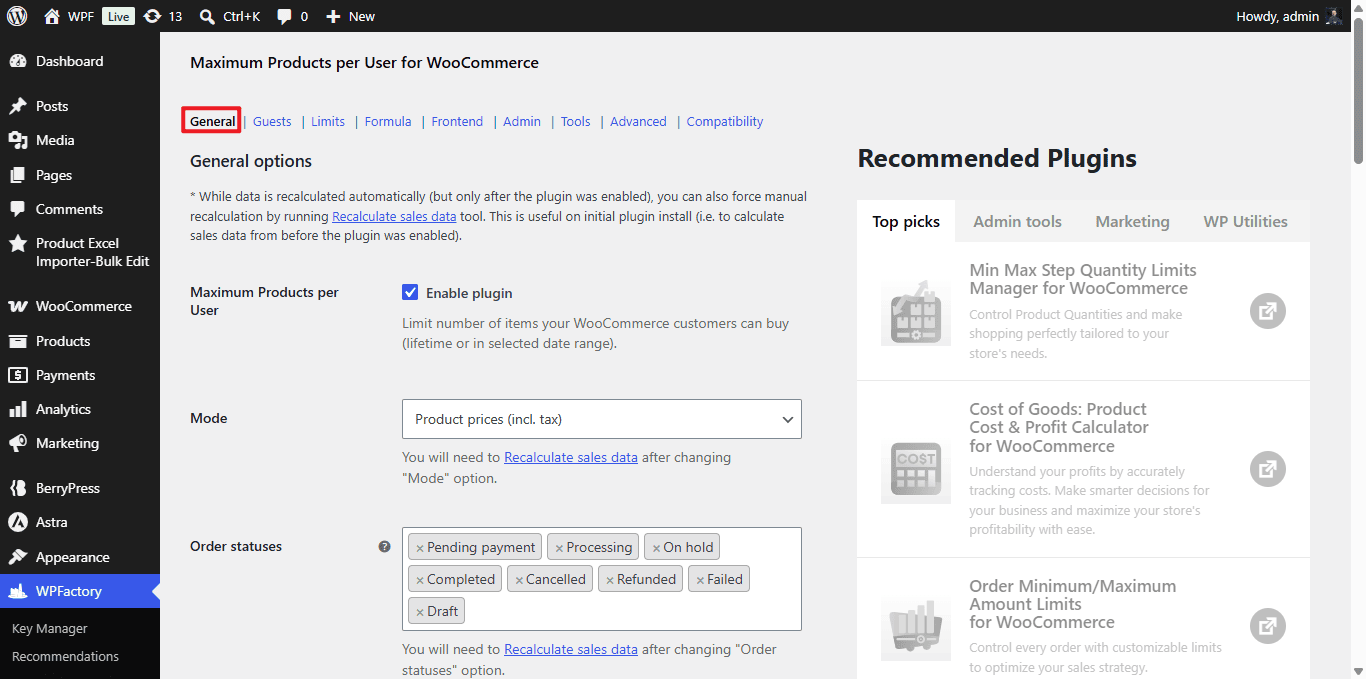
The General section of Maximum Products per User for WooCommerce is where you decide what to count and which orders count toward each customer’s limit. Everything in this section is available in the free version.
Where to find it #
Go to WPFactory > Max Products per User (also reachable at WooCommerce > Settings > Maximum Products per User), then open the General section.
Core options #
| Label | Option ID | Default | Free/Pro |
|---|---|---|---|
| Enable plugin | wpjup_wc_maximum_products_per_user_plugin_enabled |
Yes | Free |
| Mode (quantities, orders, prices incl. tax, prices excl. tax, weights, volumes) | alg_wc_mppu_mode |
Product quantities | Free |
| Order statuses (count toward limit) | alg_wc_mppu_order_status |
Completed | Free |
| Order statuses: Delete | alg_wc_mppu_order_status_delete |
None | Free |
| Payment gateways | alg_wc_mppu_payment_gateways |
All | Free |
| Quantity input (set field max to remaining limit) | alg_wc_mppu_set_qty_field_max_attr |
No | Free |
| Add to cart button (disable when limit reached) | alg_wc_mppu_disable_product_purchase_by_limit |
No | Free |
| Use variations | alg_wc_mppu_use_variations |
No | Free |
| User roles (different limits per role) | alg_wc_mppu_use_user_roles |
No | Free |
| Hide products with exceeded limits | alg_wc_mppu_hide_products |
No | Free |
| Count by current payment method | alg_wc_mppu_count_by_current_payment_method |
No | Free |
Step by step #
- Confirm Enable plugin is on (it is by default).
- Set Mode to whatever you want to cap: product quantities, number of orders, price, weight or volume.
- In Order statuses, choose which statuses mark a sale as counted. If you select several, data updates once, on whichever status change happens first.
- Optionally restrict counting to specific Payment gateways. Leave empty to count all.
- Set the actual limit values in the Limits section (All Products, or Per Product / Per Taxonomy in Pro).
- Save. If you install on an existing store, run Recalculate sales data in the Tools section so past orders are counted.
Note: whenever you change Mode or Order statuses, re-run Recalculate sales data so stored figures match the new setting.
Troubleshooting #
- Limits count nothing: the order status your store uses is not in Order statuses, or you have not recalculated after install.
- Old orders ignored: run Recalculate sales data once after enabling the plugin.
Get more control #
These General options are free. Maximum Products per User for WooCommerce Pro adds per-product, per-category and per-tag limits plus formula-based rules. See what Pro unlocks.