Shortcodes for showing and setting purchase limits #
Maximum Products per User for WooCommerce registers several shortcodes for displaying a customer’s limits and, in Pro, for defining limits by formula. As of version 4.5.0 the current tags use the wpfmppu_ prefix. The older alg_wc_mppu_ tags still work as deprecated aliases but trigger deprecation notices, so use the current names below.
1. [wpfmppu_current_product_limit] #
Displays the current product’s limit for a customer. Useful on the single product page.
user_id(optional): defaults to the current logged-in user.product_id(optional): defaults to the current product.condition(optional): only show when a condition is true, for example%remaining% == 0.msg_template(optional): the message text; defaults to the “Product limit message” content set in the Frontend section.output_template(optional): the wrapper, default<span class="alg-wc-mppu-current-product-limit">{msg_template}</span>.
Example: [wpfmppu_current_product_limit condition="%remaining% > 0" msg_template="You can buy %remaining% more of this product."]
2. [wpfmppu_user_product_limits] #
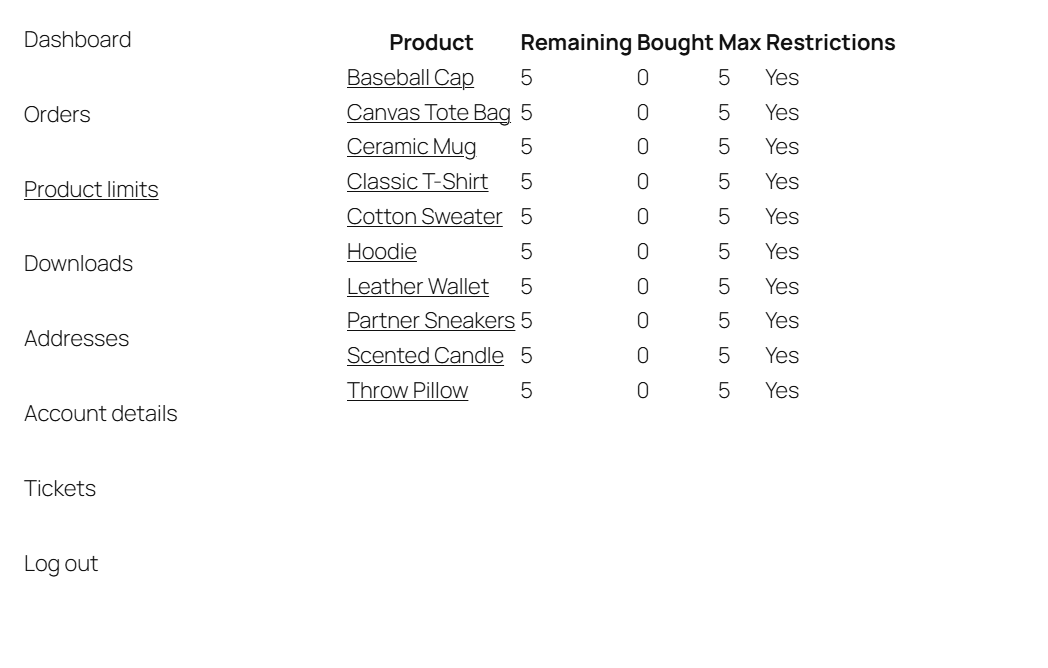
Renders a table of products with the customer’s Remaining, Bought and Max values. Ideal for the My Account page.
user_id(optional): defaults to the current user.show_only_limited_products(optional, defaultfalse): only list products that have a limit.show_restrictions_col(optional, defaulttrue): add a Restrictions column.bought_value(optional, defaultsmart):smartorper_product.show_unbought(optional, defaulttrue): include products the customer has not bought.hide_products_by_id(optional): comma-separated product IDs to hide.per_page,off_page_nav(optional): pagination controls.
Example: [wpfmppu_user_product_limits show_only_limited_products="true" show_restrictions_col="true"]
3. [wpfmppu_user_terms_limits] #
Renders a table of category or tag limits for the customer. Requires the matching taxonomy limit to be enabled (Pro).
taxonomy(defaultproduct_cat): useproduct_catorproduct_tag.show_unbought(defaulttrue).
Example: [wpfmppu_user_terms_limits taxonomy="product_cat"]
4. [wpfmppu_term_limit] #
Shows the limit message for one specific term (category or tag).
taxonomy: for exampleproduct_cat.term_idorterm_slug: which term to show.template(optional): custom message text.
Example: [wpfmppu_term_limit taxonomy="product_cat" term_id="42"]
5. [wpfmppu_customer_msg] #
Outputs one message if the customer has bought a product and a different message if they have not. Used inside the Frontend “Customer message” fields.
bought_msg: message when the customer has bought the product.not_bought_msg: message when they have not.bought_msg_min(default1): minimum bought quantity that triggersbought_msg.
6. [wpfmppu_placeholder] #
Inserts a single placeholder value into your content. The key attribute is required.
key: the placeholder name without the percent signs, for exampleremainingorfirst_order_date.before,after,on_empty(optional): text to add around the value or to show when empty.
Example: [wpfmppu_placeholder key="remaining"]
7. [wpfmppu] #
The formula shortcode, used only inside the Pro Formula section to define limits programmatically. See the formula attributes reference for the full attribute list. Example: [wpfmppu limit="5" term_id="77,96"].
8. [wpfmppu_translate] #
Shows different text per language (works with WPML and Polylang). Example: [wpfmppu_translate lang="DE"]German text[/wpfmppu_translate].
Deprecated tags: [alg_wc_mppu], [alg_wc_mppu_current_product_limit], [alg_wc_mppu_user_product_limits], [alg_wc_mppu_placeholder] and the rest of the alg_wc_mppu_* family still resolve for backward compatibility but are deprecated. Update any old content to the wpfmppu_* tags.
Need a hand? #
Our team answers every ticket on the Maximum Products per User support forum.