Table of Contents
Choosing a date range for purchase limits #
The date range in Maximum Products per User for WooCommerce decides the window each customer’s limit applies to: a lifetime cap, a rolling period, or a recurring reset. All date range options are available in the free version, with one Pro exception noted below.
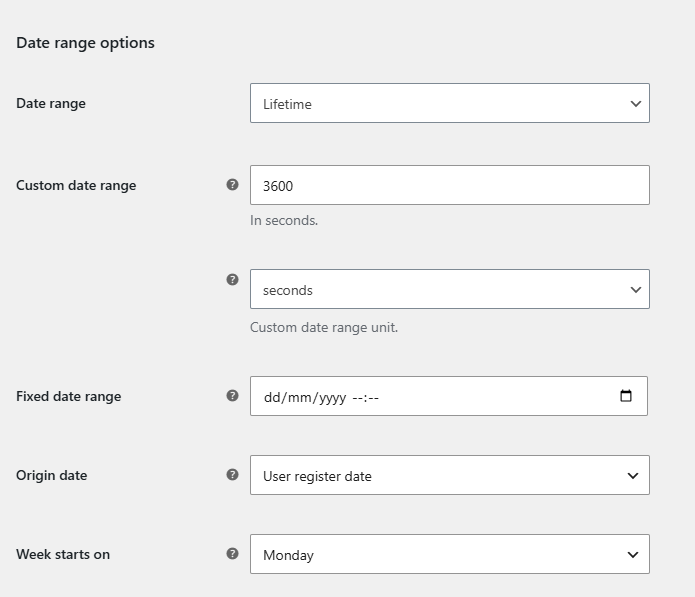
Where to find it #
Go to WPFactory > Max Products per User (also reachable at WooCommerce > Settings > Maximum Products per User), open the General section and find Date range options.
Available ranges #
The Date range option (alg_wc_mppu_date_range, default Lifetime) offers:
- Lifetime: counts a customer’s entire history in your store.
- This hour / day / week / month / year: counts within the current calendar period.
- Last hour / 24 hours / 7 days / 30 days / 365 days: counts within a rolling window ending now.
- Custom range: a fixed number of units you define.
- Fixed date: counts from a specific date and time you set.
- Monthly: a recurring monthly window that resets on the customer’s origin day.
Options reference #
| Label | Option ID | Used with | Free/Pro |
|---|---|---|---|
| Custom date range | alg_wc_mppu_date_range_custom |
Custom range (default 3600) | Free |
| Custom date range unit (seconds to weeks) | alg_wc_mppu_date_range_custom_unit |
Custom range (default seconds) | Free |
| Fixed date range | alg_wc_mppu_date_range_fixed_date |
Fixed date | Free |
| Origin date (User register date / MemberPress subscription date) | alg_wc_mppu_date_range_origin_date |
Monthly | Free (MemberPress option is Pro) |
| Week starts on | alg_wc_mppu_date_range_week_starts_on |
This week | Free |
Important details #
- Origin date applies to the Monthly range, not to Custom or Fixed date. With “User register date”, a customer registered on
2023-04-15resets on the 15th of each month (2023-05-15, 2023-06-15, and so on). The free version only supports the “User register date” value; “MemberPress subscription date” requires Pro. - Week starts on is used only by the “This week” range. Its default follows your WordPress “Week Starts On” setting rather than a fixed day. Pair it with Advanced > Current time offset for precise week boundaries.
Troubleshooting #
- Limit behaves like lifetime: Date range is still set to Lifetime, or you did not save after changing it.
- Monthly limit resets on the wrong day: check the Origin date value and the customer’s register date.
Get more control #
The date range options are free. Maximum Products per User for WooCommerce Pro adds the MemberPress subscription origin, per-product and per-category limits and formula rules. See what Pro unlocks.