URL Coupons notice options #
The notice options of Coupons & Add to Cart by URL Links for WooCommerce control the message a customer sees when a coupon is applied through a link. One option, Delay notice, is free; the rest of this sub-tab is Pro.
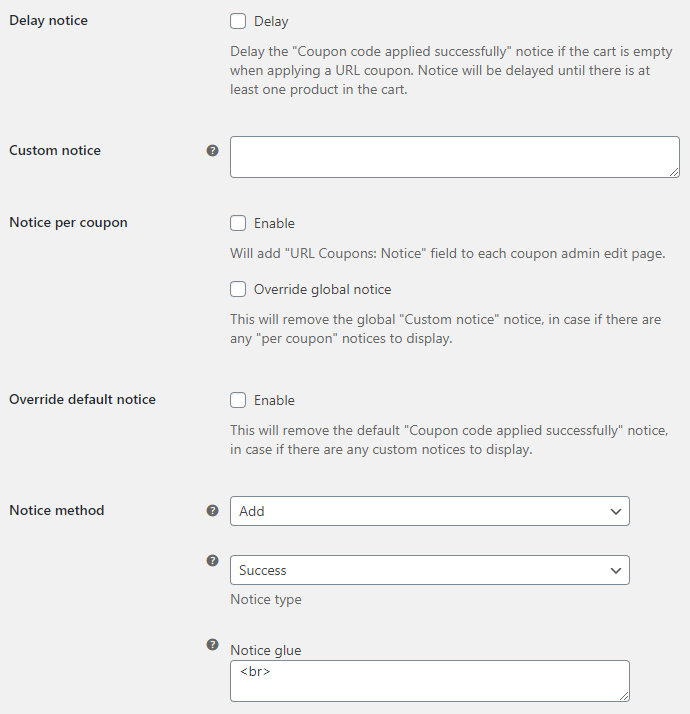
Go to WPFactory > Coupons by URL (also reachable at WooCommerce > Settings > URL Coupons) and open the Notices sub-tab.
Delay notice (Free) #
Postpones the “Coupon code applied successfully” message when a customer opens a coupon link with an empty cart. The message appears once they add at least one product, which avoids showing a success notice on a cart that has nothing in it.
Custom notice and per-coupon notices (Pro) #
- Custom notice: one message shown for all URL coupons, in place of the default one.
- Notice per coupon: adds a URL Coupons: Notice field to each coupon so a single coupon can carry its own message.
- Override global notice: when a coupon has a per-coupon notice, remove the global custom notice so only the per-coupon message shows.
- Override default notice: remove WooCommerce’s default “Coupon code applied successfully” message when you have a custom one to show.
Notice method, type, and glue (Pro) #
- Notice method > Add (default): show your custom notice as a separate notice. Its style is set by Notice type (Success, Error, or Notice). Notice type only applies when the method is Add.
- Notice method > Append: merge your custom notice into the existing coupon message, joined by Notice glue (a line break by default). Notice glue only applies when the method is Append.
Options reference #
| Label | Option ID | Default | Free/Pro |
|---|---|---|---|
| Delay notice | alg_wc_url_coupons_delay_notice |
No | Free |
| Custom notice | alg_wc_url_coupons_notice |
(empty) | Pro |
| Notice per coupon | alg_wc_url_coupons_notice_per_coupon |
No | Pro |
| Override global notice | alg_wc_url_coupons_notice_per_coupon_override |
No | Pro |
| Override default notice | alg_wc_url_coupons_notice_remove_default |
No | Pro |
| Notice method | alg_wc_url_coupons_notice_method |
Add | Pro |
| Notice type | alg_wc_url_coupons_notice_type |
Success | Pro |
| Notice glue | alg_wc_url_coupons_notice_glue |
<br> |
Pro |
Each sub-tab also has a Reset section settings checkbox to return that section to its defaults. For a full walkthrough of the per-coupon notice, see the guide on showing a custom notice per coupon.
Get more control #
Delay notice is free. Custom and per-coupon notices are part of URL Coupons Pro, which also adds redirects and add-to-cart coupons. See what Pro unlocks.