To hide a shipping method when a particular payment gateway is chosen, use the Exclude Payment Gateways condition in Conditional Shipping for WooCommerce: Restrict Shipping Options by Anything. It is the mirror of Require Payment Gateways: instead of listing the gateways that unlock a method, you list the gateways that remove it.
Before you start #
- WooCommerce, active, with at least two payment gateways enabled.
- Conditional Shipping installed and enabled. This condition is free.
Step-by-step setup #
- Go to WPFactory > Conditional Shipping (also reachable at WooCommerce > Settings > Conditional Shipping).
- Open the Payment Gateways section.
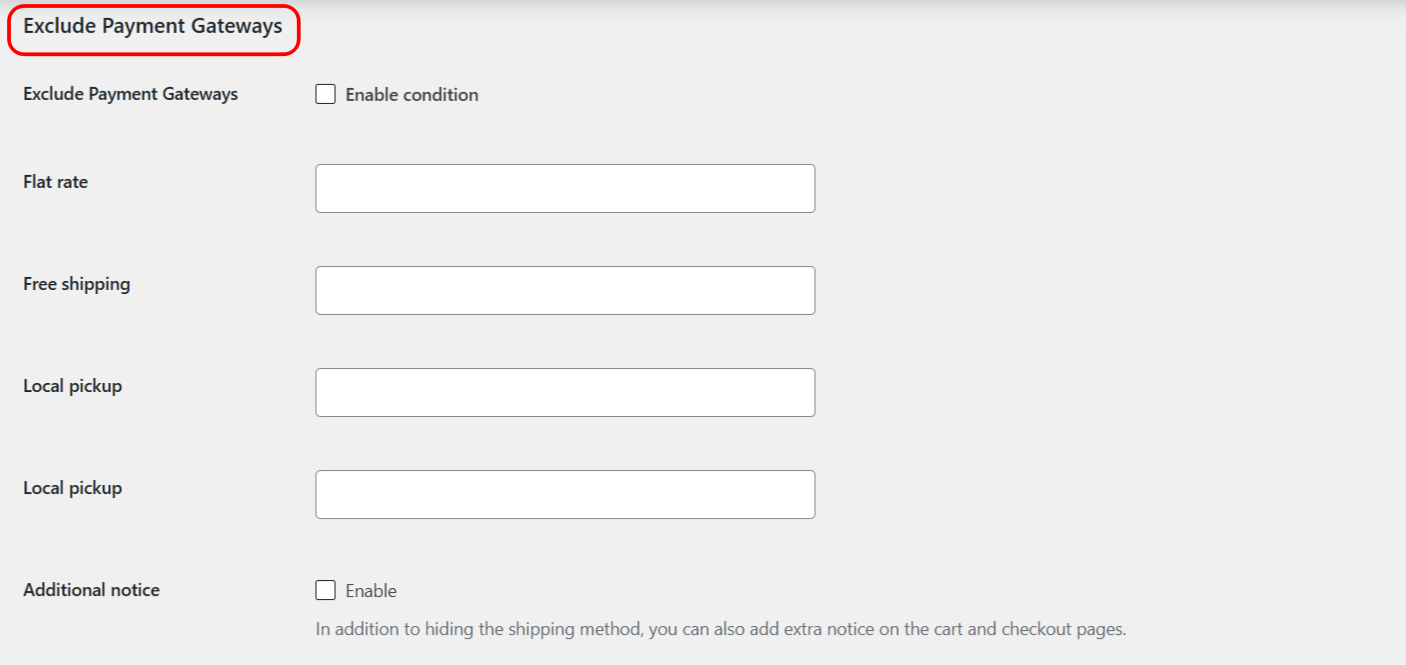
- Tick Enable condition for Exclude Payment Gateways.
- Next to the shipping method you want to restrict, select the gateways that should hide it. A customer who picks one of those gateways will not see that method.
- Leave a method’s value empty to apply no gateway rule to it.
- Save changes, then test at checkout by switching payment methods.
Note: gateway conditions are most reliable on the checkout page, where the customer’s current gateway is known. Away from checkout (for example on the cart page) the plugin falls back to the gateway stored in the session, then the store’s default gateway, then the first available gateway. On checkout the plugin re-checks the available methods whenever the customer changes the payment method, so the shipping list updates as they switch.
Options reference #
| Label | Option ID | Type | Default | Free/Pro |
|---|---|---|---|---|
| Exclude Payment Gateways (Enable condition) | wpjup_wc_cond_shipping_payment_gateways_excl_enabled |
Checkbox | No | Free |
| Excluded gateways, per shipping method | wpjup_wc_cond_shipping_payment_gateways_excl_method[{method_id}] |
Multiselect (active gateways) | Empty | Free |
| Additional notice (enable) | wpjup_wc_cond_shipping_payment_gateways_excl_notice[enabled] |
Checkbox | No | Free |
| Additional notice (content) | wpjup_wc_cond_shipping_payment_gateways_excl_notice[content] |
Text | %shipping_method% is not available. |
Free |
Require or Exclude #
- Use Require Payment Gateways to make a method available only with the gateways you list.
- Use Exclude Payment Gateways to remove a method whenever one of the listed gateways is chosen.
Use cases #
- Manage cash flow: exclude Cash on Delivery from your free or premium methods so those orders must be paid upfront.
- Reduce fraud exposure: exclude a risky gateway from express shipping, nudging customers to a more secure payment method.
- Cover extra handling cost: exclude Free Shipping for a gateway that adds processing overhead on bulky items.
Troubleshooting #
- The method still shows on the cart page: this is expected. Off checkout the plugin cannot read the live gateway and falls back to the session, default, or first gateway. Verify the rule on the checkout page.
- The list does not update when I switch payment method: confirm you are on the checkout page, where the plugin re-checks methods on payment change.
- Need to start over: tick Reset section settings in the Payment Gateways section and save to reset it to defaults.
Get more control #
This condition is free. Conditional Shipping for WooCommerce: Restrict Shipping Options by Anything Pro adds the “Use shipping instances” option, so you can set conditions per shipping-method instance (a specific Flat rate inside a specific zone) instead of globally per method type. See what Pro unlocks.