Fine-tune payment options by tag, product and country #
This article covers the more advanced sections of Payment Methods by Product & Country for WooCommerce: product tags (free), individual products (Pro) and billing countries (Pro). All are configured at WPFactory > Payment Gateways per Products (also reachable at WooCommerce > Settings > Payment Gateways per Products).
Per Product Tags (free) #
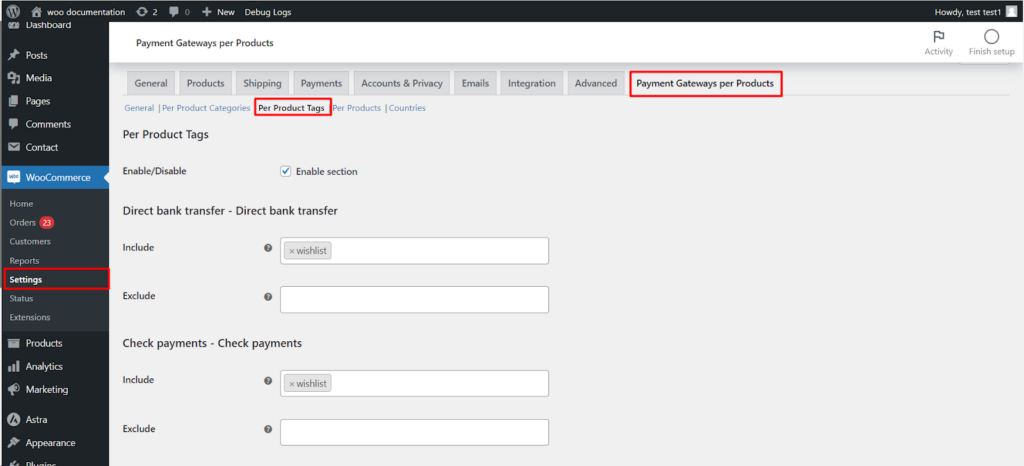
Open the Product Tags tab and make sure Enable section is on. Each gateway has an Include and an Exclude field. Both are select boxes filled with your store’s tags, so you pick tags from the list rather than typing a comma-separated string:
- Include: the gateway shows only when a product carrying one of the selected tags is in the cart.
- Exclude: the gateway is hidden when a product carrying one of the selected tags is in the cart.
Example: offer Cash on Delivery only for products tagged furniture, and exclude Check Payments for products tagged high-value.
Per Products (Pro) #
Open the Products tab and tick Enable section. As with tags, each gateway has Include and Exclude fields, here populated by a product search: type a product name and select it.
- Add variations: tick this to match specific variations of variable products instead of the parent product.
- Include: the gateway shows only when a selected product is in the cart.
- Exclude: the gateway is hidden when a selected product is in the cart.
You can also tick gateways directly on the product edit screen, in the Choose payment gateway box that appears once the Products section is enabled.
Countries (Pro) #
Open the Countries tab and tick Enable section. By default every gateway appears in every country. To tie gateways to countries:
- In Choose countries, select the billing countries the rule covers.
- In Choose gateways to appear only on selected countries above, select the gateways that should be exclusive to those countries.
The chosen gateways then appear only in the chosen countries and are removed elsewhere. Use Number of payment by country restrictions to add more country/gateway blocks, and Combine conditions from other sections to have country rules work alongside your category, tag and product rules rather than replacing them.
Key takeaways #
- Tags, products and countries each use the same Include/Exclude model.
- Products and Countries are Pro; Tags are free.
- Values are always chosen from select boxes or a product search, never typed as free text.
Ready to set this up? #
Per-product and per-country control is part of Payment Gateways per Products Pro. Get Payment Gateways per Products Pro.