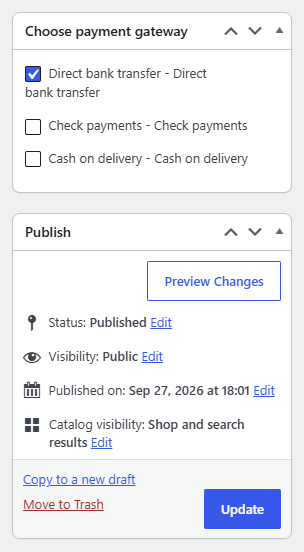
To set payment methods from the product edit page in Payment Methods by Product & Country for WooCommerce Pro, first enable the Products section at WPFactory > Payment Gateways per Products > Products. Then edit a product, tick the gateways in the Choose payment gateway box in the side column, and click Update.
Before you start #
- WooCommerce, active.
- Payment Methods by Product & Country for WooCommerce Pro.
- The Products section enabled at WPFactory > Payment Gateways per Products > Products (
alg_wc_pgpp_products_section_enabled). The box only appears when this is on.
Use the “Choose payment gateway” box #
- Open any product under Products > All Products and click to edit it.
- In the side column, find the Choose payment gateway box. It lists every gateway enabled in WooCommerce, each with a checkbox.
- Tick the gateways this product should be associated with, then click Update.
How it relates to the Products tab #
Ticking a gateway here adds this product to that gateway’s Include list in the Products settings tab, exactly as if you had added it there by hand. Unticking it removes the product from that list. In other words, the box is a per-product shortcut into the same Include rules, so a gateway you tick will show only when this product is in the cart (in combination with your other rules).
Note: The box manages Include entries. To build “hide this gateway when the product is present” rules, use the Exclude field in the Products settings tab instead.
Ready to set this up? #
Per-product control is a Pro feature of Payment Gateways per Products. Get Payment Gateways per Products Pro.