To set up automatic exchange rates in Payment Gateway Currency for WooCommerce, go to WPFactory > Payment Gateway Currency > Convert Currency > General and scroll to Automatic Currency Exchange Rates Options. Set Update periodically from server to Enabled and pick a Server (European Central Bank or Fixer.io), or use Get from plugin for WPML multi-currency.
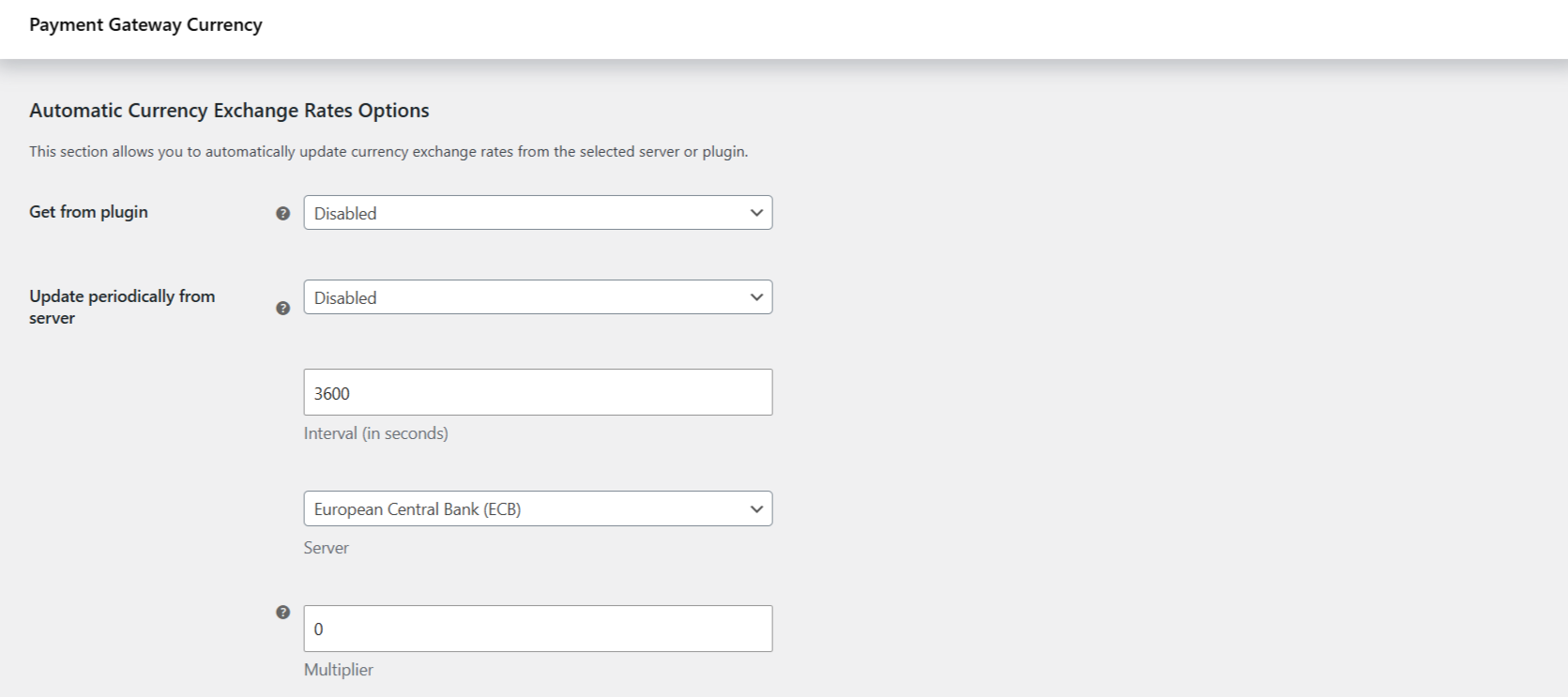
Where the settings live #
Go to WPFactory > Payment Gateway Currency (also reachable at WooCommerce > Settings > Payment Gateway Currency), open the Convert Currency sub-tab, then the General section. Scroll to Automatic Currency Exchange Rates Options. Make sure Convert currency is already enabled and that each gateway has a target currency set, since the rates are fetched for those currencies.
Option reference #
| Label | Option ID | Default | What it does |
|---|---|---|---|
| Get from plugin | alg_wc_pgbc_convert_currency_auto_rates_plugin |
Disabled | Pull rates from a multicurrency plugin. The only choice is WooCommerce Multilingual (WPML) > Multi-currency. Overrides the server option below. |
| Update periodically from server | alg_wc_pgbc_convert_currency_auto_rates_cron |
Disabled | Set to Enabled to fetch rates from a server on a schedule. Ignored when Get from plugin is set. |
| Interval (in seconds) | alg_wc_pgbc_convert_currency_auto_rates_interval |
3600 | How often the scheduled update runs. Minimum 60 seconds. The default 3600 is one hour. |
| Server | alg_wc_pgbc_convert_currency_auto_rates_server |
European Central Bank (ECB) | The rate source: European Central Bank (ECB) (no key needed) or Fixer.io (needs an API key). |
| Server key | alg_wc_pgbc_convert_currency_auto_rates_server_keys[fixer] |
(empty) | Your Fixer.io API key. Only shown when the server is Fixer.io and no key constant is defined. |
| URL | alg_wc_pgbc_convert_currency_auto_rates_fixer_url |
data.fixer.io | Which Fixer endpoint to call, the classic data.fixer.io host or the api.apilayer.com host. Only shown for Fixer.io. |
| Multiplier | alg_wc_pgbc_convert_currency_rate_multiplier |
0 | Multiplies every fetched rate by this number, for example a cushion for currency risk. Ignored when 0. A value of 1.05 multiplies the rate by 1.05; it is a factor, not a percentage. |
| Update all rates now | alg_wc_pgbc_convert_currency_auto_rates_now |
No | Tick this and save to fetch rates immediately, without waiting for the schedule. |
Use the European Central Bank (no key) #
- Set Update periodically from server to Enabled.
- Leave Server on European Central Bank (ECB).
- Set the Interval if you want something other than one hour.
- Save changes. To pull rates right away, tick Update all rates now and save again.
The ECB feed is published in euro terms, so it covers the currencies the ECB lists. If your shop currency or a target currency is not on that list, use Fixer.io instead.
Use Fixer.io (with an API key) #
- Create a free API key at fixer.io.
- Set Server to Fixer.io and save, so the key field appears.
- Paste your key into Server key, or define it in
wp-config.php(see below). - Leave URL on
data.fixer.iounless your plan uses the apilayer host. - Set Update periodically from server to Enabled, save, and optionally tick Update all rates now.
Define the key in wp-config.php #
To keep the key out of the database, define it as a constant. The constant name is ALG_WC_PGBC_API_KEY_ followed by the uppercased server name:
define( 'ALG_WC_PGBC_API_KEY_FIXER', 'your-fixer-api-key' );When the constant is defined, the Server key field is hidden and the constant value is used.
Get rates from WPML multicurrency #
If you run WooCommerce Multilingual (WPML) with multi-currency turned on, set Get from plugin to WooCommerce Multilingual (WPML) > Multi-currency. Payment Gateway Currency then reads each gateway’s rate from WPML’s currency table instead of a rate server, and the Update periodically from server option is ignored.
Get more from Payment Gateway Currency #
Automatic rates keep every gateway’s price current without manual edits. Pair them with per-gateway currencies across your whole checkout by unlocking every gateway in Payment Gateway Currency for WooCommerce Pro. See what Pro unlocks.